A Jellyfin server is the free, GPL-licensed way to stream your own films, series and music from a machine you control. On rented hardware, three things decide how well it runs: what each playback costs the CPU, what it costs the port, and how much of the server faces the internet. This guide takes each in turn, for media you own or have the rights to.
Streams per port and hours of video per terabyte are worked out in Plex server hosting and apply to Jellyfin unchanged.
Jellyfin 12: what changed
Jellyfin 12.0 arrived in September 2026; the current release is 12.4, from 26 October. The "10." prefix is gone: what would have been 10.12 is 12.0, so check pinned container tags and scripts that parse versions.
- Upgrade path. Start from 10.10.7 or any 10.11.x. The first boot rewrites the database, so back up the data and config directories, and remove third-party plugins built for 10.11, which will not load.
- Clients. Deprecated authorization mechanisms are now off by default, and the legacy
/emby/ addresses are gone, so very old third-party clients stop working.
- TLS. Removing built-in HTTPS was postponed, "extra time to migrate, not a reprieve". Terminate TLS on a reverse proxy.
Only the latest stable release is guaranteed security patches.
Direct play is the goal on a Jellyfin server without a GPU
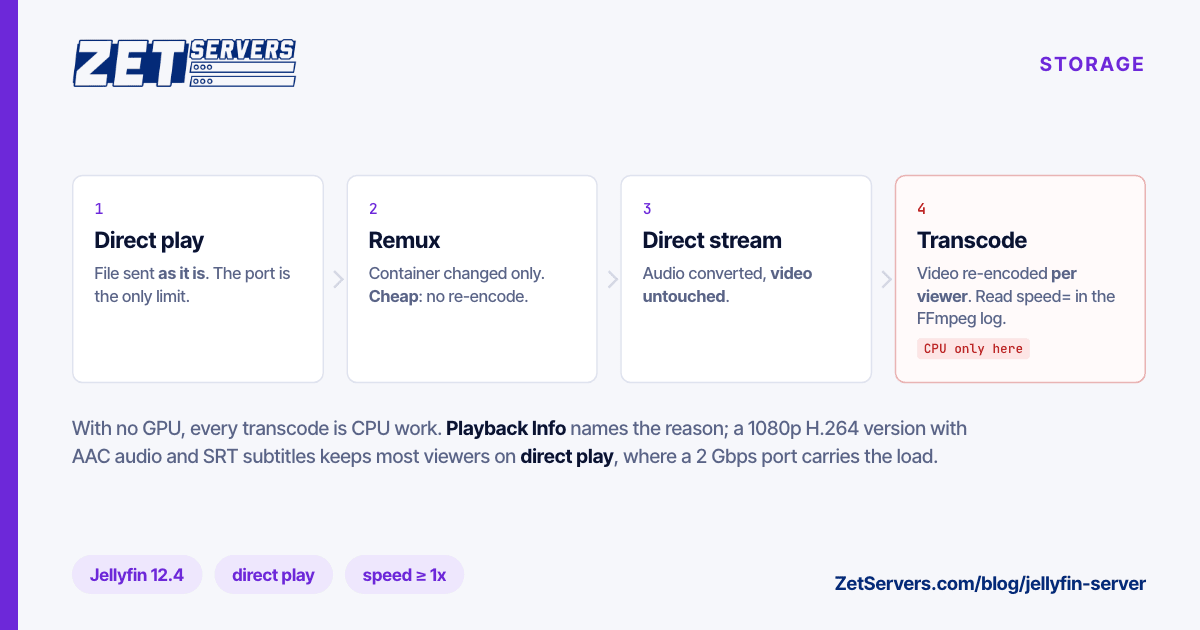
Jellyfin delivers a file in one of four ways, cheapest first: direct play sends it as it is, remux changes only the container, direct stream converts only the audio, and transcode re-encodes the video live, per viewer.
The hardware guide is blunt: not having a GPU is "NOT recommended for Jellyfin, as video transcoding on the CPU is very performance demanding." None of our Xeon or EPYC builds has integrated graphics, and GPUs are not on our price list; NVENC cards are available on request, so ask before planning around one. Otherwise, design the library so the CPU rarely transcodes.
Playback Info, in the player's settings menu, lists under Reasons what forced a transcode:
| Reason shown |
Usual cause |
Fix |
| The video's bitrate exceeds the limit |
File above the streaming bitrate limit or the client's quality setting |
Raise the limit, or add a smaller version |
| The video codec is not supported |
HEVC or AV1 on a client without a decoder |
Keep an H.264 version |
| The audio codec is not supported |
AC3 or EAC3 in Chrome or Firefox |
Add an AAC stereo track |
| The subtitle codec is not supported |
Image subtitles burned into the picture |
Use SRT where you can |
| The video's range type is not supported |
HDR on an SDR screen, tone-mapped |
Keep a 1080p SDR version |
Jellyfin's docs call burning in subtitles "the most intensive method of transcoding". Audio transcodes are cheap, and a container mismatch only remuxes.
The strongest fix is multiple versions: name each file after its folder plus a label, and clients choose between them.
Movies/Film (2021)/Film (2021) - 2160p.mkv
Movies/Film (2021)/Film (2021) - 1080p.mp4
Since 12.0 this works for episodes too. A 4K HDR file for the living room plus a 1080p H.264 file with AAC audio covers most remote viewers. Disk is cheaper than CPU.
Measure what a transcode costs
Transcode capacity depends on source, target and preset, so nobody else's stream count transfers to your files. Jellyfin writes one FFmpeg log per playback, in /var/log/jellyfin for the Debian package or /config/log in Docker, named by method: FFmpeg.Remux-, FFmpeg.DirectStream- or FFmpeg.Transcode-.
Play your hardest file in a browser, pick a low quality to force a transcode, then read the speed:
log=$(ls -t /var/log/jellyfin/FFmpeg.Transcode-*.log | head -1)
grep -oE 'speed= *[0-9.]+x' "$log" | tail -3
Above 1x the transcode keeps up; speed=3x runs three times faster than playback. Turn Throttle Transcodes off while testing, as it pauses FFmpeg once it is far enough ahead. Then add viewers on other devices until the slowest nears 1x; the count before that is your limit for such files. Sizing a video transcoding server covers the parallel method in full.
Encoding preset on Auto gives Jellyfin's x264 and x265 encoders veryfast. Test HDR sources separately: software tone-mapping "is very slow", per the docs, sometimes beyond any modern consumer CPU in real time.
Bandwidth: the arithmetic for a Jellyfin server
A direct-played stream leaves at the file's own bitrate, so the port carries the sum. Read a file's average bitrate with Jellyfin's bundled ffprobe:
/usr/lib/jellyfin-ffmpeg/ffprobe -v error -show_entries format=bit_rate \
  -of default=nw=1 "Film (2021) - 2160p.mkv"
Two 4K files at 60 Mbps and six 1080p files at 10 Mbps make 120 + 60 = 180 Mbps, 9% of a 2 Gbps port. At Mbps × 0.45 gigabytes an hour, three hours a night for 30 nights is 180 × 0.45 × 90 ≈ 7.3 TB, against roughly 648 TB a 2 Gbps port can move in a month.
The tighter limit is usually the viewer's line. A 60 Mbps file will not play smoothly over a 50 Mbps home connection, so the viewer lowers the quality and the server transcodes, unless a 1080p version exists. Set the Internet streaming bitrate limit only if you mean it: any file above it transcodes.
Storage: library on the drives, Jellyfin on the SSD
Our storage server has eight 12 TB SATA drives, 96 TB raw. With two drives of parity (RAID 6 or RAIDZ2), six hold data: 6 × 12 = 72 TB before filesystem overhead. Choosing a RAID level explains why double parity suits drives this size.
Jellyfin's hardware guide asks for a 100 GB SSD for the OS, Jellyfin's own files and the transcoding cache; its own files "will see a lot of random access". The node's separate 240 GB SSD fits, and transcode segments sit in the cache directory by default. The guide sizes that cache as largest file times concurrent streams: three transcodes of a 60 GB remux would want 180 GB. Delete segments removes them once downloaded. Watch it:
du -sh /var/cache/jellyfin/transcodes
Exposing a Jellyfin server safely
Jellyfin's networking docs call opening a port directly to the internet "insecure and not recommended". There are two sound ways in.
A reverse proxy with TLS. The docs recommend Caddy, which fetches its own certificate. The Caddyfile:
jellyfin.example.com
reverse_proxy 127.0.0.1:8096
Then close everything except SSH and the proxy:
ufw default deny incoming
ufw allow 22/tcp && ufw allow 80/tcp && ufw allow 443/tcp && ufw allow 443/udp
ufw enable
In Docker, publish Jellyfin as -p 127.0.0.1:8096:8096, because Docker's documentation says published ports bypass ufw.
Then add the proxy under Known proxies. Without it, Jellyfin sees every request as the proxy's, so its local-versus-remote rules judge the proxy instead of the viewer. Those rules have been attacked before: CVE-2025-32012 let an unauthenticated request pose as a LAN address and restart the server, until 10.10.7. Log at Info level and add Jellyfin's fail2ban filter, keep full URLs out of proxy logs because Jellyfin can put an api_key in one, and never forward the UDP 7359 discovery port.
WireGuard instead of a public port. If only your household watches, reach Jellyfin through a tunnel at its private address. WireGuard does not answer unauthenticated packets, so scanners see nothing; the cost is a WireGuard client on every device. WireGuard on a VPS covers setup; the steps are the same on a dedicated server.
Where to run it
Our storage servers pair 2× Xeon E5-2660v3 (20 cores, 40 threads) and 128 GB of DDR4 with those drives and the SSD: €549 a month at 2 Gbps guaranteed, €789 at 5 Gbps and €1,189 at 10 Gbps, in Bucharest or Frankfurt, with full root and IPMI; ask for the delivery time. The storage and seedbox page lists Jellyfin among the stacks people run on these nodes. A VPS suits a small library only: the largest unmetered VPS has 800 GB of NVMe, and none has a GPU.
Frequently asked questions
What is the current version of Jellyfin server?
Jellyfin 12.4, released on 26 October 2026, is the current stable release. Version 12.0, from September 2026, dropped the old "10." prefix, so it follows 10.11. Upgrading needs 10.10.7 or any 10.11.x first, a full backup of the data and config directories, and third-party plugins removed.
Can a Jellyfin server transcode without a GPU?
Yes. It transcodes in software with the x264 and x265 encoders, at the veryfast preset when the encoding preset is Auto. That costs far more CPU than a hardware encoder, and HDR tone-mapping is very slow. Measure capacity from the speed values in FFmpeg.Transcode logs, and design the library for direct play.
Is it safe to expose a Jellyfin server to the internet?
Not directly. Jellyfin's documentation calls an open port insecure and recommends a reverse proxy that terminates HTTPS. Run the latest release, set Known proxies so Jellyfin sees real client addresses, add the fail2ban filter and firewall port 8096. For one household, a WireGuard tunnel avoids any public listener.
How much bandwidth does a Jellyfin server need?
Add up the bitrates of everything playing at once. Two 4K files at 60 Mbps and six 1080p files at 10 Mbps total 180 Mbps, under a tenth of a 2 Gbps port. The viewer's home connection is usually the tighter limit, so a smaller alternate version avoids most transcodes.