Hytale server hosting starts from one official program: Hypixel Studios ships HytaleServer.jar and documents it in a Server Manual, last edited on 12 October 2026. The game entered Early Access on 13 January 2026; on 23 November the release channel is on Update 7, hotfix 0.7.3, and Update 8 is in pre-release. Three facts shape the machine: the server speaks QUIC over UDP, each server signs in with a Hytale account, and view distance drives memory more than player count does.
What the official server needs
From the manual:
| Item |
Official figure |
| Java |
25, from Adoptium's builds by the manual's recommendation |
| Architecture |
x64 or arm64 |
| Memory |
at least 4 GB on the device |
| Network |
UDP port 5520, QUIC; TCP forwarding not required |
| Linux |
glibc 2.28 or newer for the QUIC library, since 0.7.3 |
CPU, the manual says, goes on players and entities such as NPCs and mobs; memory goes on loaded world area, from a high view distance or players exploring apart. Each world runs on its own main thread and hands parallel work to a shared pool, so one busy world wants one fast core and several worlds want several. Game server hardware explains why per-core speed decides whether a main thread keeps up.
Installing a Hytale server on Linux
For production, the manual points to the Hytale Downloader, which signs in with OAuth2 and fetches the server and its assets:
java --version                       # must report 25
unzip hytale-downloader.zip
./hytale-downloader -print-version   # the game version it would fetch
./hytale-downloader                  # sign in, download the latest release
Start the server with the bundled start.sh, not Java directly. It passes --backup --backup-frequency 30, so backups every 30 minutes are on from the first boot, and when the server exits with code 8, meaning an update is staged, the script applies it and restarts. Update 8's pre-release notes add that updates apply automatically only under a Hytale launcher script.
JVM flags go in a jvm.options file beside start.sh, one per line. Add your heap limit and the AOT cache the server ships with, which the manual says shortens boot by skipping JIT warmup; the script does not pass it:
-Xmx6G
-XX:AOTCache=HytaleServer.aot
Then open the one port the game uses:
sudo ufw allow 5520/udp
--bind changes the port. Keep 5520 if you can: the manual lists SRV records as unsupported, so players connecting to any other port must type it after the hostname. Update 8's notes add a _hytale._udp SRV record.
Signing in: every server is tied to an account
A fresh server cannot accept players until it authenticates. Run /auth login device in the console, open the address it prints and enter the code within the 900 seconds the prompt allows. Hypixel says this lets the server use its service APIs and counters abuse.
Hypixel's Server Provider Authentication Guide gives the lifetimes: the game session lasts an hour and renews itself, and the OAuth refresh token lasts 30 days and is replaced at each refresh. A running server stays signed in; one offline for more than 30 days needs a new login.
The limit is 500 servers per game license, enforced as 500 concurrent sessions per account. Hosting panels can pass tokens with --session-token and --identity-token, or the matching environment variables. --auth-mode also accepts offline; keep a public server on the default, authenticated.
View distance sets the memory bill
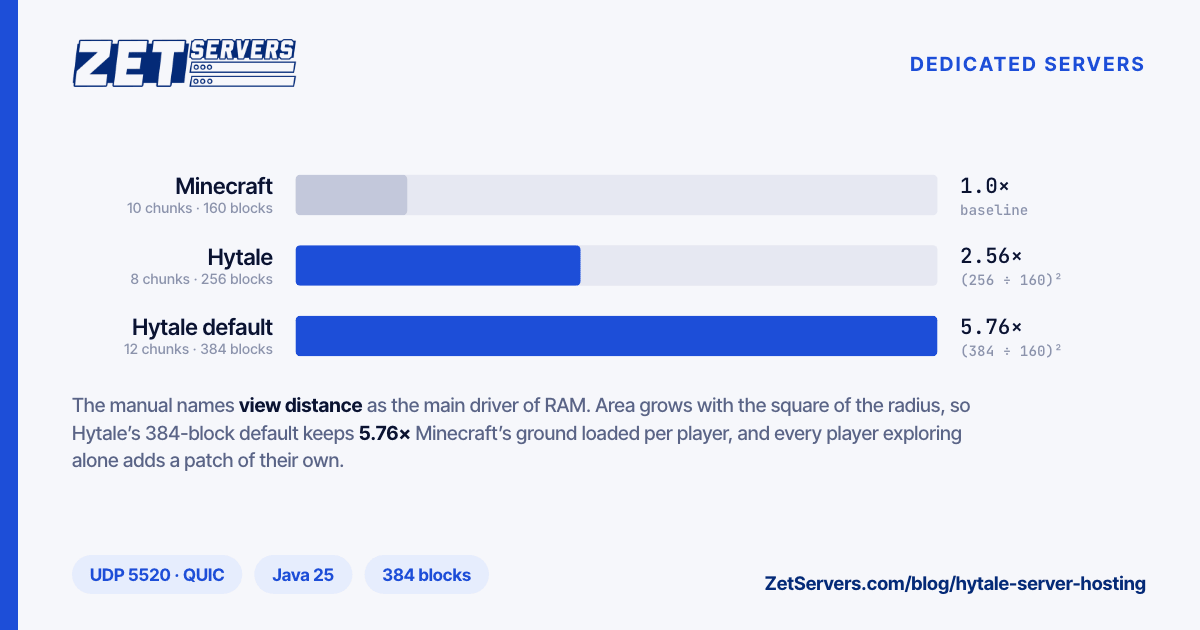
The manual calls view distance the main driver of RAM use and recommends capping it at 12 chunks, or 384 blocks. Minecraft servers default to 10 chunks, 160 blocks; Hytale's default of 384 blocks, the manual notes, is roughly 24 Minecraft chunks. The area a player keeps loaded grows with the square of the radius:
| View distance |
Radius |
Area per player vs Minecraft's default |
| Minecraft default, 10 chunks |
160 blocks |
1.0× |
| Hytale, 8 chunks |
256 blocks |
2.6× |
| Hytale default and recommended cap, 12 chunks |
384 blocks |
5.8× |
(384 ÷ 160)² = 5.76, whatever the shape of the loaded area. Memory has a fixed base for the JVM and assets, but the part that grows, grows like this. Players exploring in different directions each carry their own area; ten players at one base share most of theirs. Dropping from 12 chunks to 8 cuts each explorer's area by 56%: 1 − (8 ÷ 12)² = 0.56.
The server-wide cap is MaxViewRadius in config.json; Update 7 clamps values outside 1 to 32. The manual warns that edits made while the server runs will likely be overwritten, so stop it first.
Hypixel publishes no per-player memory figure, so in Hytale server hosting the number to get right is one you measure. Resident memory runs above the heap, because chunk saves use direct buffers outside it, so log it every 15 minutes:
*/15 * * * * echo "$(date -Is) $(ps -o rss= -p "$(pgrep -f HytaleServer.jar)")" >> ~/hytale-mem.log
The figure is in KiB. If CPU climbs while the player count does not, check memory first: the manual names garbage collection under memory pressure as the typical symptom.
Mods and plugins live on the server
Hytale modding is server-side: Hypixel's modding post says all modding is based on the server's host, and client mods are not planned. Mods are Java plugins, JSON data assets for blocks, items, NPCs and world generation, and art assets such as models and textures. They go in mods/ as .zip or .jar files.
The catch is versioning. Client and server must run the exact same protocol version, so the server updates as soon as a release ships, and plugins can break: Update 6's notes said plugins and custom servers "must be rebuilt against the new protocol to connect". Of the manual's three AutoApplyMode settings, WhenEmpty, Scheduled and Disabled, a heavily modded server wants Disabled: run /update apply --confirm once your plugins have new builds. The manual lists a ±2 version tolerance as coming soon; plan without it.
VPS or dedicated for Hytale server hosting
Treat these as starting points and read your memory log; players per game server covers why what players do predicts more than how many there are.
| Setup |
Plan |
| Testing, or plugin development |
1 vCPU, 4 GB unmetered VPS, €29: exactly the floor, no headroom |
| One world, a small group, 8–12 chunks |
2 vCPU, 8 GB VPS, €59 |
| One public world, players exploring apart |
4 vCPU, 16 GB VPS, €119 |
| Several servers, or hosting for others |
Dedicated with 128 GB: 2× Xeon E5-2630v4 from €209, EPYC 9254 from €449 |
A VPS suits one server. Ours run on dedicated 3.2 GHz cores with NVMe, so a world's main thread never waits on a neighbour. The manual itself suggests a VPS or dedicated server when a home connection sits behind symmetric NAT.
A dedicated server suits several. The manual says no BungeeCord-style proxy is needed: player referral moves a connected player to another host and port, with a payload the manual says to sign. A lobby and two worlds can be three processes on one box. The 2× Xeon E5-2630v4 has 40 threads at up to 3.1 GHz for many lighter worlds; the EPYC 9254 boosts to 4.15 GHz for busy ones. Minecraft server hosting makes the same split for Paper networks.
The game port is UDP and its address goes to every player. Every plan includes 100 Gbps of network-layer DDoS filtering; game server DDoS protection explains why UDP game traffic is hard to filter, and titles can be tuned on request through our game server hosting page. Pick the city nearest most of your players. Servers in the official browser send a heartbeat every two minutes and drop off the list after more than two minutes of silence.
Frequently asked questions
What port does a Hytale server use?
UDP port 5520 by default. Hytale runs over QUIC on UDP, and the official manual says TCP forwarding is not required. Change it with --bind, but players must then type the port after the hostname: the manual lists SRV records as unsupported, and SRV support arrives with Update 8, now in pre-release.
How much RAM does a Hytale server need?
The manual sets a floor of 4 GB and names view distance as the main driver of memory, recommending a cap of 12 chunks, or 384 blocks. Hypixel publishes no per-player figure, so start a small group on 8 GB, log resident memory through a busy week, and size up from what you measure.
Which Java version does a Hytale server need?
Java 25, from Adoptium's builds by the official manual's recommendation, on x64 or arm64. Start the server with the bundled start.sh and put JVM flags in jvm.options beside it, including the heap limit and -XX:AOTCache=HytaleServer.aot, which the manual says shortens boot by skipping JIT warmup.
Is a VPS good enough for Hytale server hosting?
For one world, yes, if its cores are dedicated and its memory leaves headroom over the 4 GB floor. Start a small group on 8 GB and a public world with players exploring apart on 16 GB. Several servers linked by player referral, or hosting for others, fit better on a dedicated machine.