A high bandwidth VPS is easy to advertise and hard to compare, because "bandwidth" on a plan page can mean three different things: how fast the port is, how much of it you are guaranteed, and how many terabytes you may move before something changes. A "10 Gbps VPS" with a 2 TB monthly allowance runs out of allowance in about 27 minutes at full speed. This guide separates the three numbers, works out what a guaranteed gigabit is worth in traffic and in euros, and shows how to check that the plan delivers it.
Three numbers that get blurred together
Port speed is the ceiling: the fastest the virtual interface can ever go. It says nothing about what you get when the host is busy.
Guaranteed rate is the floor: throughput reserved for you, all day, every day. It is the only figure you can plan capacity on.
Traffic allowance is a cap on volume. "Unlimited" usually means a fair-use clause that becomes a cap the moment you rely on it.
A plan that shows only the first number has told you very little. The arithmetic is unforgiving: 2 TB is 16,000 gigabits, and at 10 Gbps that is 1,600 seconds. The port speed sold the plan; the allowance decides what it can do. When you compare plans, write all three numbers down side by side, and treat any that are missing as the least favourable answer.
What a guaranteed gigabit moves in a month
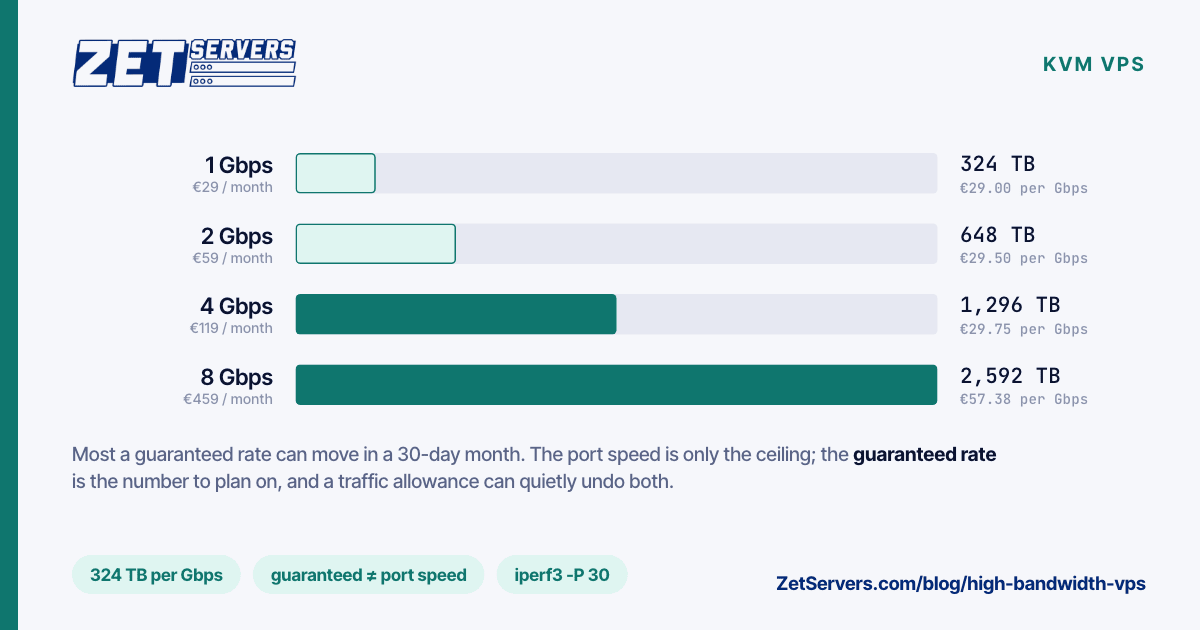
One gigabit per second held for a 30-day month is 1 Gbps × 2,592,000 seconds ÷ 8 = 324 TB. That is the ceiling for a full month at the guaranteed rate. Here is how that scales across our unmetered VPS range, every plan on a 25 Gbps port:
| Plan |
Guaranteed |
Max per month |
Price |
€ per guaranteed Gbps |
| 1 vCPU, 4 GB |
1 Gbps |
324 TB |
€29 |
€29.00 |
| 2 vCPU, 8 GB |
2 Gbps |
648 TB |
€59 |
€29.50 |
| 4 vCPU, 16 GB |
4 Gbps |
1,296 TB |
€119 |
€29.75 |
| 8 vCPU, 32 GB |
6 Gbps |
1,944 TB |
€239 |
€39.83 |
| 16 vCPU, 64 GB |
8 Gbps |
2,592 TB |
€459 |
€57.38 |
Nobody runs a port at 100% for a month. Real traffic follows the day: busy evenings, quiet nights. At a 40% average — a realistic figure for public-facing traffic — the €29 plan moves about 130 TB, which works out to roughly €0.22 per terabyte. On per-gigabyte cloud egress the same 130 TB would be priced in thousands; cost per terabyte of bandwidth does that comparison in full.
Two patterns in the table are worth noticing. The first three plans hold the price per guaranteed gigabit almost flat, so a bandwidth-heavy workload can scale up without paying a premium. The top two plans charge more per gigabit because they are selling cores and memory as well; if you need 8 Gbps but not 16 cores, two or three smaller instances behind DNS may be the better buy.
Bandwidth costs CPU, too
A network card does not move packets by itself. Every packet passes through the kernel, and the kernel runs on your vCPUs. How much CPU a gigabit costs depends heavily on what is in the packets:
- Large files over HTTP are the cheap case. With
sendfile the kernel hands file pages straight to the socket and the application barely wakes up.
- TLS adds encryption on every byte. Modern cores with AES-NI handle it well, but it is no longer free.
- Small packets — VPN tunnels, proxies, DNS, game traffic — are the expensive case. The cost is per packet, not per byte, and a gigabit of 200-byte packets is several times more packets than a gigabit of full-size ones.
That is why our plans scale cores and guaranteed bandwidth together. It is also why a VPS that "can't reach its bandwidth" is often CPU-bound rather than network-bound. Check with mpstat -P ALL 1 while under load: if one core sits near 100% in the %soft column, that core is spending its time on network interrupts, and the fix is more cores or more parallel connections, not a faster port. Dedicated vCPUs help here too, because softirq work stalls on a shared core whenever a neighbour holds it — dedicated vCPU vs shared vCPU explains how to spot that with steal time.
How to test what you were sold
Do not use a browser speed test. Most public speed-test servers have under a gigabit available per client and will report their own limit as yours. Use iperf3 against a well-connected public server, with parallel streams:
apt install iperf3
iperf3 -c ping.online.net -p 5201 -P 30 -t 30        # download direction (server sends)
iperf3 -c ping.online.net -p 5201 -P 30 -t 30 -R     # upload direction
What to look for:
- The
[SUM] line, not the individual streams. Thirty streams of 40 Mbps each is 1.2 Gbps.
- Retransmits (
Retr). A few hundred over a 30-second test is normal; tens of thousands means loss somewhere on the path, and the server at the other end may be the bottleneck.
- Consistency across the day. Run it at 03:00 and at 21:00. A guaranteed rate should look the same at both; a shared one will not.
If one target falls short, try another before blaming the VPS — a single remote host is often the limit. How to verify your port speed covers the method, including how to find suitable targets.
What a high bandwidth VPS is good for
The workloads that fit are the ones that move a lot of data without needing much disk or a lot of cores:
- CDN edge caches. A few VPS in different cities, each holding the hot part of a catalogue, in front of one origin. Build your own CDN shows the layout and the numbers.
- VPN and proxy nodes. Small packets, steady traffic, many concurrent users. Size by packet rate and cores, not just Gbps; a WireGuard VPS is the simplest one to build.
- Download mirrors and package caches. Release files, container images, game patches: bursty demand that a flat-rate port absorbs without a bill.
- Streaming relays. Taking one ingest and fanning it out to many viewers, where outbound traffic is a large multiple of inbound.
What does not fit: large libraries (800 GB of NVMe is the top plan's limit), sustained traffic above 8 Gbps, or workloads that need a whole socket's memory bandwidth. Those are dedicated-server territory.
When to move up to a dedicated server
The crossover is lower than most people expect. Our 4 Gbps VPS at €119 is cheaper per gigabit than our cheapest dedicated server, €209 at 1 Gbps — but the dedicated machine brings 40 threads, 128 GB of RAM and six drive bays. At the top of the range, the 8 Gbps VPS costs €459, while a 10 Gbps dedicated server starts at €659 with far more hardware behind the port. Above that, the 20 Gbps tier runs over bonded uplinks, where no single connection goes faster than one member link; LACP bonding explains why.
So the question is rarely bandwidth alone. If the workload needs more than 16 cores, more than 64 GB of RAM, more than a few hundred gigabytes of fast storage, or more than 8 Gbps sustained, the VPS range has run out. Dedicated server vs VPS walks through the rest of that decision.
Frequently asked questions
What is a high bandwidth VPS?
A virtual server with a fast port and, more importantly, a guaranteed rate and no traffic cap. Port speed alone is a ceiling; the guaranteed rate is what you can rely on at the busiest hour of the busiest day.
How much traffic can a 1 Gbps VPS move in a month?
At a sustained 1 Gbps, about 324 TB in a 30-day month. Real traffic averages well below the peak, so 100–150 TB is a more typical figure for a busy public service on a 1 Gbps guarantee.
Is unmetered VPS bandwidth really unlimited?
On our plans there is no traffic counter and no overage line: you can use the guaranteed rate around the clock. Elsewhere, read the terms for a fair-use clause or an allowance hidden behind the word "unlimited".
Why does a speed test show less than my plan?
Most public speed-test servers cannot serve more than a gigabit to a single client, so they measure themselves. Use iperf3 with parallel streams against a well-connected target, and check the summed result.
When should I choose a dedicated server instead?
When you need more than 8 Gbps sustained, more than 16 cores or 64 GB of RAM, or large storage. At that point a dedicated machine gives far more hardware per euro, on the same network.