LACP bonding joins two or more network links into one logical interface, and it is how many high-bandwidth servers reach 20 Gbps and beyond. It also causes one of the most common support questions in hosting: "I have a 20 Gbps server, so why does my transfer stop at 10?" The answer is that a bond of two 10 Gbps links carries 20 Gbps of traffic in total, but no single connection runs faster than one link. This guide explains why, how to configure a bond on Linux so it actually spreads your traffic, and how to test it properly.
What LACP does
LACP — the Link Aggregation Control Protocol, defined in IEEE 802.3ad and now maintained as 802.1AX — lets a server and a switch agree that several physical links form one group. Both ends exchange small control frames (LACPDUs) to confirm that every member link is connected to the same partner and working. If a link fails or is wired to the wrong place, LACP removes it from the group.
On Linux this is bonding mode 802.3ad, also called mode 4. It needs configuration on both ends: the server's bond, and a matching link aggregation group on the switch. If only one side is configured, the links either do not come up or behave unpredictably.
Why one connection uses one link
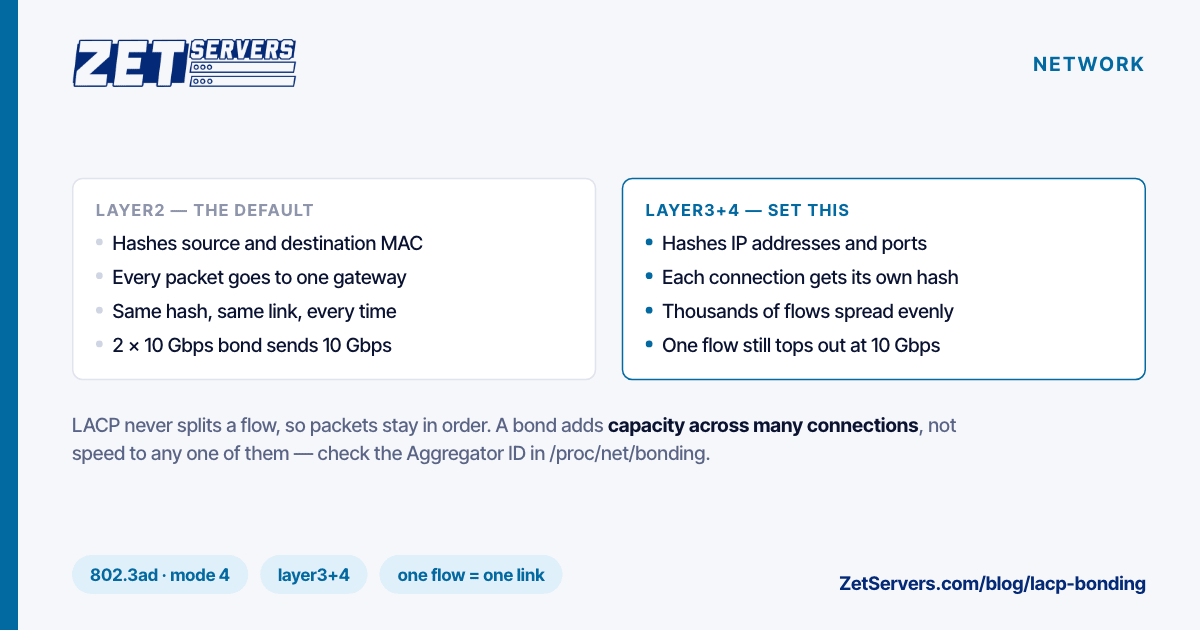
Ethernet and TCP both assume packets in a flow arrive in order. If a bond sent alternate packets of one TCP connection down different links, small differences in timing would reorder them, and TCP would read the reordering as loss and slow down. So LACP never splits a flow. Instead, it takes a hash of some header fields for each packet and uses the result to pick a link. Every packet with the same fields produces the same hash, so a whole flow sticks to one member link.
The consequences follow directly:
- One TCP connection is limited to the speed of one member link.
- Many connections spread across all links, in proportion to how evenly the hash distributes them.
- A few large connections can collide. With two flows on two links, there is a 50% chance both land on the same link.
For a server talking to thousands of clients — a CDN origin, a streaming server, a VPN gateway — the hash evens out and the bond delivers close to its full aggregate. For a server doing one big replication stream to one other host, it does not.
The setting that decides everything: the hash policy
Linux chooses the transmit hash with xmit_hash_policy. The default is layer2, which hashes source and destination MAC addresses. On a server, that is a trap: every outbound packet goes to the same next hop — the default gateway — so every packet has the same destination MAC, the same hash, and the same link. A bond with the default policy sends all of its outbound traffic down one member.
Use layer3+4, which hashes IP addresses and ports, so each connection gets its own hash:
| Policy |
Hashes on |
Use it when |
layer2 |
MAC addresses |
Rarely, on a server: all routed traffic shares one hash |
layer2+3 |
MACs and IPs |
Many client IPs, few connections each |
layer3+4 |
IPs and ports |
Almost always: each connection hashes separately |
The kernel documentation notes that layer3+4 is not fully 802.3ad compliant, because fragmented packets of one flow can carry different port information. In practice, with modern path MTU handling, it is the standard choice for servers.
The hash policy controls only what the server sends. What the server receives is distributed by the switch's own hash, which you do not control. For most hosting workloads, outbound is the direction that matters.
Configuring a bond on Linux
With netplan (Ubuntu):
network:
  version: 2
  ethernets:
    enp65s0f0: {}
    enp65s0f1: {}
  bonds:
    bond0:
      interfaces: [enp65s0f0, enp65s0f1]
      addresses: [203.0.113.10/24]
      routes:
        - to: default
          via: 203.0.113.1
      parameters:
        mode: 802.3ad
        lacp-rate: fast
        mii-monitor-interval: 100
        transmit-hash-policy: layer3+4
Apply it with netplan apply from the IPMI console rather than over SSH. Reconfiguring the interface that carries your session is the classic way to lock yourself out, and the console is how you get back in.
Then check the bond:
cat /proc/net/bonding/bond0
Look for Bonding Mode: IEEE 802.3ad Dynamic link aggregation, Transmit Hash Policy: layer3+4, MII Status: up on every member, and the same Aggregator ID on every member. A member with a different aggregator ID is not part of the group, usually because the switch side is not configured for it.
Testing a bond properly
A single-stream test proves only that one link works. To test the aggregate, use many parallel streams, and preferably several destinations:
iperf3 -c target-a.example.net -P 16 -t 30 &
iperf3 -c target-b.example.net -P 16 -t 30 &
wait
iperf3 is multi-threaded from version 3.16 onwards; with older versions, run several processes in parallel, as above, so the test does not become CPU-bound on one core. One remote server is often the bottleneck itself, which is why two targets are better than one.
While the test runs, watch each member link's counters to confirm the traffic is spread:
watch -n1 'grep -H . /sys/class/net/enp65s0f*/statistics/tx_bytes'
Both counters should climb at similar rates. If only one moves, the hash policy is wrong or the bond is not aggregating. How to verify your port speed covers finding good test targets, and Linux 10 Gbps tuning covers the buffer and interrupt settings each member link needs to reach full speed.
Failover, and what fast LACP buys you
A bond also survives a link failure. If one member goes down, traffic moves to the others and the bond carries on at reduced capacity. mii-monitor-interval: 100 checks link state every 100 ms, which catches a dead cable or port almost immediately.
Some failures leave the light on: a link that is physically up but no longer passing frames. LACP catches those with its control frames. At the default slow rate they are sent every 30 seconds and a partner is declared dead after 90; with lacp-rate: fast they are sent every second and timed out after three. Use fast.
When to choose one fast port instead
Bonding suits traffic made of many flows. If your workload depends on single large flows — database replication between two hosts, one big backup stream, a single high-bitrate video feed to one destination — a bond of 10 Gbps links will cap each of those flows at 10 Gbps. A single 25 Gbps or 100 Gbps port does not have that ceiling.
Our 20 Gbps servers are delivered over bonded uplinks, and whether a given build at another tier arrives as one port or a bond depends on the hardware and the location. Check with ip link on delivery, and ask support for the switch-side hash if you need to plan around it. For carrier-scale egress, the 50 Gbps and 200 Gbps tiers are the next steps up, and saturating a 100 Gbps port covers the CPU, memory and storage work needed to fill them.
Frequently asked questions
What is LACP bonding?
A standard way to combine several physical network links into one logical interface, with the server and switch negotiating the group through LACP. It adds capacity and survives a link failure, but each individual flow still uses one link.
Does LACP double the speed of a single download?
No. One TCP connection is hashed to one member link, so it runs at that link's speed. LACP increases total capacity across many connections, not the speed of any one of them.
Which xmit_hash_policy should I use on a server?
layer3+4. The default layer2 hashes on MAC addresses, and since all outbound traffic goes to the same gateway, it sends everything down one link.
Does the switch need to be configured for LACP?
Yes. LACP is negotiated between both ends, so the switch ports must be in a matching link aggregation group. On a rented server the provider configures the switch side.
What happens if one link in a bond fails?
Traffic moves to the remaining links within about 100 ms for a link that goes down, or within three seconds with fast LACP for a link that stops passing frames. The bond keeps working at reduced capacity.