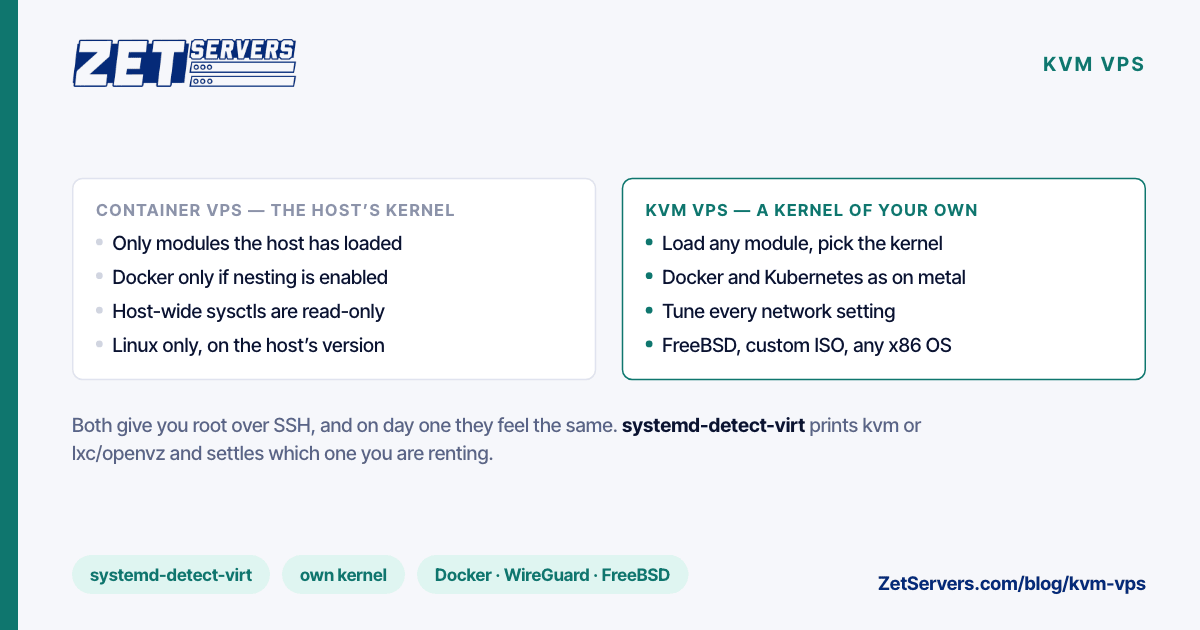
Two very different technologies are sold under the same three letters. A KVM VPS is a full virtual machine with its own kernel, booting on virtual hardware. A container VPS — OpenVZ, Virtuozzo, LXC — is a group of processes running on the host's kernel, fenced off from its neighbours. Both give you a root prompt over SSH, and on day one they feel the same. The difference appears the first time you need to load a kernel module, run Docker, change a network setting or install anything that is not Linux. Here is what each one is, what only your own kernel lets you do, and how to find out which one you are renting.
How each one works
KVM (Kernel-based Virtual Machine) is a module in the Linux kernel that turns the host into a hypervisor, using the processor's virtualisation extensions (Intel VT-x, AMD-V). Each guest gets virtual hardware — CPUs, memory, a disk, a network card — usually exposed through fast paravirtual virtio drivers. The guest boots its own kernel, and from the inside it is a normal computer.
Containers skip the virtual hardware. The host kernel runs your processes directly and uses namespaces to give them their own view of the filesystem, process table and network, and cgroups to cap their CPU and memory. There is one kernel on the host, and every container shares it. OpenVZ 7, still common at the budget end, runs on a kernel based on Linux 3.10.
Containers are lighter for the provider: no second kernel per customer and no virtual hardware to emulate, which means more customers per host. That is the main reason they are cheaper, and also why they are easier to oversell.
What only your own kernel lets you do
| Task |
KVM VPS |
Container VPS |
| Load kernel modules |
Yes |
Only modules the host has loaded and allows |
| Choose or upgrade the kernel |
Yes |
No — you get the host's |
| Run Docker or Kubernetes |
Yes, as on any server |
Only if the host enables nesting, often with limits |
| Set host-wide sysctls |
Yes |
Only namespaced ones |
| Run FreeBSD, a custom ISO or another OS |
Yes |
No — Linux on the host's kernel only |
| Use swap and see your real memory |
Yes |
Depends on the platform |
| In-kernel WireGuard |
Yes |
Only if the host kernel has it |
A few of these deserve detail.
Kernel modules and versions. WireGuard has been part of the mainline kernel since Linux 5.6. On a KVM guest running a current distribution it is simply there, which is why a WireGuard VPS should be a KVM one. On a container whose host runs an older kernel, it is not, and you cannot add it. The same applies to the BBR congestion control module, newer filesystems and newer I/O interfaces.
Network tuning. Some network settings are per-namespace and can be changed inside a container. The host-wide ones cannot, including the socket buffer ceilings net.core.rmem_max and net.core.wmem_max that high-throughput tuning depends on. If you plan to follow a guide like Linux 10 Gbps tuning, you need your own kernel.
Docker. Docker needs overlay filesystems, cgroups and the ability to create namespaces of its own. On KVM that is one install command. In a container, it works only if the host has enabled nesting, and some storage drivers and networking modes may still be unavailable.
Other operating systems. A container shares a Linux kernel, so it can only run Linux. A KVM guest can boot FreeBSD, a custom Linux build, an appliance image or anything else that runs on x86 hardware.
Isolation and security
On KVM, the boundary between you and your neighbours is the hypervisor: a small, well-defined interface between virtual hardware and the host. In a container, the boundary is the shared kernel itself, which has a far larger surface. A kernel vulnerability on a container host concerns everyone on that host; on a KVM host, a guest kernel bug stays inside the guest.
Neither model is unbreakable, and a well-run container platform is not insecure. But if you run anything with compliance requirements, or simply do not want your security to depend on how quickly the provider patches a shared kernel, full virtualisation is the more conservative choice.
How to tell which one you have
Run these on the server:
systemd-detect-virt              # prints kvm, qemu, lxc, openvz, ...
cat /sys/class/dmi/id/sys_vendor # QEMU on most KVM hosts; empty or absent in containers
ls /proc/user_beancounters       # exists only on OpenVZ / Virtuozzo
uname -r                         # a vendor kernel you cannot change is a container sign
lsmod | head                     # empty or permission denied in a container
systemd-detect-virt alone usually settles it. If it says lxc or openvz, every row in the right-hand column of the table above applies to you.
What KVM costs you
A small amount of overhead. Your guest kernel and its page cache live in your RAM allocation, so a 4 GB KVM guest has slightly less free memory than a 4 GB container. Virtual disks and network cards add a little latency, although with virtio drivers it is close to native for most workloads. Booting takes seconds, where a container starts almost instantly.
For a server that runs for months, none of that matters much. What matters is that the full machine behaves like a machine.
KVM is necessary, not sufficient
Full virtualisation tells you what you can do inside the VPS. It does not tell you how much of the host you actually get. A KVM host can still be oversold on CPU, with your vCPUs waiting in line behind a neighbour's; dedicated vCPU vs shared vCPU shows how to measure that with steal time. And it says nothing about bandwidth: a fast port without a guaranteed rate is a ceiling, not a promise, as high bandwidth VPS explains.
So treat KVM as the first item on the checklist rather than the whole of it. How to choose a VPS lists the other eight.
Our VPS, for reference
Every unmetered VPS we sell is KVM, with dedicated cores at 3.2 GHz, NVMe in RAID 10 and a guaranteed rate from 1 to 8 Gbps on a 25 Gbps port. Templates cover the major Linux distributions and FreeBSD; for anything else, upload your own ISO and install it over the VNC console. Cores, RAM and disk can be resized later without a rebuild.
If you need to run your own hypervisor — your own VMs, your own containers, your own network layout — the next step is a dedicated server with Proxmox on it. Proxmox on a dedicated server covers sizing, storage and networking for that setup.
Frequently asked questions
What is a KVM VPS?
A virtual private server that runs as a full virtual machine under the Linux KVM hypervisor. It has its own kernel and virtual hardware, so it behaves like a dedicated computer: you can load modules, run Docker and install other operating systems.
Is KVM better than OpenVZ?
For flexibility and isolation, yes. OpenVZ containers share the host's kernel, which rules out custom kernels and modules and limits Docker and network tuning. OpenVZ is lighter, which is why it often costs less.
Can I run Docker on a KVM VPS?
Yes. A KVM guest is a normal Linux machine, so Docker, Podman and Kubernetes distributions install exactly as they would on physical hardware, and a few small KVM instances make a good separate control plane for Kubernetes on dedicated servers.
How do I check if my VPS uses KVM?
Run systemd-detect-virt. It prints kvm or qemu on a KVM guest and lxc or openvz in a container. The presence of /proc/user_beancounters also identifies OpenVZ.
Can a KVM VPS run FreeBSD or Windows?
It can run any operating system that supports x86 virtual hardware. On our plans FreeBSD is a template; for other systems, upload your own ISO and install over the VNC console, bringing your own licence where one is needed.