Rust server hosting means running the dedicated server for Rust, Facepunch Studios' multiplayer survival game, not anything to do with the Rust programming language. The server is a separate program, RustDedicated, installed with SteamCMD. Three things decide what the machine under it needs: the map size sets the starting memory, the wipe cycle sets how far memory grows from there, and the forced wipe on the first Thursday of each month sets your calendar. This guide covers all three, plus ports, mods and the VPS question.
Installing the Rust dedicated server
The server is a free download from Steam under app ID 258550, with an anonymous login. On Linux, after unpacking SteamCMD:
./steamcmd.sh +force_install_dir ../rust +login anonymous +app_update 258550 validate +quit
SteamCMD drops a minimal startup script next to the server files. Replace its command line with one that states every port explicitly, for a reason the next section explains:
./RustDedicated -batchmode \
  +server.port 28015 +server.queryport 28017 \
  +rcon.port 28016 +rcon.password "change-me" +rcon.web 1 \
  +app.port 28082 \
  +server.level "Procedural Map" +server.seed 1234 +server.worldsize 3500 \
  +server.maxplayers 100 +server.hostname "My Rust Server" \
  +server.identity "main" -logfile "rust-$(date +%F).log"
server.identity names the folder under server/ that holds the map, the save, the player databases and cfg/server.cfg. That folder is the whole server state, so back it up. The Linux console is not interactive, so Facepunch suggests running the server inside screen and reading the log file.
Ports to open
Facepunch's wiki says the server uses four ports: game and query on UDP, RCON and the Rust+ companion app on TCP.
| Port |
Protocol |
Setting |
Purpose |
Open to |
| 28015 |
UDP |
server.port |
Game traffic |
Everyone |
| 28017 |
UDP |
server.queryport |
Server browser queries |
Everyone |
| 28016 |
TCP |
rcon.port |
Remote admin console |
Your own IP only |
| 28082 |
TCP |
app.port |
Rust+ companion app |
Everyone, if you use Rust+ |
The defaults are formulas. RCON defaults to the game port; the query port to one above the higher of the game and RCON ports; the Rust+ port to 67 above that higher port, and it must be 10000 or more for Facepunch's backend to reach it. Leave RCON alone and Rust+ lands on 28082; move RCON to 28016, as Facepunch's own example does, and the formula gives 28083. Set all four and your firewall rules stop depending on arithmetic:
ufw allow 28015/udp
ufw allow 28017/udp
ufw allow 28082/tcp
ufw allow from 203.0.113.10 to any port 28016 proto tcp   # your admin IP
Web RCON is protected only by its password, so keep it off the public internet. Setting app.port to -1 switches Rust+ off.
Map size and starting memory
Facepunch lists 12 GB of free RAM and 15 GB of free disk as the requirement, notes that a 6000 map uses more, and prefers SSD or NVMe. server.worldsize runs from 1000 to 6000, and a larger map needs more disk and memory.
The value is the edge length of the terrain in metres, so area grows with its square:
server.worldsize |
Map area |
Area against a 3000 map |
| 3000 |
9 km² |
1.0× |
| 3500 |
12.25 km² |
1.4× |
| 4000 |
16 km² |
1.8× |
| 4500 |
20.25 km² |
2.3× |
| 6000 |
36 km² |
4.0× |
Going from 4000 to 6000 sounds like 50% more and is 2.25 times the ground to generate, hold and save. A small group on a 6000 map leaves most of it empty while the server pays for all of it.
Memory grows over a wipe: measure it
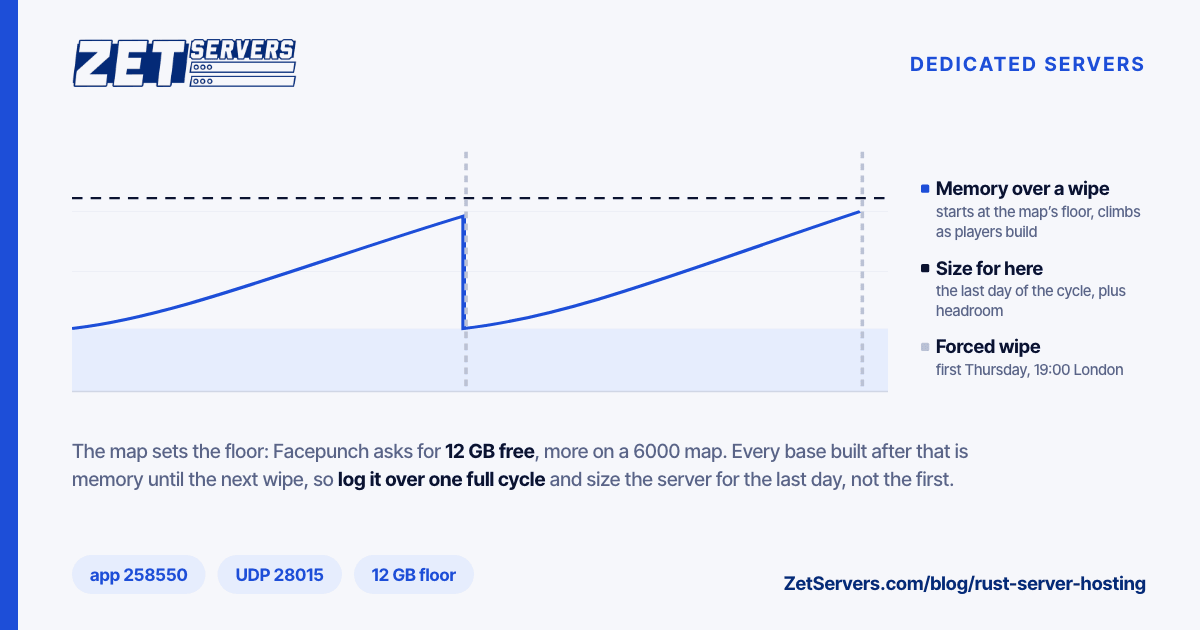
The 12 GB figure is where a server starts. Everything players build and place is an entity in the save, and the count rises from the moment a wipe opens until the next one clears it. The last day of the cycle uses more memory than the first evening.
Nobody can give you that curve for your map and plugins, so record it. A cron entry logging resident memory and save size every 15 minutes is enough:
*/15 * * * * echo "$(date -Is) $(ps -o rss= -C RustDedicated) $(du -k ~/rust/server/main/*.sav | tail -1 | cut -f1)" >> ~/rust-mem.log
The middle column is in KiB. After one full wipe you have the real growth curve; size the next machine for its last day plus headroom. Run out mid-wipe and the kernel kills the process, losing everything since the last save.
The forced wipe on the first Thursday
Facepunch ships an update every month, and the monthly default in the server's own wipe timer is the first Thursday at 19:00 London time. The last four monthly patches on Facepunch's changes page landed on 6 August, 3 September, 1 October and 5 November 2026, each the first Thursday of its month. On that pattern the next falls on 3 December 2026.
Save file names carry a protocol number. A forced wipe raises it, so the updated server creates a new map and save instead of loading the old ones; Facepunch's wiki calls renaming an old save to dodge the wipe dangerous and ill-advised. For servers that also wipe between forced wipes, the wipetimer convars offer weekly and biweekly schedules, and PrintWipe lists the next ten dates.
On update day the order matters: stop the server, run SteamCMD, then reinstall your mod framework, because a SteamCMD update restores vanilla files. Script it, and the downtime is little more than the download.
CPU: clock speed, then verify
Facepunch's guidance on the processor is one line: the more players, the faster the CPU needs to be. Hosting guides go further and call the server effectively single-threaded, which matches how tick-based game servers behave, as game server hardware explains. You can check it yourself on a busy evening:
top -H -p "$(pgrep -x RustDedicated)"
If one thread sits near 100% while the rest idle, the server is clock-bound, and a faster core helps more than extra cores. The spare cores then decide how many servers fit on one machine. Player count alone predicts little; players per game server covers why what players do matters more.
Oxide or Carbon
Oxide (uMod) is the long-standing one. Extract its archive over the server files and put plugins, single C# files, in oxide/plugins. Oxide ships a new build shortly after each Rust update, and you reinstall it every time the server updates.
Carbon calls itself a drop-in replacement for Oxide, aiming for full compatibility with Oxide plugins and keeping the same folder structure. Its pitch is performance; measure that on your server rather than trusting it.
Either way, every plugin hooks into the game loop. Add them one at a time and watch the thread view after each.
VPS or dedicated: choosing Rust server hosting
In Rust server hosting, memory decides the plan. A Minecraft server for two or three friends fits in 4 GB; Facepunch's floor for Rust is 12 GB free before the map grows.
| Setup |
When it fits |
Plan |
| One server, map 3000–4000, light plugins |
Memory log stays well under 16 GB |
4 vCPU, 16 GB unmetered VPS, €119 |
| One server, larger map or heavy plugins |
Log nears 16 GB by the end of the wipe |
8 vCPU, 32 GB VPS, €239 |
| Several servers, or hosting for others |
12 GB or more per server, added up |
Dedicated EPYC 9254, 128 GB, from €449 |
A VPS suits one server, if its cores are dedicated. Ours run on dedicated 3.2 GHz cores with NVMe, so no neighbour steals time from your server loop. The €59 plan, with 8 GB, is below Facepunch's minimum.
A dedicated server suits more than one. Add a weekly-wipe or modded server next to the main one and each wants its own memory. At the 12 GB floor, 128 GB holds about ten instances on paper, fewer once each grows through its wipe. The EPYC 9254 boosts to 4.15 GHz on a single core, the figure that matters for each server's main loop.
Public game servers attract floods, and a Rust server is most visible on wipe night. Every plan includes 100 Gbps of network-layer DDoS filtering; game server DDoS protection explains what that does and does not stop. Locations and the full range are on our game server hosting page; pick the city nearest most of your players.
Frequently asked questions
How much RAM does a Rust server need?
Facepunch lists 12 GB of free RAM as the requirement and says a 6000 map uses more. Memory then grows through each wipe as players build, so log resident memory over one full wipe and size for its last day. A 16 GB VPS is the practical floor for one server.
What ports does a Rust server use?
Four: UDP 28015 for the game, UDP 28017 for server queries, TCP 28016 for RCON and TCP 28082 for the Rust+ companion app, in the usual layout. The defaults are calculated from each other, so set all four in the startup line and restrict RCON to your own address.
When is the Rust forced wipe?
Facepunch releases a monthly update on the first Thursday, and the server's wipe timer defaults to 19:00 London time that day. The update raises the save protocol number, so every server starts a fresh map. Update the server and reinstall Oxide or Carbon straight after the patch lands.
Is a VPS good enough for Rust server hosting?
For one server, yes, with dedicated cores, NVMe storage and at least 16 GB of memory. Move to 32 GB if your memory log nears 16 GB by the end of a wipe. Several servers, or hosting them for others, are simpler and cheaper on a dedicated machine with 128 GB or more.