A file download server has one job: move large files to many people at once, and let them resume when a connection drops. Game patches, Linux ISOs, model weights and datasets all load a server the same way — big files that never change once published, read start to finish by hundreds of clients in parallel.
Size the port from the arithmetic
The port has to carry concurrent downloads × per-client rate. At 8 bits to the byte, 1 Gbps is 125 MB/s.
| Port |
Bytes per second |
Clients at 100 Mbps |
8 GB downloads per hour |
| 10 Gbps |
1.25 GB/s |
100 |
562 |
| 20 Gbps |
2.5 GB/s |
200 |
1,125 |
| 50 Gbps |
6.25 GB/s |
500 |
2,812 |
| 100 Gbps |
12.5 GB/s |
1,000 |
5,625 |
At 20 Gbps, 2.5 GB/s × 3,600 s = 9,000 GB an hour, or 1,125 copies of an 8 GB patch. Add about 30% headroom above your expected peak.
You do not choose the per-client rate. One TCP connection carries at most its window divided by the round-trip time. The kernel documentation caps the auto-tuned send buffer at up to 4 MB by default, so a client 100 ms away tops out near 335 Mbps (4,194,304 bytes × 8 ÷ 0.1 s) however large your port is. Raise net.ipv4.tcp_wmem for distant users, and plan on a blended rate.
Where the bytes come from: page cache, NVMe or HDD
20 Gbps needs 2.5 GB/s of reads; 50 Gbps needs 6.25 GB/s.
Page cache first. Linux keeps recently read file data in free RAM. Most catalogues have a small hot set and a long tail. If the hot set fits, the disks read each file once and later downloads come from RAM. fincore from util-linux shows how much of a file is resident:
fincore /srv/files/game-1.42-patch.pak
A 128 GB server holds several 8 GB patches. A 140 GB model checkpoint (70 billion parameters × 2 bytes at 16-bit precision) does not fit, which argues for a 256 GB build.
NVMe for what does not fit. A PCIe 4.0 ×4 link carries at most about 7.9 GB/s (16 GT/s × 4 lanes × 128/130 ÷ 8), so one drive serving 50 Gbps runs close to its ceiling. Spread hot files over several.
HDD for the archive, not the release. Hard drives handle one sequential reader well and hundreds at different offsets badly, because every switch is a seek. Measure with many readers:
fio --name=readers --directory=/srv/test --rw=read --bs=1M \
    --size=4G --numjobs=64 --direct=1 --group_reporting
If the aggregate falls short of the port, keep the hot set on NVMe or in RAM. Saturating a 100 Gbps port runs the same chain one tier up.
nginx settings for a file download server
Several settings that matter are off by default:
http {
    sendfile           on;
    sendfile_max_chunk 2m;
    tcp_nopush         on;
    aio                threads;
    open_file_cache    max=10000 inactive=60s;
    limit_conn_zone    $binary_remote_addr zone=perip:10m;

    server {
        listen 443 ssl;
        ssl_conf_command Options KTLS;

        location /files/ {
            root       /srv;
            limit_conn perip 8;
            max_ranges 1;
            add_header Cache-Control "public, max-age=31536000, immutable";
        }
    }
}
sendfile on has the kernel copy file data straight to the socket, which the Linux man page calls more efficient than read() plus write() through user space.sendfile_max_chunk 2m is the default since nginx 1.21.4; before that one fast client could monopolise a worker.tcp_nopush on sets TCP_CORK on Linux, so the header and the start of the file share a packet and the rest goes out in full packets.aio threads moves blocking disk reads to a thread pool, so a worker waiting on a cold disk does not stall its other clients. It needs nginx built --with-threads; nginx -V tells you.directio, not set here, bypasses the page cache above a given size and disables sendfile there. Reserve it for huge, rarely repeated files that would evict the hot set.
Over HTTPS, nginx must otherwise pull file data into user space to encrypt it — the very copy sendfile avoids. Since 1.21.4, nginx can hand encryption to the kernel through SSL_sendfile(), given OpenSSL 3.0 or later and the KTLS line above; the nginx write-up recommends Linux 5.2 or newer. Check the debug log for BIO_get_ktls_send(): 1 before counting on it.
Range requests and resumable downloads
A 140 GB checkpoint at 100 Mbps takes 11,200 seconds (140 × 8,000 Mbit ÷ 100), just over three hours. Connections will drop, and the client should resume. Range requests, section 14 of RFC 9110, make that work: the server sends Accept-Ranges: bytes, the client asks for Range: bytes=52428800-, and the server answers 206 Partial Content with only the missing bytes. nginx does this for static files out of the box.
Three details keep it safe:
- Never overwrite a published file. A resume across a change splices two versions together. Clients guard against it with
If-Range, sending back the ETag they saw; nginx derives its ETag from modification time and size, and on a mismatch sends the whole file instead. Publish each version under a new name.
- Limit ranges per request. With
max_ranges 1, nginx ignores multi-range requests and sends the full file. RFC 9110 permits this, warning that many small or overlapping ranges can signal a denial-of-service attempt. Download managers ask for one range per connection, so they keep working.
- Count connections per address with care.
limit_conn keys on client IP, and carrier-grade NAT can put hundreds of users behind one; eight per IP stops one accelerator hoarding slots without locking out a campus.
Release day on a file download server
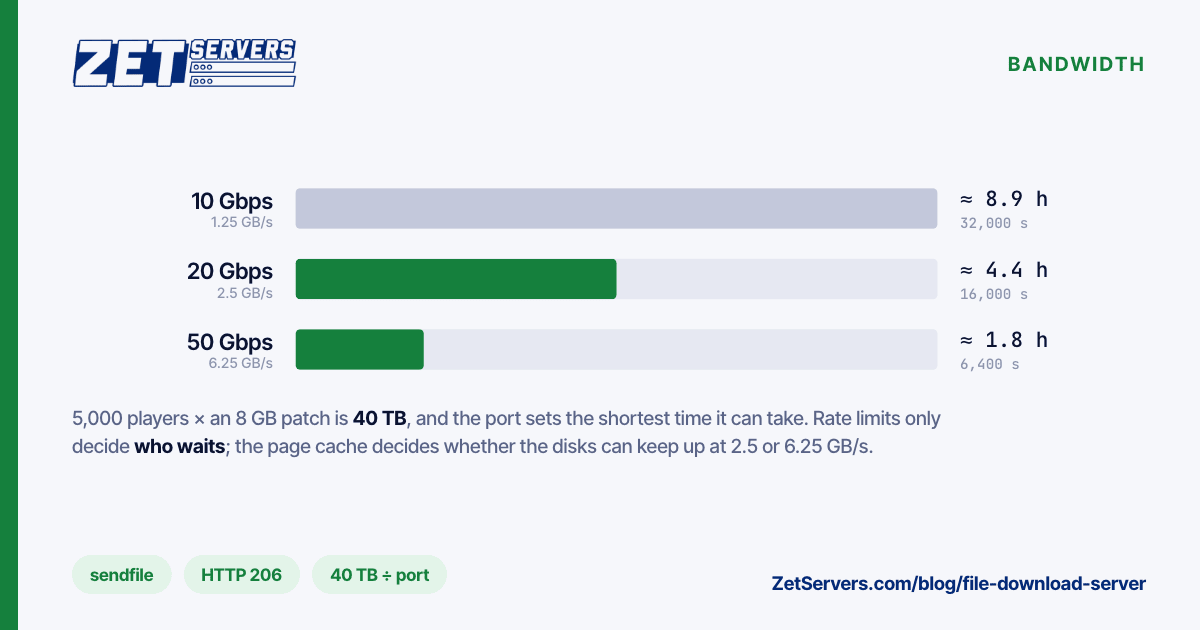
On release day, divide total bytes by the time you are willing to let it take. Five thousand players fetching an 8 GB patch is 40 TB:
40 TB × 8 = 320,000 Gbit
at 10 Gbps   320,000 ÷ 10 = 32,000 s   ≈ 8.9 hours
at 20 Gbps   320,000 ÷ 20 = 16,000 s   ≈ 4.4 hours
at 50 Gbps   320,000 ÷ 50 =  6,400 s   ≈ 1.8 hours
Demand spikes in the first hour, so these are best cases. limit_rate caps each request (two connections get twice the limit, the nginx docs note), so more people progress at once, but 40 TB still takes as long to move. What helps:
- Stage the file before announcing it, then warm the cache with
cat patch.pak > /dev/null and confirm with fincore.
- Spread the load. A second server in another city halves what each carries. LACP bonding adds ports to one server, though each download rides a single member link — fine with thousands of clients.
- Buy the port for the peak you can predict. Monthly patches to tens of thousands of players are what 20 Gbps servers and 50 Gbps servers are for: 20 Gbps from €1,159 a month on dual Xeon with 128 GB, or €1,919 on an EPYC 9254 with ten NVMe bays; 50 Gbps from €2,799 on dual Xeon Gold 6148 with 256 GB. All unmetered, so release day costs nothing extra.
When to put a CDN in front, and when to run mirrors
A CDN earns its fee when users span continents, since round-trip time caps every connection, or when one release could exceed any port you would rent. It is poor value for a known audience in one region, where per-gigabyte pricing on tens of terabytes soon outruns a flat port. If you use one, versioned names with immutable caching mean your origin sees one fetch per edge location, not one per user. Building a CDN origin server covers sizing it.
Mirrors are the middle path between one file download server and a CDN, and how Debian has long shipped its ISOs. Put two or three servers near your users — Frankfurt or Amsterdam for Europe, Ashburn for North America — sync them with rsync, and have a small redirector answer each request with a 302 to the nearest healthy mirror. Publish SHA-256 checksums from one place, and move the "latest" link only once every mirror holds the file. Choosing a server location maps cities to audiences.
Frequently asked questions
How much bandwidth does a file download server need?
Multiply concurrent downloads by the average per-client rate and add about 30% headroom: two hundred clients at 100 Mbps need 20 Gbps before headroom. For a release, divide total bytes by the time you accept. Forty terabytes in under two hours needs about 50 Gbps.
Are hard drives fast enough to serve downloads?
For an archive read by a few clients at a time, yes. For a popular release with hundreds of clients at different offsets, hard drives spend their time seeking. Keep hot files in page cache or on NVMe, and test the array with 64 parallel fio readers first.
Should I enable sendfile in nginx for large files?
Yes. It is off by default and lets the kernel move file data to the socket without copying it through nginx. Pair it with tcp_nopush and aio threads. Over HTTPS it only helps with kernel TLS active, which needs nginx 1.21.4 or later and OpenSSL 3.0.
How do resumable downloads work over HTTP?
The server advertises Accept-Ranges: bytes. After a dropped connection, the client requests the missing part with a Range header, and the server replies 206 Partial Content with only those bytes. An If-Range header carrying the file's ETag stops the client stitching two versions of a file together.