A cheap dedicated server is cheap for one of three reasons. The hardware is old and paid off. The network is thin: a shared port, a traffic cap, a "fair use" clause. Or something essential is missing: no out-of-band console, no ECC memory, desktop parts in a server case. Only the first of those is a good trade. This guide shows how to tell them apart, what our own entry-level machine gives up and what it keeps, and the point at which a VPS is the cheaper answer.
Reason one: the hardware is paid off
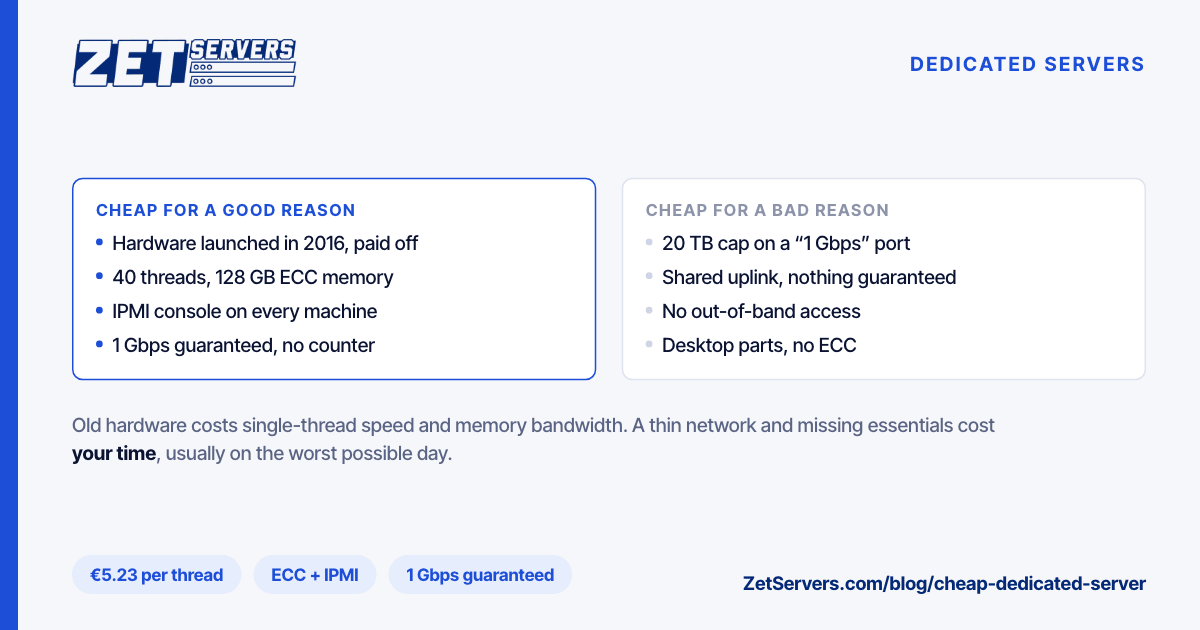
Our lowest-priced dedicated server is a dual Intel Xeon E5-2630 v4 at €209 a month on the 1 Gbps tier. Intel launched that processor in 2016. Ten years on, here is what its age costs you and what it does not:
|
Dual Xeon E5-2630 v4 |
Single EPYC 9254 |
| Launched |
2016 |
2022 |
| Cores / threads |
20 / 40 |
24 / 48 |
| Max turbo |
3.1 GHz |
4.15 GHz |
| Memory |
128 GB DDR4-2133 ECC |
128 GB DDR5-4800 ECC |
| Drive bays |
6 × SSD |
10 × NVMe |
| Price at 1 Gbps |
€209 |
€449 |
What age costs: single-thread speed and memory bandwidth. A core that turbos to 3.1 GHz on a 2016 architecture finishes a single-threaded task noticeably later than a 4.15 GHz Zen 4 core, and four channels of DDR4-2133 per socket feed far less data than twelve channels of DDR5. The older platform also draws more power per unit of work, which is part of why a newer machine costs more to rent. EPYC vs Xeon puts numbers on both gaps.
What age does not cost: capacity. Forty threads and 128 GB of ECC memory are a lot of room for jobs that run in parallel — build runners, a fleet of small VMs, batch processing, many low-traffic sites. For that kind of work, an old server does nearly everything a new one does, at less than half the price.
Reason two: the network is thin
This is where many low-priced offers make their margin, and it rarely appears in the headline. Watch for:
- A "1 Gbps port" with a small traffic allowance. A 20 TB monthly cap is about 6% of what a gigabit can move in a month (324 TB at full rate).
- A shared port. "1 Gbps" that is really a slice of an uplink shared by a rack, with a guaranteed rate of 100 Mbps or none at all.
- Overage pricing. A low base price with a per-terabyte charge above the allowance turns a cheap server into an expensive one in a busy month.
The question to ask is simple: what rate is guaranteed, and is there a traffic counter at all? Our €209 server has 1 Gbps guaranteed and no counter. If the workload needs more, the same chassis can be ordered at higher tiers without a migration.
Reason three: something essential is missing
These are the corners that look harmless on the order page and cost real time later.
Out-of-band management (IPMI). Without it, a firewall rule that locks out SSH, a kernel that fails to boot or a mistyped network config becomes a support ticket and a wait. With it, you open a remote console, mount an ISO and fix it yourself. Every one of our dedicated servers ships with IPMI access.
ECC memory. Memory errors happen, and the more RAM a machine has, the more of them it sees. Without error-correcting memory they surface as corrupted files, crashed processes or a database that will not start. ECC corrects single-bit errors and reports the rest. Every build in our range uses ECC.
Server-grade parts. Desktop processors and consumer drives keep prices low, but they were not designed to run flat out around the clock, and consumer boards usually lack both IPMI and ECC support.
Somewhere to escalate. A cheap server with a support queue measured in days is not cheap the first time it fails. Ask how tickets are handled and how quickly. Ours go to a NOC staffed around the clock, with a 15-minute average response.
Price per thread and per gigabyte
Here is how the entry dedicated servers compare with our VPS plans when you divide price by what you get:
| Option |
Threads |
RAM |
Price |
€ per thread |
€ per GB of RAM |
| VPS, 4 vCPU |
4 |
16 GB |
€119 |
29.75 |
7.44 |
| VPS, 16 vCPU |
16 |
64 GB |
€459 |
28.69 |
7.17 |
| Dual E5-2630 v4 |
40 |
128 GB |
€209 |
5.23 |
1.63 |
| Dual E5-2699 v4 |
88 |
256 GB |
€299 |
3.40 |
1.17 |
| Single EPYC 9254 |
48 |
128 GB |
€449 |
9.35 |
3.51 |
The comparison is not exactly like for like. Each VPS vCPU is a dedicated core at 3.2 GHz, while a "thread" on a dual Xeon is one half of a hyper-threaded core at a lower clock. Even allowing for that, once a VPS bill passes about €200 a month, a dedicated server gives several times the hardware for the money. Below that line, the VPS is usually the cheaper answer — high bandwidth VPS covers what €29 to €119 buys, including a guaranteed rate of up to 4 Gbps.
Who should buy the cheap one, and who should not
Good fits for an entry Xeon:
- CI and build runners that parallelise across many threads
- A virtualisation host for many small VMs or containers
- VPN exits, proxies and download mirrors on a guaranteed port
- Staging environments that need production-sized memory
- Backup targets, with drives added in the six bays
Pay more for:
- Game servers and database primaries. Both are bound by single-thread speed and memory latency, which is exactly where the 2016 platform is weakest. The EPYC 9254 is the better buy; Minecraft server hosting shows the reason with the game's 50 ms tick.
- Heavy storage I/O. The EPYC builds carry 10 or 24 NVMe bays on PCIe 5.0; the E5 builds have six SSD slots on PCIe 3.0.
- Ports above 25 Gbps. At that rate, the NIC, the drives and the memory controller all have to keep up at once.
If you are unsure whether you have outgrown a VPS at all, dedicated server vs VPS works through the decision from the other side.
Four checks on delivery
Old hardware is fine. Worn or mismatched hardware is not. In the first hour:
- Confirm the CPU with
lscpu. The plan page notes that some locations substitute an E5-2680 v3 or E5-2670 v3 for the E5-2690 v4 build; performance is close, but know what you have.
- Confirm ECC with
dmidecode -t 16 and look for Error Correction Type: Multi-bit ECC.
- Check the drives with
smartctl -a /dev/sdX: power-on hours, reallocated sectors, and for SSDs the wear indicator.
- Measure the port with iperf3 and parallel streams, in both directions.
The benchmark checklist has the full set of commands and what normal results look like.
Frequently asked questions
What is the cheapest dedicated server worth buying?
One with old but server-grade hardware, ECC memory, IPMI access and a guaranteed port with no traffic cap. Our entry server is a dual Xeon E5-2630 v4 with 40 threads and 128 GB of RAM at €209 a month.
Are older Xeon servers still worth it?
For parallel workloads that need many threads and plenty of RAM, yes. For work bound by a single thread or by memory bandwidth, such as game servers and busy databases, a newer EPYC is worth the extra cost.
Is a cheap dedicated server better than a VPS?
Above about €200 a month of VPS spend, a dedicated server usually gives several times the cores and memory for the money. Below that, a VPS with dedicated cores is normally cheaper and simpler.
What should a cheap dedicated server always include?
IPMI or another out-of-band console, ECC memory, a stated guaranteed bandwidth rate, and support that answers within the hour. Missing any of these, the low price is borrowing against your time later.
Are there hidden costs with cheap dedicated servers?
Often in bandwidth: low traffic allowances, shared ports or per-terabyte overage. Check the guaranteed rate and whether traffic is metered before comparing headline prices.