A WireGuard VPS is the simplest private VPN you can run: one UDP port, a configuration file of about a dozen lines, and an encryption protocol built into the Linux kernel since version 5.6. Set up on a small virtual server, it gives you a fixed exit address in the country you choose, encrypted traffic on hotel and café networks, and private access to your own services, without a subscription to anyone's VPN app. This guide goes from a fresh Ubuntu 24.04 or Debian 13 server to a working tunnel on a laptop and a phone in about fifteen minutes.
What the VPS needs
A KVM VPS, not a container. WireGuard lives in the kernel. On a KVM guest with a current distribution it is already there; on a container VPS it works only if the provider's host kernel has it and allows it. KVM VPS vs container VPS explains the difference and how to check which one you have.
A location chosen on purpose. Pick the city nearest to you for the lowest latency, or the country whose address you want to appear from. Every request you make through the tunnel pays the round trip to the server first, so a server on the other side of Europe adds that distance to everything. Choosing a server location has the arithmetic.
Bandwidth in both directions. A VPN server receives every byte it sends: it fetches a page from the internet and passes it down the tunnel to you. Each gigabyte you download crosses the server's port twice, once in each direction. Ports are full duplex and a guaranteed rate applies to each direction independently, so a 1 Gbps plan on our unmetered VPS range carries a full gigabit of tunnel traffic.
For one person or a small team, the smallest plan is plenty.
Step 1: install WireGuard and generate the server keys
apt update && apt install -y wireguard
cd /etc/wireguard
umask 077
wg genkey | tee server.key | wg pubkey > server.pub
server.key is the private key and never leaves the server. server.pub is what clients need.
Find the name of your public network interface, which you will need for the NAT rule:
ip route show default # e.g. "default via 203.0.113.1 dev eth0" -> eth0
Step 2: write the server configuration
Create /etc/wireguard/wg0.conf, replacing eth0 if your interface has another name:
[Interface]
Address    = 10.8.0.1/24, fd42:42:42::1/64
ListenPort = 51820
PrivateKey = <contents of server.key>

PostUp   = iptables -t nat -A POSTROUTING -s 10.8.0.0/24 -o eth0 -j MASQUERADE
PostUp   = ip6tables -t nat -A POSTROUTING -s fd42:42:42::/64 -o eth0 -j MASQUERADE
PostDown = iptables -t nat -D POSTROUTING -s 10.8.0.0/24 -o eth0 -j MASQUERADE
PostDown = ip6tables -t nat -D POSTROUTING -s fd42:42:42::/64 -o eth0 -j MASQUERADE

[Peer]
PublicKey  = <laptop public key>
AllowedIPs = 10.8.0.2/32, fd42:42:42::2/128
On Debian, run apt install iptables first if the command is missing; it uses nftables underneath. Each device gets its own [Peer] block and its own tunnel address; keep a note of which public key belongs to which device. The IPv6 lines matter: if the tunnel carries only IPv4, a client on an IPv6-capable network sends its IPv6 traffic outside the tunnel, unencrypted.
Step 3: enable forwarding and open the port
cat > /etc/sysctl.d/99-wireguard.conf <<'EOF'
net.ipv4.ip_forward = 1
net.ipv6.conf.all.forwarding = 1
EOF
sysctl --system
If you use ufw, allow the WireGuard port and the forwarded traffic:
ufw allow 51820/udp
ufw route allow in on wg0 out on eth0
Step 4: create a client and start the tunnel
Generate a key pair for each device, on the device if its app can do it, or on the server for convenience:
wg genkey | tee laptop.key | wg pubkey > laptop.pub
Put the contents of laptop.pub into the server's [Peer] block, then write the client's configuration:
[Interface]
PrivateKey = <contents of laptop.key>
Address    = 10.8.0.2/32, fd42:42:42::2/128
DNS        = 9.9.9.9

[Peer]
PublicKey           = <contents of server.pub>
Endpoint            = 203.0.113.10:51820
AllowedIPs          = 0.0.0.0/0, ::/0
PersistentKeepalive = 25
Start the server side and make it survive reboots:
systemctl enable --now wg-quick@wg0
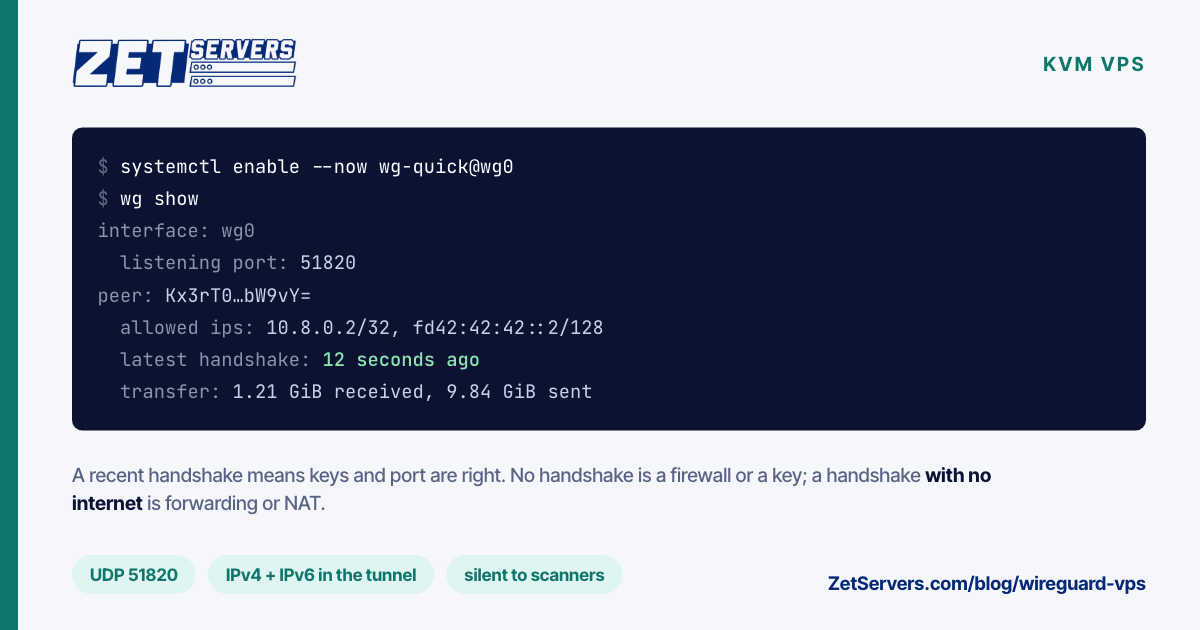
wg show
Import the client file into the WireGuard app on Windows, macOS, Linux, Android or iOS. For a phone, display it as a QR code instead of copying files around:
apt install -y qrencode
qrencode -t ansiutf8 < phone.conf
Once a client connects, wg show lists a recent handshake and growing transfer counters for that peer. Check your public address from the client: it should now be the server's. If the key files were made on the server, delete the client private keys once the devices have imported them.
When it does not work
WireGuard fails quietly, so diagnose from the server with wg show and work through the symptoms in order:
- No handshake at all. The client's packets are not arriving or not accepted. Check that UDP 51820 is open in every firewall in the path, that the client's
Endpoint has the right address and port, and that each side holds the other's public key. A swapped or mistyped key looks exactly like a closed port.
- Handshake, but no internet. The tunnel works and forwarding does not. Confirm
sysctl net.ipv4.ip_forward returns 1, that the NAT rule names the right interface, and that iptables -t nat -L POSTROUTING -v shows its packet counter climbing.
- Internet works, names do not resolve. The client's
DNS line is missing or blocked. Try another resolver, or ping an IP address to confirm the tunnel itself is fine.
- Some sites stall, others load. An MTU problem; see below.
Full tunnel or split tunnel
AllowedIPs = 0.0.0.0/0, ::/0 on the client sends all traffic through the VPN. To reach only private services on the server — a database, an admin panel, a monitoring dashboard — set AllowedIPs = 10.8.0.0/24, fd42:42:42::/64 instead. Everything else then uses the local connection, and the services can listen only on the tunnel address, invisible to the internet.
WireGuard adds up to 80 bytes of headers to each packet, so wg-quick sets the tunnel MTU to 1420 on a standard 1500-byte link. If some websites stall while others load — a classic MTU symptom on PPPoE or mobile connections — set MTU = 1380 in the client's [Interface] section and try again.
Throughput is rarely the problem for personal use. WireGuard's in-kernel implementation spreads encryption across CPU cores, and ChaCha20-Poly1305 is fast on processors with or without AES acceleration. A VPN for hundreds of users is a different job, where packet rate and core count decide the size of the server; VPN exit node hosting covers that scale.
Keeping it secure
WireGuard does not respond to packets that are not signed with a known key. To a port scanner, UDP 51820 looks closed, which makes the VPN itself a small target. The rest of the server needs the usual care: SSH with keys only, automatic security updates, and nothing listening on public addresses that does not need to — securing a new server has the checklist, and it applies to a VPS as much as to a dedicated machine.
When a device is lost, delete its [Peer] block and run systemctl restart wg-quick@wg0. Its key stops working immediately.
When personal becomes a product
A single WireGuard VPS serves you, your family or your team. If you are building a VPN service for paying customers, the questions change: exits in many cities, abuse handling, address reputation, and packet rates measured in millions per second. Servers for VPN providers describes the dedicated hardware and network we offer for that.
Frequently asked questions
Can any VPS run WireGuard?
Any KVM VPS with a Linux kernel of version 5.6 or later has WireGuard built in. Container-based VPS plans can run it only if the provider's host kernel includes it and permits it.
How much bandwidth does a WireGuard VPS need?
As much as your fastest connection, in both directions, because the server receives and forwards every byte. A 1 Gbps guaranteed plan is plenty for a household or a small team.
Which port does WireGuard use?
UDP 51820 by convention, but any UDP port works. Set it with ListenPort on the server and match it in the client's Endpoint.
Is WireGuard faster than OpenVPN?
Generally yes. WireGuard runs in the kernel, uses modern ciphers and has a far smaller codebase, while OpenVPN usually runs in user space. The difference shows most on modest CPUs.
How many users can a WireGuard VPS handle?
Dozens of light users on the smallest plan. Real limits depend on simultaneous traffic rather than user count: size the guaranteed bandwidth to the total peak, and add cores as the packet rate grows.