VPN exit node hosting is a networking problem wearing a hardware costume. The server is easy — a modern CPU forwards more traffic than most exit nodes will ever see. What decides whether your service is good is the address space it sends from, how the provider handles abuse reports, and whether you have sized the state tables for thousands of concurrent tunnels instead of thousands of concurrent HTTP requests.
The addresses matter more than the machine
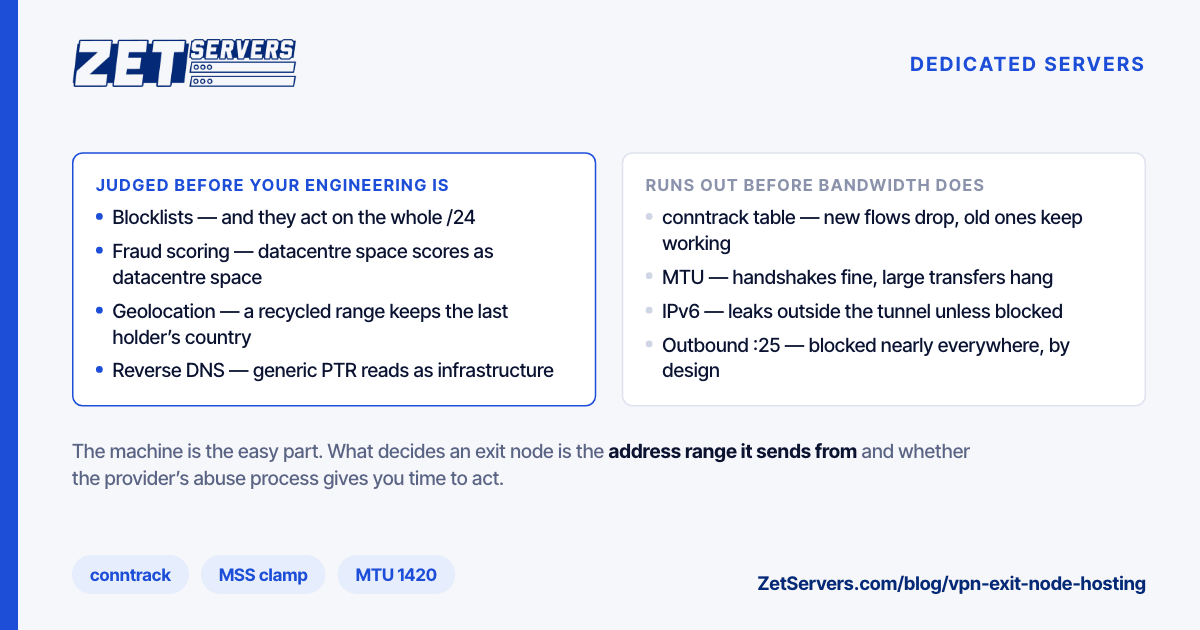
An exit node is judged by its IP address before any of your engineering is visible. Three separate systems make that judgement, and they do not agree with each other:
- Blocklists. DNSBLs and reputation feeds record addresses seen sending abuse. Entries persist after the behaviour stops, and delisting is a process rather than a switch.
- Fraud and risk scoring. Commercial services score an address on whether it belongs to a datacentre, a residential ISP, or a known VPN range. A clean datacentre address still scores as a datacentre address, and some sites treat that alone as suspicious.
- Geolocation. Geo databases decide what country your users appear to be in. A newly assigned range often carries the previous holder's location, or none at all, and correcting it means submitting to each database separately.
Practical consequences for how you buy:
- Reputation is block-shaped. Filters commonly act on a whole /24 rather than a single address, so one abusive neighbour affects everyone in the range. Ask whether you get addresses from a range shared with unknown tenants.
- Fresh is not the same as clean. A recycled range can arrive with years of history attached. Check what you are given before you build on it: query the major DNSBLs, look up the geolocation, and test the actual user experience against a few large sites.
- Reverse DNS is a signal. Generic provider-style PTR records mark an address as infrastructure. Naming yours deliberately does not make you look residential, and should not try to, but it does make you look like an operator rather than an anonymous host.
- Outbound port 25 is normally blocked, by nearly every provider, because unrestricted SMTP from a shared exit is a spam engine. Plan for it rather than being surprised by it.
Abuse handling is the actual product
An exit node produces abuse reports. That is not a sign of failure — it is arithmetic on a service that carries other people's traffic. What matters is that the reports go somewhere that answers.
Set up your side properly:
- Publish a working
abuse@ role address and keep it monitored. It is a long-standing convention for exactly this, and complainants will use it before they escalate.
- Make sure your provider's abuse contact and yours are both current in the registry record. A report that reaches only the upstream, with no way to reach you, gets resolved by disconnecting you.
- Have a documented process: acknowledge, investigate, act, reply. Most complainants want evidence that someone read the report.
- Keep only what your policy says you keep, and be able to explain it. A no-logs claim you cannot substantiate is worse than a modest retention policy you can.
Choose the provider on how they handle this, not on whether they promise you will never hear about it. A host that forwards reports, gives you time to act and expects a reply is a host you can build a business on. A host that suspends the server on first complaint is one you will discover at the worst moment. Ask before you order, in writing, and ask specifically what happens on a first report and how much notice you get. We run a 24/7 abuse desk and a stated process for exit nodes; if that matters to your business, put the question to us rather than inferring it from a feature list.
Sizing the box
Forwarding is cheap when it happens in the kernel. WireGuard runs as a kernel module and moves multi-gigabit traffic on modest hardware; OpenVPN in userspace costs considerably more per gigabit, and its per-connection cost is what limits a busy node rather than raw throughput.
The limits you will actually hit:
Connection tracking. Every tunnelled flow becomes an entry in the conntrack table, and thousands of users each holding dozens of connections exhausts the default quickly. The failure mode is dropped new connections while existing ones keep working, which reads as an intermittent fault:
sysctl net.netfilter.nf_conntrack_max
sysctl net.netfilter.nf_conntrack_count      # how close you are
Raise the maximum, and raise the hash-table size along with it. If you do not need stateful filtering on forwarded traffic, NOTRACK on that path avoids the table entirely.
MTU and MSS. Encapsulation costs bytes. WireGuard defaults to an MTU of 1420 for this reason. Get it wrong and you get the classic tunnel bug: handshakes succeed, small pages load, large transfers hang. Clamp MSS to the path MTU on the forwarding rules and the symptom disappears:
iptables -t mangle -A FORWARD -p tcp --tcp-flags SYN,RST SYN \
  -j TCPMSS --clamp-mss-to-pmtu
Per-user bandwidth. Aggregate demand is spiky and long-tailed: most users idle, a few saturate. Size the port for the peak of the few, not the mean of the many. The tier arithmetic is in how much bandwidth do you actually need, and an unmetered port turns an unpredictable egress bill into a fixed line item, which for this workload is the difference between a business model and a gamble.
IPv6. Users increasingly have it. An exit that offers IPv4 only will leak IPv6 traffic outside the tunnel unless you explicitly block it, which is a privacy failure your users will not detect.
Network choice
Exit nodes are latency-sensitive in a way that ordinary hosting is not: every packet takes a detour through you, so your path quality is added to the user's own. A node on a network with direct paths to major consumer ISPs costs your users a few milliseconds; one behind congested transit can double their latency. That makes routing quality a product feature, and it is the reason our network and PoP footprint matter more here than the specification of the machine.
Everything else is standard hardening — the exit node is a public-facing server carrying other people's traffic, so the baseline in how to secure a new dedicated server applies with no exceptions.
Frequently asked questions
How much bandwidth does an exit node need?
Model it from concurrent active users multiplied by their realistic sustained rate, not from your subscriber count. Most subscribers are idle most of the time. Measure the ratio on a small node before scaling, because it varies enormously between consumer and business audiences.
Why do some sites block my exit node?
Because the address is identifiable as datacentre space, and many sites treat that as elevated risk regardless of behaviour. Some of that is addressable through reputation work and geolocation corrections; some of it is a policy decision by the site that no configuration on your side changes.
Can I run a VPN service on a VPS?
For a small deployment, yes — the forwarding work is modest and a VPS with a fast port handles a lot of tunnels; WireGuard VPS walks through a single-server setup. Move to bare metal when the connection-tracking and interrupt load starts competing with neighbours, which happens sooner than raw throughput limits would suggest.
What logs should I keep?
Whatever your published policy says, and no more. Decide it deliberately, write it down, make it match what the servers actually do, and make sure you can answer an abuse report within whatever retention window you chose.
Next steps
Check the address range before you build on it, agree the abuse process before you need it, and size conntrack and MTU before your first busy evening. The servers for VPN providers page lists the configurations and exit locations. Ask what a specific range's history looks like before you commit to it — it is a fair question, and a provider who cannot answer it is telling you something.