Saturating a 100 Gbps port means sustaining 12.5 gigabytes per second out of the machine, every second, from disk or memory through the CPU to the wire. It is a systems problem long before it is a network one. The port is the easy part: it is sold, provisioned and lit in an afternoon. Then the machine behind it has to produce 12.5 gigabytes every second, forever, and each layer between the disk and the wire gets a chance to be the reason it does not. This is what has to be true before a hundred gigabits of guaranteed egress turns into a hundred gigabits of delivered traffic.
The three numbers that frame it
100 Gbps = 12.5 GB/s
         = 8.13 million packets per second at 1500-byte frames
         = 148.8 million packets per second at 64-byte frames
The packet-rate figures include Ethernet framing overhead — preamble, header, FCS and the inter-frame gap — which is why the first is 8.13 Mpps and not the 8.33 Mpps a naive division gives.
Those two packet numbers are the entire story of why some 100 Gbps workloads are easy and others are impossible. Serving large objects, every frame is full: 8.13 Mpps spread over, say, 32 busy cores is about 254,000 packets per second per core, roughly 11,800 cycles per packet on a 3 GHz core. That is a comfortable budget for a normal kernel network stack.
Now serve tiny packets. At 148.8 Mpps the same 32 cores get 645 cycles per packet, which is less than the stack costs on a good day. This is the wall that kernel-bypass frameworks exist to climb, and it is why "100 Gbps" on a DNS or game-packet workload means something completely different from 100 Gbps of video segments.
Size from bytes if your packets are big, from packets if they are small, and find out which you are before buying anything.
What the hardware chain has to deliver
| Layer |
Requirement at 100 Gbps |
How it usually fails |
| PCIe slot |
Gen3 ×16 or Gen4 ×8, ~126 Gbps usable |
A Gen3 ×8 slot, capped near 63 Gbps |
| NUMA |
Threads and memory on the NIC's own socket |
Cross-socket access on a dual-socket box |
| Storage |
12.5 GB/s sustained read |
An HDD array, which caps near 2 GB/s |
| Packet rate |
8.13 Mpps at 1500-byte frames |
Small packets: 148.8 Mpps, past the kernel stack |
| Connections |
Thousands of flows, or dozens in parallel |
One TCP flow, capped near 86 Gbps at 100 ms RTT |
PCIe lanes. A 100 GbE NIC needs a slot that can carry 100 Gbps. PCIe 3.0 gives about 985 MB/s per lane, so a Gen3 x8 slot tops out near 63 Gbps — the card links up, the throughput never arrives. Gen3 x16 or Gen4 x8 both provide about 126 Gbps of usable bandwidth, which is the minimum that makes sense. Check the card, the slot and what else is competing for lanes.
NUMA placement. On a dual-socket machine the NIC hangs off one socket's lanes. Threads on the other socket reach its memory across the interconnect, and at these rates that tax is measurable. Find the node and keep the work near it:
cat /sys/class/net/eth0/device/numa_node
ethtool -l eth0        # RSS queues configured vs available
Can the disks source 12.5 GB/s?
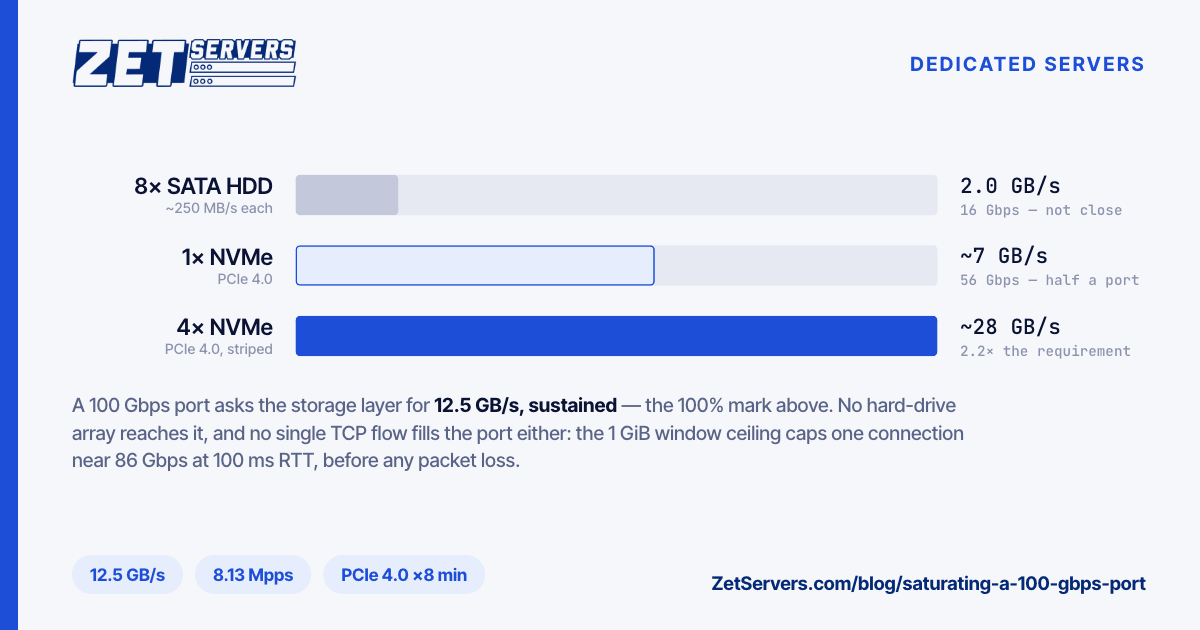
This is where most 100 Gbps builds fail, so it gets its own arithmetic. 12.5 GB/s sustained read is the number to beat.
A PCIe 4.0 NVMe drive does roughly 7 GB/s sequential, so two is an arithmetic minimum and four to eight is a working array once overhead and non-sequential access are counted. A high-capacity HDD array cannot do it at all: eight 12 TB SATA drives at around 250 MB/s each cap out near 2 GB/s, which is 16 Gbps. That is the whole reason our 100 Gbps builds start at a dual EPYC 9554 with 512 GB of DDR5 and 24 NVMe bays rather than something cheaper — nothing smaller can source the rate. The per-device numbers behind that claim are in NVMe vs SATA vs HDD.
Memory bandwidth. If the working set fits in RAM, you are reading from memory at 12.5 GB/s while the CPU also touches every byte for TLS. Modern DDR5 platforms have the headroom; it is worth knowing it is being spent.
No single connection will do this
A common and expensive misunderstanding: one TCP flow cannot fill a 100 Gbps wide-area path. The ceiling on a flow is its window divided by the round-trip time, and the window has a hard limit — RFC 7323 caps the window scale factor at 14, giving a maximum of about 1 GiB in flight.
1 GiB / 0.1 s ≈ 10.7 GB/s ≈ 86 Gbps
That is the theoretical best case for a single connection at 100 ms RTT, assuming zero loss and a receiver that actually advertises a gigabyte of buffer. Real single flows over real paths land far below it, because one lost segment triggers a congestion response that takes many round trips to recover from.
So 100 Gbps is always an aggregate: thousands of concurrent clients, or dozens of parallel streams to a handful of peers. A bonded port applies the same rule one layer down: LACP bonding hashes each flow onto a single member link. When you test, test the way you will serve — iperf3 -P 30 rather than a single stream, from several sources rather than one.
The software that has to get out of the way
Most of the tuning is the same tuning that gets a 10 Gbps link to line rate, applied with less tolerance for mistakes. Linux 10 Gbps tuning covers socket buffers, fq with BBR, ring buffers and interrupt spreading; at 100 Gbps those stop being optimisations and become prerequisites. On top of them:
- Stop copying data.
sendfile() keeps file contents out of userspace entirely. At 12.5 GB/s, a needless copy per byte is a core's worth of memory bandwidth thrown away.
- Offload TLS where you can. Kernel TLS moves symmetric encryption out of the application path, and some NICs offload it further. It needs matching kernel and OpenSSL support, so verify on the actual build rather than assuming.
- Leave hardware offloads on. GRO, GSO, TSO and checksum offload exist to reduce per-packet CPU cost, which is exactly the resource under pressure.
- Do not chase jumbo frames. They help between machines you control inside a facility. Internet paths are 1500 bytes and will stay that way.
When the tier above is the right answer
The ladder past 10 Gbps is not linear in price or in hardware. The 50 Gbps tier starts at €2,799, 100 Gbps at €4,499, and the 200 Gbps flagship at €12,879 on a dual EPYC 9754 with a terabyte of RAM (list pricing, September 2026). Per gigabit, 100 is the cheapest rung on the ladder — you are buying the machine that can fill the pipe, and at that tier the machine is most of the price.
Two practical notes before you order at this scale. High-rate ports are provisioned per facility rather than sitting in stock everywhere, so confirm availability in your chosen location first. And be honest about which number you need: if your peak is 30 Gbps with spikes, a 50 Gbps guarantee with headroom is a better buy than 100 Gbps you will never approach.
Frequently asked questions
What does saturating a 100 Gbps port require from the disks?
12.5 GB/s of sustained read. That is an NVMe array — four to eight PCIe 4.0 drives in practice — or a working set served from RAM. No hard-drive array reaches it.
Can one server really push 100 Gbps?
Yes, to many clients at once, with large objects and the offloads doing their job. To a single client over a long path, no — the per-flow window limit stops you around 86 Gbps in theory and much lower in practice.
Do I need kernel bypass?
Only for small-packet workloads. Serving video segments or large files at 1500-byte frames, a tuned kernel stack is sufficient; at tens of millions of packets per second it is not.
How do I test the port on day one?
Parallel iperf3 from several well-connected sources, then a real workload. A single-stream test will under-report by a large margin and tell you nothing useful. The procedure is in how to verify your port speed.
Is 100 Gbps cheaper per gigabit than 50?
On our range, yes — €44.99 per Gbps against €55.98. The curve is not monotonic across the whole ladder though — 200 Gbps works out at €64.40 per Gbps, more than both — so price the tier you want and the one above it before deciding. If you want both modelled against your traffic, ask us.