Choosing between NVMe vs SATA vs HDD is usually presented as a speed ranking, which is the least useful way to think about it. All three are still shipping in 2026 because they solve different problems: one is fast, one is cheap per gigabyte, and one exists mostly because a chassis has the slots. The right question is which resource your workload actually runs out of first.
The interfaces, and what they cap
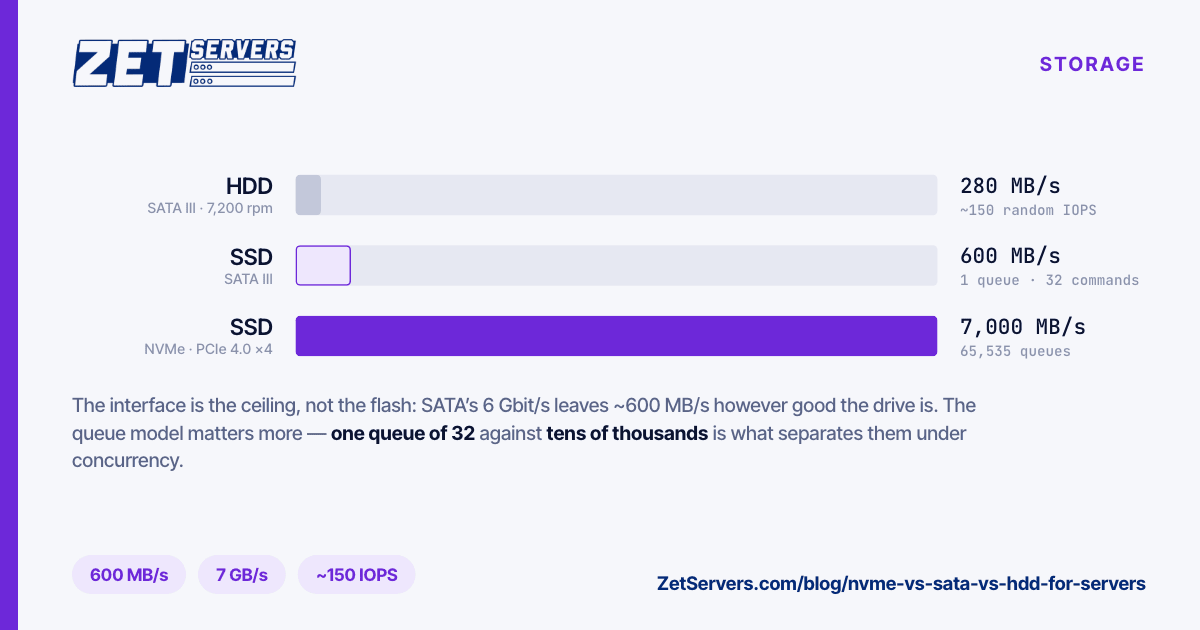
The interface sets a hard ceiling that no drive behind it can exceed.
|
Interface |
Practical sequential read |
Queue model |
| HDD (SATA) |
SATA III, 6 Gbit/s |
200–280 MB/s |
1 queue, 32 commands (NCQ) |
| SSD (SATA) |
SATA III, 6 Gbit/s |
550–600 MB/s |
1 queue, 32 commands (NCQ) |
| SSD (NVMe) |
PCIe 4.0 ×4 |
5,000–7,000 MB/s |
up to 65,535 queues |
SATA's 6 Gbit/s signalling leaves roughly 600 MB/s after encoding overhead, which a SATA SSD reaches and a spinning disk never approaches. That single number is why a SATA SSD and an NVMe SSD using identical flash perform an order of magnitude apart: the flash was never the bottleneck, the port was.
The queue model matters more than the headline throughput for anything serving concurrent users. AHCI gives you one command queue thirty-two entries deep. NVMe was designed for flash from the start and allows tens of thousands of queues — which is what lets a single drive keep hundreds of thousands of concurrent operations in flight instead of serialising them.
Where a hard drive is still the correct answer
A 7,200 rpm drive has a mechanical floor nothing improves: half a rotation of latency, about 4.2 ms, plus seek time, before a single byte moves. Random I/O lands somewhere near 100–200 operations per second per spindle, and no cache or controller changes the physics.
What it does have is capacity per euro and capacity per rack unit. A 96 TB node built from eight 12 TB drives costs a fraction per terabyte of the equivalent in flash, and for workloads where that capacity is read sequentially and infrequently — archives, backup targets, media libraries, VOD catalogues with a long tail — the mechanical penalty never shows up in the numbers users see.
Hard drives are the right choice when:
- The working set is far smaller than the capacity, and RAM or an NVMe tier absorbs it.
- Access is sequential: whole files read start to finish.
- Capacity is the budget line that decides the build, as it is on our storage servers and seedbox nodes.
They are the wrong choice for a database, for anything with concurrent random writes, and for a busy VOD origin without a cache tier in front of it.
Where SATA SSDs still make sense
The honest case for SATA flash is narrow and mostly physical: the chassis has 2.5" SATA bays and no free PCIe lanes, or you need many mid-capacity devices and NVMe would exhaust the CPU's lane budget first.
At 550 MB/s a SATA SSD saturates roughly 4.4 Gbit/s of network. For a boot pair, a log volume, or a general-purpose application server on a 1 or 2 Gbps port, that is plenty and the drive will never be the limiting component. Past that, you are paying flash prices for a spinning-disk-era port.
Where NVMe earns its price
NVMe wins on the two axes that decide whether a busy server feels fast: random IOPS and latency under concurrency. Read latency in the tens of microseconds against several milliseconds for a hard drive is not a percentage improvement, it is a different category of behaviour, and it is what keeps p99 response times flat while load climbs.
Take it as the default for:
- Databases. Random reads and fsync-heavy writes are exactly the pattern spinning disks are worst at.
- Virtualisation. Many guests produce a random access pattern even when each guest is sequential.
- Anything feeding a fast port. A single 10 Gbps link asks for 1.25 GB/s sustained. One NVMe device covers it; a stripe of hard drives does not, once the pattern is random.
- Cache and hot tiers. The most cost-effective build is usually not all-flash. It is NVMe for the working set and HDD for the bulk.
The specification that matters more than speed
For a server, endurance decides the replacement schedule and the read-only failure mode nobody plans for.
DWPD (drive writes per day) is how many times the drive's full capacity can be overwritten daily across the warranty period. Consumer drives sit near 0.1–0.3 DWPD; datacentre mixed-use drives are typically 1–3. TBW is the same number expressed as a total. Divide your daily write volume by the drive's capacity and compare — a 2 TB drive taking 1 TB of writes a day is at 0.5 DWPD and a consumer drive rated 0.2 will exhaust its endurance in well under its warranty.
The second specification is power-loss protection: capacitors that let the drive flush its volatile write buffer on an unexpected power cut. Enterprise drives have it, consumer drives generally do not, and its absence is the difference between an fsync that means "on media" and one that means "in a buffer that a power event erases". For a database this is not an optimisation.
Picking the mix
A practical way to decide, in order:
- Measure the working set. How much data is actually touched in a day? If it fits in RAM plus a modest NVMe tier, the bulk capacity behind it can be mechanical.
- Characterise the access pattern. Sequential and large favours HDD economics; random and small favours flash by orders of magnitude.
- Check the port. A 1 Gbps server needs 125 MB/s sustained to saturate; a 10 Gbps one needs 1.25 GB/s. Storage that cannot feed the port is a wasted port, and a port that cannot drain the storage is a wasted array.
- Then pick redundancy. Drive class and RAID level are separate decisions and interact badly if made together — rebuild time on a 12 TB drive is measured in days, which changes which levels are safe. That trade-off is in choosing a RAID level for a storage server.
Frequently asked questions
Is NVMe always faster than SATA SSD?
For random I/O and under concurrency, yes, by a wide margin — the queue depth and latency advantages are structural. For a single-threaded sequential read of a large file, the gap narrows to the interface ratio, and if your workload is one stream at a time you may never notice the difference.
Are hard drives obsolete for servers?
No. They remain the cheapest way to hold a lot of bytes, and capacity-led workloads — archives, backups, large media libraries — are a large share of what servers actually store. What is obsolete is using them for random I/O without a flash tier in front.
How many drives do I need to saturate a 10 Gbps port?
At 1.25 GB/s sustained: one NVMe device, or roughly five to six hard drives reading purely sequentially with nothing else competing. In practice the access pattern is never purely sequential, so plan on a cache tier rather than more spindles.
Does RAID make hard drives fast enough for random workloads?
Striping multiplies throughput but barely improves latency, and random IOPS scale with spindle count from a very low base. Fifty operations per second per drive is still fifty; ten drives give you a few hundred, where one NVMe device gives you hundreds of thousands.
Next steps
Size the flash tier to your working set, the bulk tier to your capacity, and both to the port you intend to fill. The storage server page lists the high-density builds and what each ships with, and dedicated configurations cover the NVMe-heavy compute side. If you know your daily write volume and working-set size, we can spec the mix rather than guess at it.