A Proxmox dedicated server is the most direct way to own a private cloud: one rented machine, a free and open-source hypervisor, and as many virtual machines and containers as the hardware will hold. Proxmox VE bundles KVM for full virtual machines, LXC for containers, ZFS for storage and a web interface to run it all, and costs nothing unless you want the enterprise repository and vendor support. The install is the quick part. What decides whether the result is pleasant to run are three choices made before it: how much memory to buy, how to lay out the disks, and how the network reaches your guests.
Running a hypervisor inside a virtual machine needs nested virtualisation, which most VPS platforms do not expose and which costs performance where they do. A dedicated server hands Proxmox the real CPU virtualisation extensions, the raw disks that ZFS wants to manage itself, and an out-of-band console to install from. Mount the Proxmox ISO as virtual media over IPMI and install it like any other operating system; reinstalling over IPMI walks through the console side.
Memory is the budget
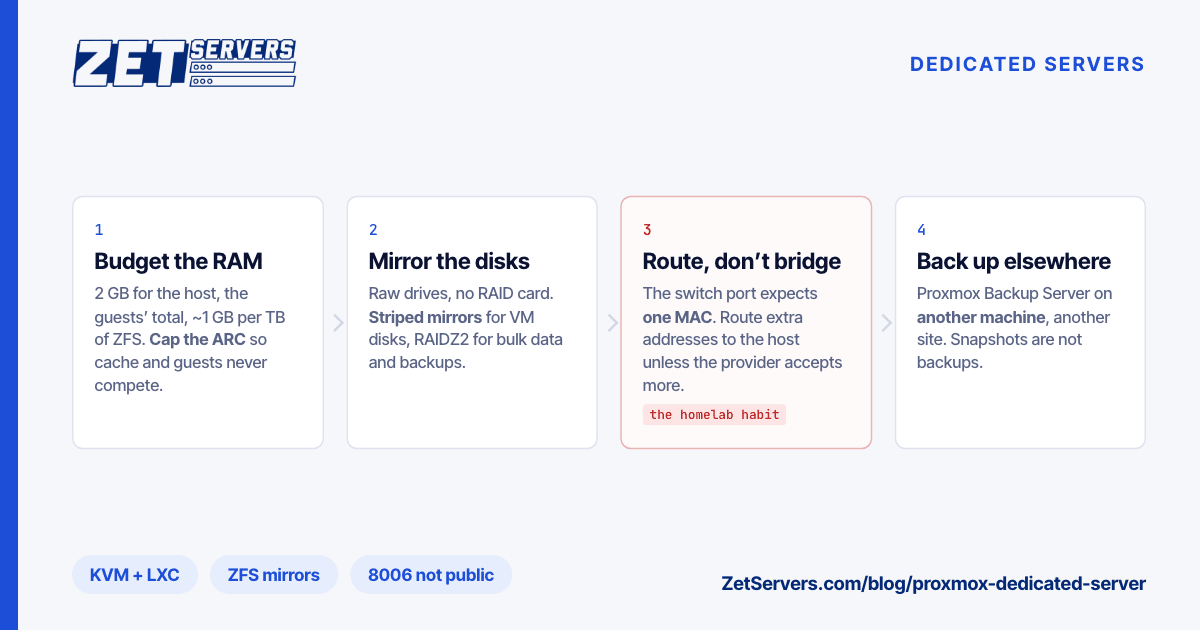
RAM is the resource you cannot stretch. CPU time overcommits comfortably, because most guests idle most of the time; memory overcommits only a little before the host starts swapping or killing guests. Proxmox's own guidance is 2 GB for the host and its services, plus the memory assigned to guests, plus roughly 1 GB per terabyte of used storage if you run ZFS or Ceph.
Worked through for a 256 GB machine with 4 TB of NVMe:
| Item |
GB |
| Proxmox host and services |
4 |
| ZFS ARC, capped |
16 |
| Headroom for spikes and backup jobs |
12 |
| Available to guests |
224 |
That is 28 virtual machines at 8 GB each, or any mix of large and small, before any overcommit at all. Cap the ZFS read cache explicitly, so that it and the guests are not competing for the same memory:
echo "options zfs zfs_arc_max=17179869184" > /etc/modprobe.d/zfs.conf   # 16 GiB
update-initramfs -u -k all                                               # then reboot
CPU is more forgiving. Give each guest the vCPUs it actually uses at peak rather than the most you can spare — an idle vCPU still costs scheduling work — and keep the host's busiest hour short of the point where runnable threads start to queue. For the processor itself, EPYC vs Xeon compares the platforms. A dual Xeon E5-2699 v4 with 88 threads and 256 GB for €299 is the density-per-euro pick; a dual EPYC 9554 with 256 threads, 512 GB and 24 NVMe bays is the one to grow into.
Storage: ZFS on raw disks
Give ZFS the disks directly, with no hardware RAID controller in between, and choose the layout by what the pool will hold:
- Virtual machine disks: striped mirrors. The ZFS equivalent of RAID 10 delivers the random IOPS that dozens of guests generate at once, and rebuilds quickly after a drive failure.
- Bulk data and backups: RAIDZ2. More usable space per drive and slower random I/O, which is fine for sequential work.
Choosing a RAID level has the arithmetic behind both. On flash, prefer enterprise drives with power-loss protection: guests issue a steady stream of synchronous writes, and a drive that can acknowledge them from protected cache handles that far better than one that must wait for the NAND. Thin-provisioned zvols and instant snapshots come free with ZFS. Neither one is a backup.
Networking: the part that differs from a homelab
At home you bridge virtual machines straight onto the LAN and each gets an address from the router. In a data centre, the switch port in front of your server usually expects one MAC address — the server's own — and may drop frames from the new MACs your bridged guests invent. Three patterns work:
- Routed. The host keeps its main IP; additional IPv4 addresses and your IPv6 prefix are routed to it, and guests use the host as their gateway. Works on any switch.
- Bridged, only where the provider accepts extra MACs or assigns virtual MACs for additional addresses. Simplest inside the guest, but confirm it before you build on it.
- NAT, for guests that only need outbound access: a private bridge with masquerading.
The NAT bridge, adapted from the Proxmox documentation, in /etc/network/interfaces — vmbr0 being the bridge that holds the public address on a default install:
auto vmbr1
iface vmbr1 inet static
    address 10.10.10.1/24
    bridge-ports none
    bridge-stp off
    bridge-fd 0
    post-up   echo 1 > /proc/sys/net/ipv4/ip_forward
    post-up   iptables -t nat -A POSTROUTING -s '10.10.10.0/24' -o vmbr0 -j MASQUERADE
    post-down iptables -t nat -D POSTROUTING -s '10.10.10.0/24' -o vmbr0 -j MASQUERADE
Apply it with ifreload -a. For IPv6, route the prefix to the host and hand addresses out from it; IPv6 on a dedicated server covers the /64 boundary and the neighbour-discovery traps. Before designing any of this, ask how your additional addresses are delivered — that one answer decides between routed and bridged.
Size the port for the guests' combined peak, not one guest's. A host whose virtual machines together peak at 1.5 Gbps belongs on the 2 Gbps tier, and every tier is unmetered, so the guests' traffic never turns into an overage line.
Lock down the management plane
The web interface listens on port 8006 and has root-level power over every guest. Do not leave it open to the internet: firewall it to your own addresses, reach it over a VPN or an SSH tunnel, and turn on two-factor authentication, which Proxmox supports natively. Everything else is ordinary host hardening — SSH keys only, a default-deny firewall, unattended security updates.
Backups belong on another machine
Proxmox Backup Server takes incremental, deduplicated backups of whole virtual machines and containers, and restores them into the same interface. Run it somewhere else. A backup on the same host, in the same rack or under the same credentials protects you from a bad upgrade and nothing more serious. An offsite backup server, sized by how fast it can restore, is what turns a private cloud into one you can recover.
When one node is not enough
A single host is a single point of failure. A Proxmox cluster wants three nodes for quorum — two plus a small external vote also works — with low-latency links between them, and shared storage or ZFS replication for moving guests between nodes. Build the cluster inside one location, and spread copies of the data, not the cluster, across sites.
Frequently asked questions
Can I run Proxmox on a VPS?
Only if the platform exposes nested virtualisation, and even then guests run slower and ZFS loses the raw-disk access it wants. For a handful of workloads, separate VPS instances are simpler. For a private cloud, rent the whole machine.
How much RAM does a Proxmox host need?
About 2 GB for Proxmox itself, plus the memory assigned to all guests, plus roughly 1 GB per terabyte of used ZFS storage, with headroom on top. RAM, not CPU, is what fills a Proxmox host first.
Should I use bridged or routed networking?
Routed works everywhere and is the safe default on a rented server. Bridged is simpler inside the guests, but depends on the provider accepting extra MAC addresses on your port — confirm that first.
Do I need a Proxmox subscription?
Not to run it. Proxmox VE is free and fully functional; a subscription buys access to the enterprise package repository and vendor support. Production clusters often take one for the support alone.
Which server should I start with?
For a first private cloud, 256 GB of RAM and mirrored SSDs is a comfortable floor, with NVMe — the EPYC builds — if the guests are write-heavy. If you are torn between two builds, send us the guest list and we will size it; custom RAM and drive configurations are available.