To read an MTR report correctly you need one rule above all: packet loss only counts if it carries on all the way to the destination. MTR combines traceroute and ping, sending probes with deliberately low TTLs and recording which routers answer and how fast. That makes it the quickest way to see where a path goes wrong, and the easiest to misread, because a router that declines to answer looks exactly like a router that drops traffic. Below: the columns, the numbers to ignore, the physics check, and what to send support.
What each column measures
The mtr man page names each field by the letter you would pass to -o, and its latency view, LS NABWV, is exactly the set a report prints:
| Column |
Letter |
Read it as |
| Loss% |
L |
Probes with no reply. Counts only if it continues to the last hop |
| Snt |
S |
Probes sent. Below 100, one loss is worth over 1% |
| Last |
N |
Newest round-trip time: one sample, not a statistic |
| Avg |
A |
Mean time, dragged up by a few slow replies |
| Best |
B |
Lowest time seen, closest to pure distance |
| Wrst |
W |
Highest time seen. One slow reply sets it |
| StDev |
V |
Spread of the times. High at the destination means jitter |
Every time is a round trip: your probe out to the hop, and its reply back by whatever path that router chooses.
Why a middle hop shows loss when nothing is lost
A router that receives a probe whose TTL has run out drops it and, if it is willing, sends back an ICMP time-exceeded message. Forwarding is the router's job. Writing that reply is extra work, and routers ration it.
Linux shows the rationing plainly. On our own production server, stock Ubuntu 24.04.4 LTS:
$ sysctl net.ipv4.icmp_ratelimit net.ipv4.icmp_ratemask
net.ipv4.icmp_ratelimit = 1000
net.ipv4.icmp_ratemask = 6168

6168 = 4096 + 2048 + 16 + 8 = 2^12 + 2^11 + 2^4 + 2^3

bit  3  ->  type 3   destination unreachable
bit  4  ->  type 4   source quench
bit 11  ->  type 11  time exceeded      <- what every middle hop in MTR sends
bit 12  ->  type 12  parameter problem
bit  0  ->  type 0   echo reply         <- not set: echo replies are exempt
The kernel's ip-sysctl documentation defines icmp_ratelimit as the minimum gap, in milliseconds, between replies of those types to a given target. So a stock Linux router sends you at most one time-exceeded reply per second, sustained, and MTR's default one-second interval sits right on that limit. Run it as root with -i 0.2 and the router gets five probes a second, answers about one, and shows loss approaching 80% while forwarding everything.
Routers from the large vendors police or deprioritise control-plane ICMP too, and the man page's bugs section warns that mtr reports such routers as less reliable than they are.
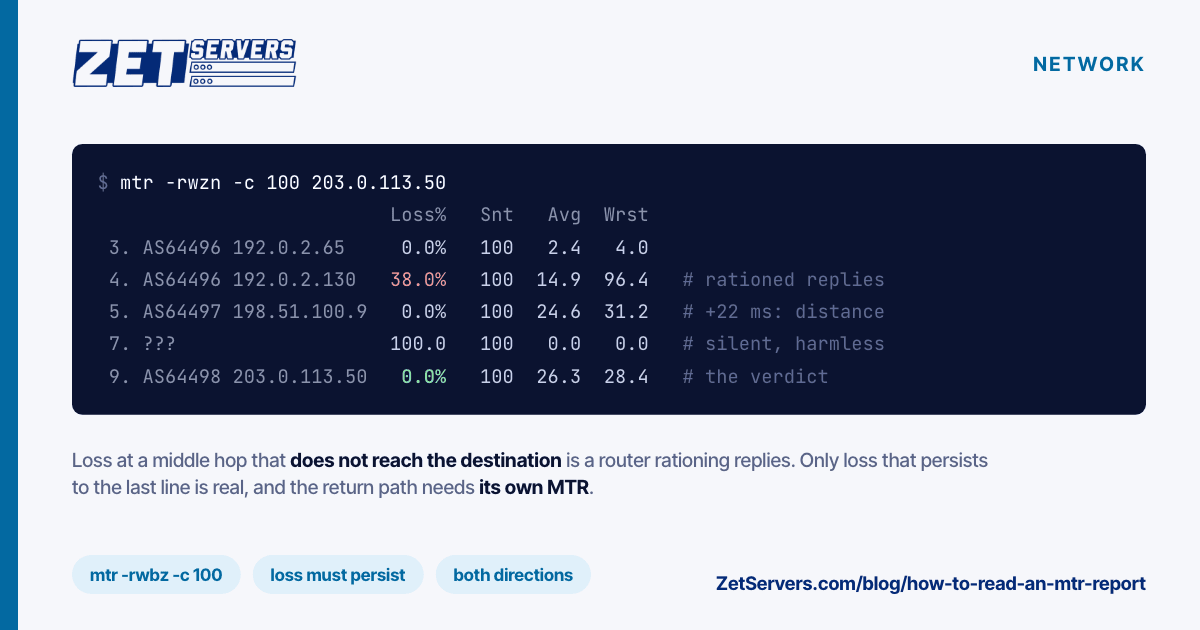
So if hop 4 shows 38% loss and every hop after it shows 0%, hop 4 must have forwarded those packets, or the later hops could not have answered. Real loss starts at some hop and persists, at roughly the same level, to the final line.
Latency: spikes, steps and the fibre floor
Time works the same way. One hop with a 96 ms worst time, followed by hops steady at 25 ms, is a router slow to write replies, not slow to forward. A latency figure matters only if every later hop carries it.
A step that goes up and stays up is distance: a long-haul link or an ocean crossing. Check it against the floor. Light in fibre covers roughly 200 km per millisecond and a round trip travels the distance twice, so the working rule is great-circle km ÷ 100 = minimum round-trip ms. Cables follow coasts and ducts, so real paths sit above it.
Take Bucharest to Amsterdam. From the time-zone database coordinates (44°26′N 26°06′E, 52°22′N 4°54′E), the haversine formula gives about 1,787 km, so the floor is about 17.9 ms. A Best of 26 ms at the destination is 8 ms over the floor, which cable routing and a few routers explain. A Best of 60 ms is more than three times the floor: that path is taking a detour, a routing question peering vs transit covers. Use Best, not Avg, because it carries the least queueing. Choosing a server location applies the same floor to picking a city.
Silent hops and odd addresses
A line of ??? means no reply came back for that TTL. Many routers never answer and some firewalls drop expired probes; if later hops answer, the silent one forwarded your traffic. AS??? means no AS number was found, normal for private addresses; the man page's example shows one, 172.31.1.16, labelled that way. A run of ??? at the very end usually means your probe type is filtered: switch to TCP.
A worked example
Illustrative only, using documentation addresses and AS numbers. A client in Bucharest traces a server in Amsterdam:
$ mtr -rwzn -c 100 203.0.113.50
Start: 2026-10-14T16:05:12+0000
HOST: client-buh                Loss%   Snt   Last   Avg  Best  Wrst StDev
  1. AS64496  192.0.2.1          0.0%   100    0.5   0.6   0.4   2.1   0.2
  2. AS64496  192.0.2.33         0.0%   100    1.9   2.0   1.6   5.8   0.5
  3. AS64496  192.0.2.65         0.0%   100    2.3   2.4   1.9   4.0   0.3
  4. AS64496  192.0.2.130       38.0%   100    2.6  14.9   2.3  96.4  21.7
  5. AS64497  198.51.100.9       0.0%   100   24.1  24.6  23.9  31.2   0.9
  6. AS64497  198.51.100.33      0.0%   100   25.0  25.3  24.7  27.8   0.5
  7. ???                        100.0   100    0.0   0.0   0.0   0.0   0.0
  8. AS64498  203.0.113.1        0.0%   100   26.0  26.4  25.8  29.9   0.6
  9. AS64498  203.0.113.50       0.0%   100   26.1  26.3  25.9  28.4   0.4
Hop 4 shows 38% loss and a 96.4 ms worst time, but hop 5 onwards has no loss and tight times: hop 4 is rationing replies. At hop 5, Best jumps from 2.3 to 23.9 ms and stays there: the long-haul link, with the destination's 25.9 ms Best 8 ms over the floor. Hop 7 is silent and harmless, because 8 and 9 answer. The last line reads 0% loss, 0.4 ms StDev. Healthy.
The same path on a bad evening:
  5. AS64497  198.51.100.9       0.0%   100   24.4  24.9  23.9  33.0   1.1
  6. AS64497  198.51.100.33      9.0%   100   25.2  27.8  24.7  71.5   6.9
  7. ???                        100.0   100    0.0   0.0   0.0   0.0   0.0
  8. AS64498  203.0.113.1        8.0%   100   26.4  29.0  25.8  80.2   8.1
  9. AS64498  203.0.113.50       9.0%   100   26.6  28.9  25.9  77.0   7.7
Now loss starts at hop 6 and persists to the destination, with Avg, Wrst and StDev rising alongside: real loss, and it looks like queueing. The fault is the link into hop 6, hop 6 itself, or the return path from hop 6 onwards, and a forward report cannot tell those apart.
The return path is half the measurement
Each reply comes back by the route the replying router chooses, which can cross networks your probe never touched. A reverse MTR, run from the destination toward your IP, shows that path. If it is clean, suspect the forward link; if it shows loss starting in a network absent from your forward report, the problem is on the return leg. Ask the far server's admin, their host or your provider to run it.
Flags worth knowing
All from the man page:
-r            report mode: run -c cycles, print the statistics, exit
-c 100        number of cycles; each lasts one second
-w            wide report: hostnames are not cut
-b            show hostnames and IPs (needs -w in report mode)
-n            numeric addresses, no DNS lookups
-z            AS number beside each hop (same as -y 0)
-T -P 443     TCP SYN probes to port 443 instead of ICMP echo
-u -P 53      UDP datagrams to port 53 instead of ICMP echo
-e            MPLS labels from ICMP extensions (RFC 4950)
-4 / -6       IPv4 only / IPv6 only: test each family separately
-a ADDRESS    bind the source address, for servers with several IPs
What to send support
A screenshot of a live MTR earns a request for more. This gets worked on:
- Both directions: your forward report and the reverse from the other end.
- 100 probes or more. With 10, one lost reply reads as 10%; with 100, as 1%.
- Timestamps in UTC, so they line up with the provider's graphs.
- Source and destination IPs, including which source if the server has several.
- Captured while the problem is happening. A clean report next morning proves nothing.
- What the application sees. If throughput is the complaint, measure it first with how to verify your port speed.
date -u +%Y-%m-%dT%H:%M:%SZ                      # UTC timestamp
mtr -rwbz -c 100 203.0.113.50                    # ICMP, 100 probes
mtr -rwbz -c 100 -T -P 443 203.0.113.50          # TCP to the service port
while true; do date -u; mtr -rwbz -c 100 203.0.113.50; sleep 600; done >> mtr-log.txt
Each run takes about 105 seconds: 100 one-second cycles plus the default 5-second grace period. For an intermittent problem, the loop logs a report roughly every 12 minutes. Paste text, not screenshots.
Our network, for reference
With -z, hops inside our network show as AS25198, our own backbone; the network page lists the facilities and transit carriers behind it, and the peering policy the terms for direct sessions. The rules above apply to our routers too: a middle AS25198 hop showing loss over a clean destination is not a fault. If loss starts inside AS25198 and persists to your server, send both directions to [email protected] or via the contact page, and ask us for the reverse trace from our side.
Frequently asked questions
Why does one hop in my MTR show packet loss?
Usually because that router limits how often it answers expired probes. Routers forward traffic as their main job and rate limit the ICMP replies MTR depends on; a stock Linux router sends at most one time-exceeded reply per second per target. If the hops after it show no loss, nothing was lost.
What does ??? mean in an MTR report?
It means no reply came back for that hop. Many routers are configured never to answer expired probes, and some firewalls drop them. If the hops after the silent one answer, it forwarded your traffic and you can ignore it. A run of silent hops at the very end usually means ICMP is filtered.
How many probes should an MTR report use?
At least 100, with -c 100, which takes a little under two minutes at the default one-second interval. With only 10 probes, a single lost reply shows as 10% loss; with 100 it shows as 1%. More probes make intermittent problems visible and keep one unlucky reply from looking like a fault.
Why do I need an MTR in both directions?
Because the return path can be completely different from the forward one. Every round-trip time in a report includes the reply's journey back, so loss that starts at a hop may be on the way out or on the way back. A reverse report from the destination toward you shows which leg is at fault.