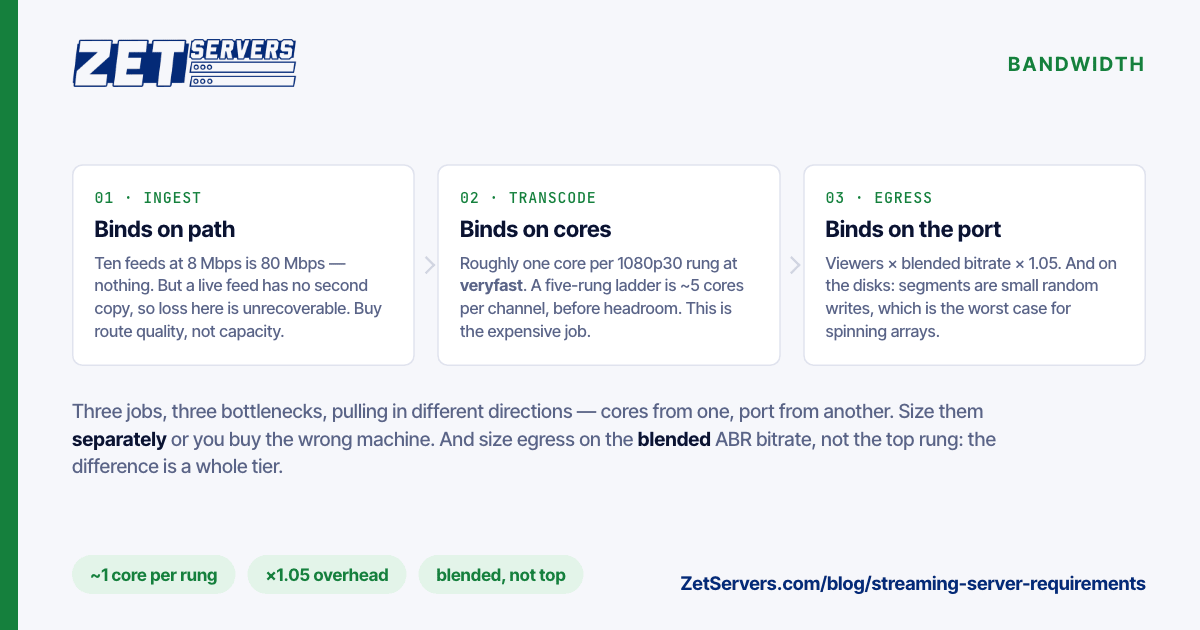
Most streaming server requirements documents are a list of specifications with no arithmetic behind them. That is why so many live deployments fail in the same way: the box was sized for one of the three jobs a streaming server does, and the other two were assumed to come free. Ingest, transcode and egress have different bottlenecks, scale on different resources, and want different hardware. Size them separately, then buy the machine that satisfies all three.
The three jobs, and what each one binds on
Ingest is cheap and almost always over-provisioned. One RTMP or SRT contribution feed at 8 Mbps is 8 Mbps. Ten of them is 80. Ingest binds on nothing except a stable path — but it is the one leg where packet loss is unrecoverable, because there is no second copy of a live feed. Buy path quality here, not capacity.
Transcode binds on CPU, and it is the expensive job. A software H.264 ladder in libx264 at veryfast costs roughly one modern core per 1080p30 output rendition, more at higher presets, considerably more for HEVC or AV1. A five-rung ladder from a single 1080p source is therefore around five cores of steady load, per channel, with no headroom. Twenty channels of that is a hundred cores and you are buying a dual EPYC.
Egress binds on the NIC and on whatever feeds it. This is the number everyone quotes and the easiest to compute:
egress = concurrent viewers × average rendition bitrate × 1.05
The 1.05 covers TCP, TLS and HTTP framing. At 6 Mbps for 1080p, a 1 Gbps port carries about 166 concurrent viewers; a 10 Gbps port about 1,660; a 25 Gbps port about 4,160. Concurrent viewers per server works the full table through, including where disk and TLS caps bite before the NIC does.
The trap is the ladder. If you serve adaptive bitrate, your average delivered rendition is not your top rendition. A ladder of 6 / 3 / 1.5 / 0.8 Mbps with a realistic audience distribution averages nearer 3 Mbps than 6, which doubles the viewer count a given port supports. Measure your own distribution before sizing on the top rung — it is the difference between a 10 Gbps build and a 25.
A worked build
Ten live channels, 1080p source, five-rung ABR ladder, 4,000 concurrent viewers at a 3 Mbps blended average:
| Requirement |
Arithmetic |
Result |
| Ingest |
10 × 8 Mbps |
80 Mbps |
| Transcode |
10 channels × 5 renditions × ~1 core |
~50 cores + headroom |
| Egress |
4,000 × 3 Mbps × 1.05 |
12.6 Gbps |
| With 30% headroom |
12.6 × 1.3 |
16.4 Gbps |
| Segment storage |
5 renditions × 10 ch × DVR window |
NVMe, tens of GB |
That resolves to a 44-core or larger box on a 20 Gbps guaranteed uplink — a build from the streaming servers range rather than a general-purpose box with a big NIC bolted on. Note that the transcode requirement and the egress requirement pushed in different directions: cores from one, port from the other. Sizing on either alone gets you the wrong machine.
Storage, which nobody plans for
Live streaming looks stateless and is not. Every segment written is a file, every DVR window is a rolling buffer, and every rendition multiplies both.
A 4-second HLS segment at 6 Mbps is 3 MB. Ten channels × 5 renditions × a 2-hour DVR window is 9,000 segments live on disk at any moment, being written and read continuously at small block sizes. That pattern is fine on NVMe, tolerable on SSD, and actively hostile on spinning disks — random small writes are the worst case for an HDD array, and a stalled segment write shows up as a stalled player.
If you keep the recording afterwards, that is a different machine's problem: a video-on-demand origin sized on capacity, not on IOPS.
Latency, and what actually sets it
Glass-to-glass latency is mostly protocol, not hardware. Standard HLS with 6-second segments and a 3-segment buffer is structurally 18–30 seconds behind live, and no CPU purchase changes that. Low-latency HLS or DASH with partial segments brings it to 2–5 seconds. WebRTC reaches sub-second and costs you scale, because there is no CDN cache in front of it.
What hardware does control is jitter — the variance that turns a 3-second buffer into a rebuffer. That comes from transcode overrun (a rendition that takes longer than real time to encode), disk stalls on segment writes, and network path variance. The first two are capacity problems you can buy your way out of. The third is a routing problem, which is why the path matters as much as the port.
The checklist before you buy
- Peak concurrent viewers, from logs, not from hope.
- Blended average rendition bitrate, not the top rung.
- Channel count × ladder depth, in cores, at your actual encoder preset.
- Egress with 5% overhead and 30% headroom, converted to a guaranteed rate.
- NVMe sized for segments × renditions × DVR window, with IOPS to match.
- A CDN in front if your audience is geographically spread — then size the origin for the fill burst, not the steady state.
- Hardware encode (QSV, NVENC) only if your quality budget tolerates it; it is far cheaper per stream and visibly worse at the same bitrate.
Frequently asked questions
Do streaming server requirements change for restreaming versus transcoding?
Substantially. Pure restreaming copies bytes and needs almost no CPU — a small VPS handles many channels. Transcoding is the expensive job, and once you add it the machine class changes entirely.
How many 1080p streams can one server transcode?
As a planning figure, roughly one core per 1080p30 output rendition with libx264 veryfast. A 44-core box handles about 40 renditions with headroom — eight channels on a five-rung ladder. Benchmark your own encoder settings; presets move this by a factor of three.
Is a CDN required?
Not for a regional audience served from a well-connected origin. It becomes necessary when your audience is spread across continents, or when your peak exceeds what one machine's port can deliver.
What uplink should I start with?
Compute egress from concurrent viewers and blended bitrate, add 30%, and buy the tier at or above that — choosing an uplink speed has the per-gigabit costs of each tier. Under 1,600 concurrent 1080p viewers, 10 Gbps is usually enough.
What about redundancy for a live event?
Two origins in different facilities with the encoder pushing both, and a player-side failover. A single machine is a single point of failure, and live events are exactly when that is unacceptable — tell us the event date and we will size both.