Layer 7 DDoS protection is about requests, not packets. A volumetric flood fills your port; an HTTP flood sends requests that look like visitors, each over a real TCP connection and TLS session, until the application runs out of CPU or workers. The port can sit half empty while the site is down, and the scrubbing that absorbs a UDP flood cannot read a URL inside TLS.
Why an HTTP flood is a different problem
Every request is a real session. A spoofed address cannot complete a TCP handshake, so every request comes from a machine that holds its address and has cleared TCP, TLS and HTTP parsing.
It is light on bandwidth. At an assumed 800 bytes per request, 100,000 requests a second is 100,000 × 800 × 8 = 640 Mbps, or 0.64% of the 100 Gbps protection included with our servers. If each hits an uncached page costing 20 ms of CPU, that is 100,000 × 0.02 = 2,000 cores.
The part worth judging is encrypted. A network-layer filter sees addresses, ports, packet rates and TCP flags; the path, cookies and user agent are inside TLS. Cloudflare's own pipeline decrypts in one proxy and runs Layer 7 mitigation in the next.
What Cloudflare's numbers say
From Cloudflare's reports (the newest, for Q4 2025, published 5 February 2026):
| Measure |
Figure |
| HTTP share of attacks, Q3 2025 |
29% (2.4 million) |
| HTTP share of attacks, Q4 2025 |
22% (100 − 78% network-layer) |
| HTTP attacks above 1 million requests/s, Q3 |
4 in 100 |
| HTTP attacks over in under 10 minutes, Q3 |
71% |
| Largest request rates |
201 Mrps (2023), 205 Mrps (Dec 2025) |
Q3 also splits HTTP attacks: nearly 70% from botnets Cloudflare already knew, about 20% from fake or headless browsers or with suspicious HTTP attributes, and about 10% generic floods, unusual requests, cache busting and attacks on login endpoints.
That is a work list: your configuration handles the 10%, challenges target the 20% that behave like browsers, and the 70% needs reputation built across many sites. With 71% over inside ten minutes, defences must already be running.
Case study: HTTP/2 Rapid Reset (CVE-2023-44487)
HTTP/2 multiplexes requests over one connection as streams, capped by the server's SETTINGS_MAX_CONCURRENT_STREAMS; a client may cancel one with RST_STREAM. A cancelled stream stops counting against the cap at once, so a client can open, cancel and reopen without waiting, while the server starts work on each. In Cloudflare's test trace, the server advertised 100 streams and one client packet carried 525 requests. Their verdict: "stream concurrency on its own cannot mitigate rapid reset."
From 25 August 2023, real attacks peaked just above 201 million requests per second from about 20,000 machines: 201,000,000 ÷ 20,000 ≈ 10,050 each. Cloudflare puts the whole web at 1–3 billion requests per second, so one attack equalled 7–20% of it.
The fix watched client-sent RST_STREAM frames and closed connections that abused them. Cutting the stream limit to 64 broke real pages, since many clients assume 100 without waiting for the server's settings and an image gallery sends 100 requests at once. So: run web server and proxy releases that fix this CVE, which Cloudflare expected to hit every HTTP/2 implementation, and test limits against real browsers.
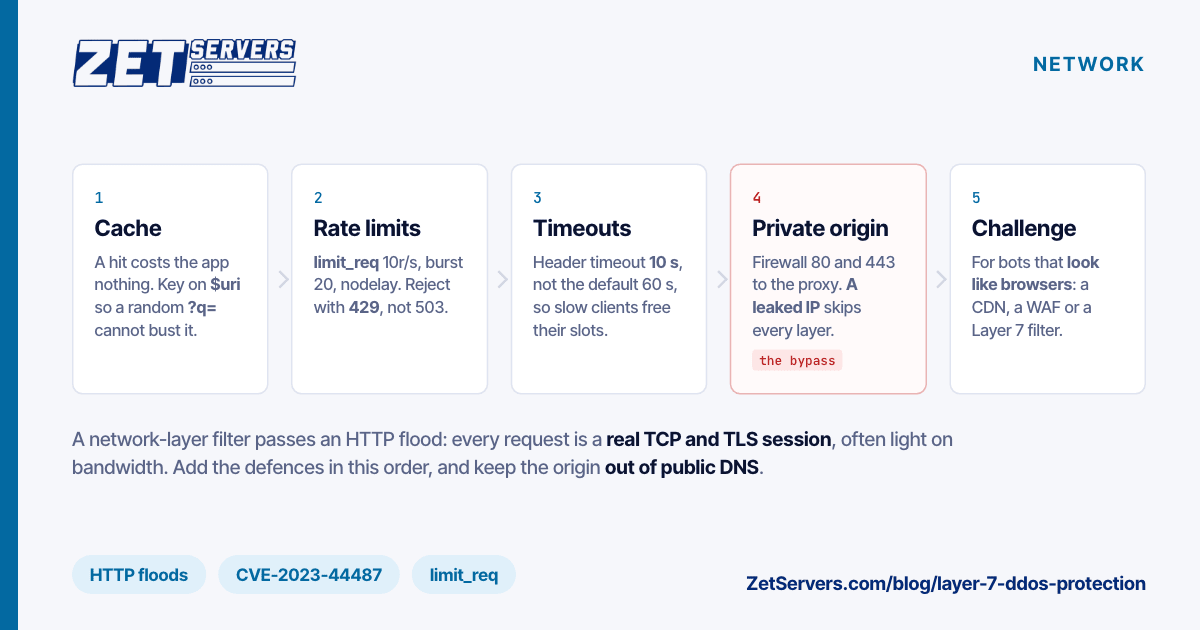
Step 1: cache what can be cached
A cache hit costs the application nothing, so cache logged-out pages for a few seconds. With simultaneous misses collapsed into one fetch (proxy_cache_lock, set up in build your own CDN), 10,000 requests a second for a page cached for one second become about one a second at the app.
The counter is cache busting: a random query string such as /?q=83af2 makes every request a new cache key, and so a miss. Where the response ignores the query string, key on $scheme$host$uri: $uri is the normalised path, without $args. Where some parameters matter, add only those, such as $arg_page.
Step 2: nginx limit_req and limit_conn
The limits follow the nginx limit_req documentation and its limit_conn sibling; trial them first with limit_req_dry_run on; and $limit_req_status in the log:
http {
    limit_req_zone  $binary_remote_addr zone=perip:10m rate=10r/s;
    limit_req_zone  $binary_remote_addr zone=login:10m rate=30r/m;
    limit_req_zone  $server_name        zone=site:10m  rate=500r/s;
    limit_conn_zone $binary_remote_addr zone=connip:32m;

    limit_req_status  429;
    limit_conn_status 429;

    server {
        # listen, server_name, certificates

        location / {
            limit_req  zone=perip burst=20 nodelay;
            limit_req  zone=site  burst=200;
            limit_conn connip 50;
            proxy_pass http://127.0.0.1:8080;
        }

        location = /login {
            limit_req  zone=perip burst=20 nodelay;
            limit_req  zone=login burst=5 nodelay;
            proxy_pass http://127.0.0.1:8080;
        }
    }
}
- Rate and burst. Each address averages 10 a second and may run 20 ahead, served at once with
nodelay rather than queued; beyond that, rejected with 429 instead of the default 503, which monitoring reads as an outage. 30r/m is one every two seconds.
- Inheritance. A location with its own
limit_req inherits none from the server level, so each location lists the per-IP rule itself.
- The site ceiling. One bucket for the whole site, set just under what the app can serve. Excess waits at most 200 ÷ 500 = 0.4 s.
- Zone sizes. On 64-bit, limit_req keeps about 8,000 addresses per megabyte, evicting the least recently used. limit_conn keeps about 16,000, so 32 MB is about 512,000; a full limit_conn zone rejects every further request.
- limit_conn counts a connection once its header is read, and on HTTP/2 each concurrent request. Keep it off static files fetched 100 at a time.
- Behind a CDN,
$binary_remote_addr is the CDN's address; restore the visitor's first.
Per-IP limits cut concentrated bots, not distributed ones. At 10 a second per address, the Rapid Reset botnet would still send 20,000 × 10 = 200,000 requests a second, and nginx must finish TLS and parse each request before rejecting it.
Step 3: timeouts against slow clients
Slow clients send the header a few bytes at a time and hold the slot. The nginx defaults:
| Directive |
Default |
Times |
client_header_timeout |
60s |
the whole request header |
client_body_timeout |
60s |
gap between two body reads |
send_timeout |
60s |
gap between two response writes |
keepalive_timeout |
75s |
an idle keep-alive connection |
Only the header timeout covers a whole phase; the others reset on every read or write, so a trickled body is capped per address by limit_conn, not the clock. To hold 10,000 connections in the header phase, an attacker needs 10,000 ÷ 60 ≈ 167 new ones a second at the default, and 1,000 at 10 s. Set all four to 10–15 s, the body gentler for slow uploads, and add reset_timedout_connection on; so a timed-out socket is reset and freed, not left in FIN_WAIT1.
Step 4: keep the origin IP private
A leaked origin address bypasses every proxy: attackers send straight to it, and the CDN, WAF or challenge page never sees the flood.
Origins leak through DNS records from before the proxy went in, a mail or staging subdomain on the same address, headers in outgoing mail, and scans that find your certificate on port 443. Move to an address never published in DNS, send mail from another host, make the default server refuse unknown names, and firewall ports 80 and 443 to the proxy's ranges; Linux DDoS mitigation covers the firewall.
Step 5: challenge pages, a CDN or a WAF
When your logs cannot tell bots from users, a challenge decides: a JavaScript check costs a visitor a moment and stops scripts that run none. Headless browsers do run it, so challenges are paired with reputation.
Put a CDN or WAF in front when the flood spans more addresses than per-IP limits can cut, when TLS and parsing saturate nginx before limit_req acts, or when most content can be cached at the edge. Exempt API clients and webhooks by path or key.
Where the 10 Tbps + Layer 7 tier fits
DDoS protection is a choice on the order form of every KVM VPS and dedicated server (EUR a month excluding VAT, checked 26 October 2026):
| Tier |
Monthly |
| 100 Gbps |
included |
| 500 Gbps |
€149 |
| 1 Tbps |
€499 |
| 2 Tbps |
€999 |
| 5 Tbps |
€2,499 |
| 10 Tbps + Layer 7 |
€4,499 |
The first five are network-layer (L3/L4) protection: they keep packet floods off the port, but an HTTP flood's complete sessions pass through to nginx. Layer 7 filtering is part of the 10 Tbps tier only: on a €29 unmetered VPS that totals €4,528 a month, on a 1 Gbps dedicated server from €209, €4,708. For a mostly cacheable site, price a CDN or WAF first; the tier fits services that must be reached at their own address, or attacks that already overwhelm nginx. Ask support what it needs for HTTPS and API clients; DDoS protected dedicated server lists more questions. Either way, keep your limits: what passes a filter still reaches the app.
Frequently asked questions
What is Layer 7 DDoS protection?
Layer 7 DDoS protection filters attacks at the application layer: floods of HTTP requests that each look like a visitor, over real TCP and TLS sessions. Because the requests are valid and often light on bandwidth, it judges them by path, rate, headers and behaviour, which means seeing them decrypted.
Can network-layer DDoS protection stop an HTTP flood?
Not on its own. A network-layer filter sees addresses, ports, packet rates and TCP flags, while the URL, headers and cookies of an HTTPS request are encrypted. It stops packet floods filling the port, but complete sessions reach your web server, where caching, rate limits and timeouts must take over.
What was the HTTP/2 Rapid Reset attack?
Rapid Reset, CVE-2023-44487, abused HTTP/2 stream cancellation. A client opened a stream, cancelled it at once with RST_STREAM and opened another, so the concurrent-stream limit never applied while the server kept starting work. In 2023 it drove attacks just above 201 million requests per second from about 20,000 machines.