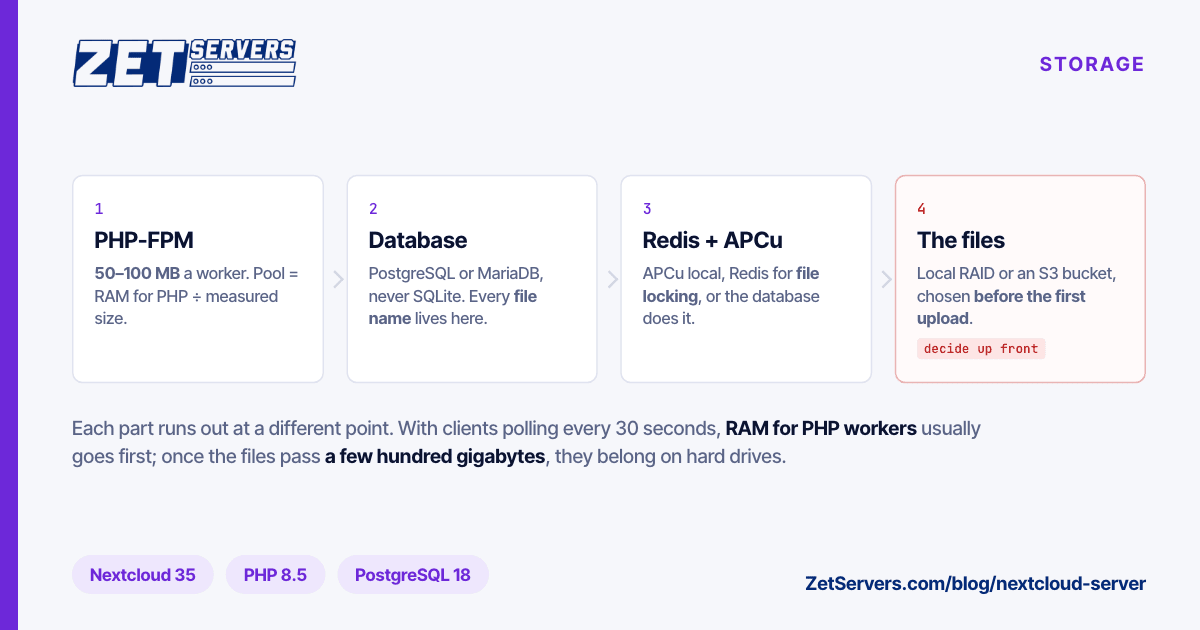
A Nextcloud server is four programs pretending to be one: a PHP application, a database, a cache and a directory full of files. Each runs out at a different point, so sizing one means knowing which part your users exhaust first. This guide covers what the current release needs, how to size it, the settings Nextcloud's documentation recommends, and where to run it.
The current major version is Nextcloud 35, released as Hub 26 Summer on 16 September 2026 and maintained until September 2027.
What a Nextcloud server actually runs
The Nextcloud 35 admin manual lists what it supports:
| Part |
Supported |
Recommended |
| Operating system |
Ubuntu 24.04, Debian 13, RHEL 9, SLES, Alpine and others, 64-bit |
Ubuntu 26.04 LTS or RHEL 10 |
| PHP |
8.3, 8.4 |
8.5 |
| Web server |
nginx with PHP-FPM |
Apache 2.4 with mod_php or PHP-FPM |
| Database |
MySQL 8.4 / 9.7, MariaDB 10.11 to 12.3, PostgreSQL 14 to 18 |
PostgreSQL 18 |
| Memory per PHP process |
128 MB minimum |
512 MB |
SQLite is the default if you pick nothing, and the manual recommends it only for testing and minimal instances. Choose PostgreSQL or MariaDB from the start; moving later is a migration. MariaDB and MySQL also need the InnoDB engine, the READ COMMITTED isolation level, and binary logging either off or in ROW format.
Two pieces are not set up for you. Memory caching is off by default because it needs APCu or Redis, and background jobs default to AJAX mode, where one job runs each time someone loads a page. The manual recommends system cron instead.
Nextcloud All-in-One, the official Docker-based installer, wires PostgreSQL, Redis and APCu together, with optional BorgBackup, Collabora and Talk containers. It recommends a KVM or non-virtualised host and SSD storage.
Sizing a Nextcloud server by users and data
Nextcloud's deployment tiers give the shape. A small workgroup is up to 100 users with 100 GB to 10 TB of data. A mid-sized organisation is 100 to 5,000 users with up to 200 TB, and at that tier Nextcloud expects every component to be redundant. The small tier accepts that a component failure interrupts service, which is what one machine means. Above it, plan for several.
Inside one machine, memory is usually the first limit. The manual's tuning chapter says a typical PHP worker uses 50 to 100 MB, and sizes the pool as:
pm.max_children = floor(RAM for PHP ÷ average worker RSS)

8 GB VPS:  8 GB − ~2 GB OS, PostgreSQL and Redis = 6 GB for PHP
           6,144 MB ÷ 100 MB = 61 workers, worst case
Then measure your own workers, because Office, previews and apps change the figure (match the process name to your PHP version):
ps --no-headers -o rss -C php-fpm8.4 | awk '{s+=$1; n++} END {printf "%d workers, %.0f MB average\n", n, s/n/1024}'
Concurrency comes from clients more than people. Desktop and mobile clients poll the server every 30 seconds, so 50 users with a laptop and a phone each are 100 clients making about 3.3 requests a second before anyone opens a file. That is why the manual advises against PHP-FPM's ondemand mode: the polling keeps triggering cold starts.
As starting points to measure from, not benchmarks:
| Use |
Data |
Starting point |
| Family or a small team, under 10 users |
under 80 GB |
2 vCPU, 8 GB, 100 GB NVMe VPS — €59 |
| Team of 10–50 with Office documents |
under 300 GB |
4 vCPU, 16 GB, 200 GB VPS — €119, or 8 vCPU, 32 GB, 400 GB — €239 |
| Up to ~100 users, terabytes of files |
up to 72 TB usable |
Storage server, 8 × 12 TB — from €549 |
| 100+ users with uptime requirements |
any |
Several machines: app, database, storage, each redundant |
Our unmetered VPS plans run on dedicated 3.2 GHz vCPUs with NVMe, which suits the database and PHP. The disk tops out at 800 GB, so a VPS fits data in the hundreds of gigabytes. Beyond that, the files need hard drives.
Tuning: PHP-FPM, OPcache, Redis and cron
PHP-FPM. The manual's example for 2 GB of RAM given to PHP, in the dynamic mode it recommends:
pm = dynamic
pm.max_children = 30
pm.start_servers = 8
pm.min_spare_servers = 4
pm.max_spare_servers = 16
pm.max_requests = 500
OPcache. Keep opcache.save_comments = 1, which Nextcloud requires, and set opcache.revalidate_freq = 60 so PHP checks scripts for changes once a minute instead of every two seconds. If the admin panel warns that a buffer is over 90% full, raise it.
Memory cache and locking. For a single-server organisation, the manual recommends APCu locally and Redis for everything else:
'memcache.local' => '\\OC\\Memcache\\APCu',
'memcache.distributed' => '\\OC\\Memcache\\Redis',
'memcache.locking' => '\\OC\\Memcache\\Redis',
'redis' => ['host' => 'localhost', 'port' => 6379],
Without Redis, file locking runs in the database, adding load to the busiest part.
Cron. As the web server user, add one line with crontab -u www-data -e:
*/5 * * * * php -f /var/www/nextcloud/cron.php
Running it this way switches the background job mode to Cron automatically. A systemd timer works too.
Local disks or object storage as primary storage
Nextcloud can keep files on the local filesystem or use an S3-compatible bucket as primary storage, and that choice changes more than the backend. With a bucket, the manual says, all metadata, file names and folder tree included, lives only in the database, and the bucket holds content under unique identifiers. You can no longer reach your files by going around Nextcloud.
Configuring a primary object store on an existing instance makes every existing file inaccessible, so decide before the first upload. If you need it, because several application servers share one store or the data will outgrow one chassis, self-hosted S3 storage compares Garage, SeaweedFS, Ceph RGW and MinIO for running the bucket on your own disks.
For one machine, a local RAID array is simpler, and the files stay readable without Nextcloud. Our storage servers pair eight 12 TB drives, 72 TB usable after RAID 6 or RAIDZ2 parity (six data drives × 12 TB), with 128 GB of RAM. The 240 GB SSD is a single drive: put the operating system, PostgreSQL and Redis on it, the data directory on the array, and dump the database off it nightly.
Backups: the database and the files, together
The manual lists five things to back up: the config folder, the data folder, the theme folder, any custom apps, and the database. Put the instance in maintenance mode so the files and the database dump describe the same moment:
sudo -E -u www-data php occ maintenance:mode --on
pg_dump nextcloud -U nextcloud -f nextcloud-$(date +%Y%m%d).sql
rsync -Aavx /var/www/nextcloud/ /backup/nextcloud-$(date +%Y%m%d)/
sudo -E -u www-data php occ maintenance:mode --off
On MariaDB, use mariadb-dump --single-transaction instead. With object storage as primary, the bucket and the dump must come from the same moment, because a bucket without its database is anonymous blobs. Keep the copy on another machine in another city; an off-site backup server covers sizing and retention. Then test a restore.
Why a data-centre port rather than a box at home
A home Nextcloud fails on the upload side. Most home connections upload far slower than they download, and every file fetched from outside is an upload from your house. One 20 GB folder of video:
20 GB × 8 = 160,000 Mb
at 20 Mbps upload:   160,000 ÷ 20    = 8,000 s, about 2 h 13 min
at 1 Gbps:           160,000 ÷ 1,000 = 160 s
Measure yours with iperf3 to a host outside your network. Then add power cuts, a dynamic IP address, and a backup in the same room as the server.
Our VPS plans carry 1 to 8 Gbps guaranteed and the storage servers 2, 5 or 10 Gbps, all unmetered. One Gbps at line rate for a month is about 324 TB, none of it counted, so a laptop re-sync never becomes an invoice line.
Where the data lives: EU residency
Many teams choose Nextcloud to decide where their files sit. Our storage servers are in Bucharest and Frankfurt and the VPS plans in eight European cities, run by INTERKVM HOST SRL, a Romanian company. Residency is only part of the question: mobile push notifications pass through Nextcloud's hosted push proxy, encrypted with the device's key, and any app calling an outside API sends data there. EU data residency separates residency from sovereignty and protection law.
Frequently asked questions
How much RAM does a Nextcloud server need?
Nextcloud recommends a PHP memory limit of at least 512 MB per process, though a typical worker uses 50 to 100 MB. For a small team, 8 GB alongside PostgreSQL and Redis is a reasonable start. Size the PHP-FPM pool as the RAM left for PHP divided by your measured average worker size, and add memory before you add cores.
Should I use PostgreSQL or MariaDB for Nextcloud?
Either works. The Nextcloud 35 manual marks PostgreSQL 18 as recommended, and the official All-in-One installer ships PostgreSQL. MariaDB is supported from 10.11 to 12.3 and needs InnoDB with the READ COMMITTED isolation level. Avoid SQLite outside testing, because moving off it later is a migration.
Can a Nextcloud server run on a VPS?
Yes, if the vCPUs are dedicated, the disk is NVMe and it is a full KVM machine, which Nextcloud's All-in-One installer recommends. A VPS suits a few dozen users with data in the hundreds of gigabytes. Once the files run to terabytes, a storage server with large hard drives costs less per terabyte.
Does Nextcloud need Redis?
Not to run, but it should have it beyond a personal instance. Without Redis, transactional file locking runs in the database and adds load there. Nextcloud's manual recommends APCu for the local cache and Redis for the distributed cache and file locking on any single-server organisation.