An offsite backup server is a machine in a different building that holds a copy of your data and can hand it back fast enough to matter. It is bought on the wrong number almost every time. People size it by how much data they have, then discover during an incident that the constraint was never capacity — it was how long the restore takes, whether anyone had verified the archive, and whether the ransomware that reached the production fleet could also reach the backups. Capacity is the easy half. Everything that decides whether the backup is worth having lives in the other half.
Size it by restore time, not by data volume
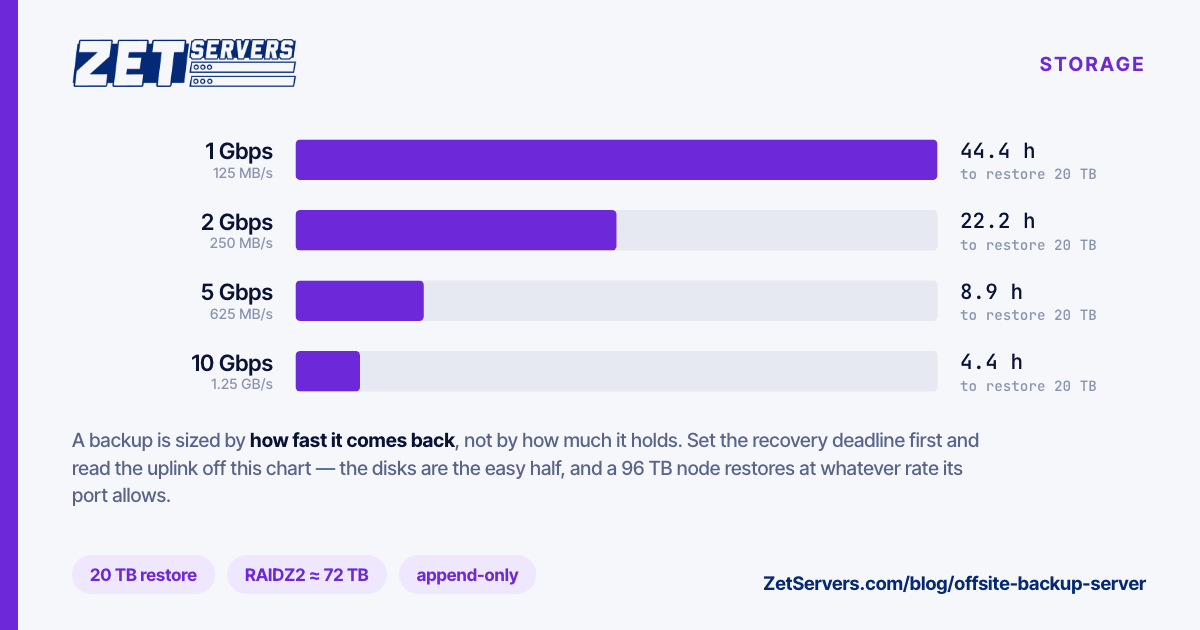
The question a backup answers is "how long until we are running again". Work that backwards through the link and it sets the uplink, not the disks:
restore hours = TB × 1,000,000 MB / (rate in MB/s) / 3,600
For 20 TB of data actually needed back:
| Uplink |
Sustained |
20 TB restore |
| 1 Gbps |
125 MB/s |
44.4 hours |
| 2 Gbps |
250 MB/s |
22.2 hours |
| 5 Gbps |
625 MB/s |
8.9 hours |
| 10 Gbps |
1.25 GB/s |
4.4 hours |
Read these as ceilings: protocol overhead and small files typically cost 10–20% of line rate, so add a fifth again to every figure. Set your recovery time objective first, then read the tier off this table. A business that cannot be down for two days does not have a 1 Gbps backup target, whatever the storage costs. Our storage servers are sold as exactly this pairing — 96 TB raw with 2, 5 or 10 Gbps guaranteed, at €549, €789 and €1,189 a month — because the disk without the pipe restores slowly and the pipe without the disk holds nothing.
Two caveats keep the table honest. A restore also has to be written somewhere at that rate, so check the destination can absorb it. And if the disaster took out the site rather than one server, the first restore is usually a subset — the database and the critical volumes — not the whole 20 TB. Plan both numbers.
Capacity: raw, usable, and what you can actually fill
A 96 TB node is eight 12 TB drives plus a separate SSD for the operating system. What survives your redundancy choice:
| Layout |
Fault tolerance |
Usable |
Practical fill (80%) |
| RAIDZ2 / RAID 6 |
2 drives |
~72 TB (~65 TiB) |
~52 TiB |
| RAIDZ1 / RAID 5 |
1 drive |
~84 TB (~76 TiB) |
~61 TiB |
| Mirror / RAID 10 |
1 per pair |
~48 TB (~43 TiB) |
~35 TiB |
Three deductions in a row catch people out: parity, then the decimal-to-binary conversion your filesystem reports in, then the fill ceiling — ZFS in particular slows noticeably above roughly 80% full. On 12 TB drives, double parity is the only sane choice for an archive, for the reason set out in choosing a RAID level: single parity is a bet on a clean multi-hour rebuild with no second failure, and drives that size make that bet worse every year.
Then size the retention. A rough model for 8 TB of source data with 3% daily change:
first full backup          8 TB
30 daily increments        30 × 240 GB = 7.2 TB
12 monthly retained fulls  deduplicated, typically far below 12 × 8 TB
Deduplicating tools make the monthlies much cheaper than a naive multiplication suggests, but the ratio depends entirely on your data, so measure it after a month rather than trusting a vendor figure.
The three properties that separate a backup from a copy
It must be unreachable from the thing it protects. The dominant modern failure is not a dead disk, it is an attacker with your credentials deleting the backups before they encrypt production. Two mechanisms fix this and both need a server you control:
- Pull, do not push. The backup server opens the connection and fetches. A compromised production host has no write path to the archive because it has no credentials for it.
- Append-only. Where push is unavoidable, restrict the client to appending.
restic supports this through rest-server's --append-only mode; BorgBackup does it with borg serve --append-only behind a forced SSH command. The client can write new data and cannot delete old data.
It must be verified. An unverified backup is a hypothesis. Verify at two levels: the archive's own integrity checks, and an actual restore.
restic check --read-data-subset=1/10     # verify a tenth of the data each run
borg check --verify-data                 # full verification pass
zpool scrub tank                         # monthly, catches silent corruption
Then restore something real on a schedule — a database into a scratch instance, monthly — and time it. That timing is your true recovery objective; the rest is an estimate.
It must be encrypted before it leaves the source. restic and BorgBackup both encrypt client-side by default, which means the backup host stores ciphertext it cannot read. Keep the passphrase somewhere that survives the disaster you are planning for. A backup you cannot decrypt is indistinguishable from no backup.
Why a dedicated node beats object storage for this job
Per-gigabyte object storage is convenient and priced per byte stored, per request, and per byte restored. That last one is the problem: the day you need everything back is the day you find out what egress costs, and the invoice arrives on the worst possible week.
A dedicated node inverts it. The monthly price is flat, the restore is free, and the restore speed is a number you chose when you picked the uplink tier. You also get full root, so the node can be an S3 endpoint via MinIO, an SFTP target, a restic REST server, a Borg repository and a Veeam target at the same time. The same hardware doubles as an archive or a seedbox and storage node when the backup window is idle, which it is for twenty-two hours a day.
Where object storage still wins is the second offsite copy. The mature pattern is a fast dedicated node for the restores you expect, plus a cheap cold copy somewhere else entirely for the disaster you do not.
A layout that works
- OS on the dedicated SSD, data on the array. Never mix them; a full data pool should not take the system down with it.
- RAIDZ2 across all eight drives, one pool, datasets per client or per source.
recordsize=1M for large backup blobs; a smaller record size on a separate dataset for anything with many small files.- Compression on (
lz4 or zstd) — it is close to free on this CPU and helps throughput on compressible data.
- Scrub monthly, alert on the result, and check SMART weekly rather than after a failure.
- Two locations if the data justifies it: matched nodes in Bucharest and Frankfurt replicating to each other keeps the replication path short and predictable rather than hauling the data across the open internet.
Spinning disks are correct here, by the way. An archive is sequential, large-block and cost-dominated; the per-device numbers in NVMe vs SATA vs HDD show why paying for flash to hold cold backups is a rounding error of benefit at a large multiple of cost.
Frequently asked questions
How big should an offsite backup server be?
Roughly your source data, times the compression and dedup ratio you measure, times retention, divided by 0.8 for fill headroom. Then round up one tier — backup sets grow, and migrating a full array is worse than buying slightly too much.
Is one offsite copy enough?
The 3-2-1 rule asks for three copies on two media with one offsite. A fast dedicated node covers the offsite copy properly; add a cold second copy elsewhere when the data is irreplaceable.
Can the backup server be in the same country as production?
For hardware failure, yes. For a site or regional event, put real distance between them — different city and different power grid at minimum. Our storage nodes sit in Bucharest and Frankfurt, which is a workable pair for most European deployments.
How often should I test a restore?
Monthly for a representative dataset, annually for a full rehearsal. Every organisation that skipped this discovered the same thing at the same moment, and none of them were pleased.
What uplink do I actually need?
Whatever makes your restore fit inside your recovery time objective — the first table converts one to the other. If you tell us the volume and the deadline, we will size it with you.