LLM inference on CPU sounds like a mistake until you do the arithmetic. Generating each token means reading the model's active weights from memory once, so the ceiling on generation speed is memory bandwidth divided by the size of those weights — not core count, and not clock. A server socket has less memory bandwidth than a graphics card but far more memory, and for a specific set of workloads that trade is the right one. This is how to estimate what a CPU server will do before you rent one, and how to tell whether your workload is one of them.
For the token-by-token generation phase:
tokens per second ≤ memory bandwidth ÷ bytes of weights read per token
Bytes per token is the number of parameters used for each token times the bytes each parameter occupies after quantisation. At 16-bit precision that is 2 bytes. The common 8-bit GGUF format uses 8.5 bits per weight, and a typical 4-bit quantisation about 4.8. Some reference points:
| Model class |
Precision |
Weights read per token |
| 8B dense |
4-bit |
~4.9 GB |
| 8B dense |
8-bit |
~8.5 GB |
| 70B dense |
4-bit |
~42.5 GB |
| 70B dense |
8-bit |
~75 GB |
| Mixture-of-experts, 22B active |
4-bit |
~13 GB |
The mixture-of-experts row is the interesting one. Those models hold far more parameters than they use for any single token — Qwen3-235B-A22B, for example, holds 235 billion and activates 22 billion per token — so they need the memory of a giant model but generate at the speed of a mid-sized one. That is where CPU inference is most competitive.
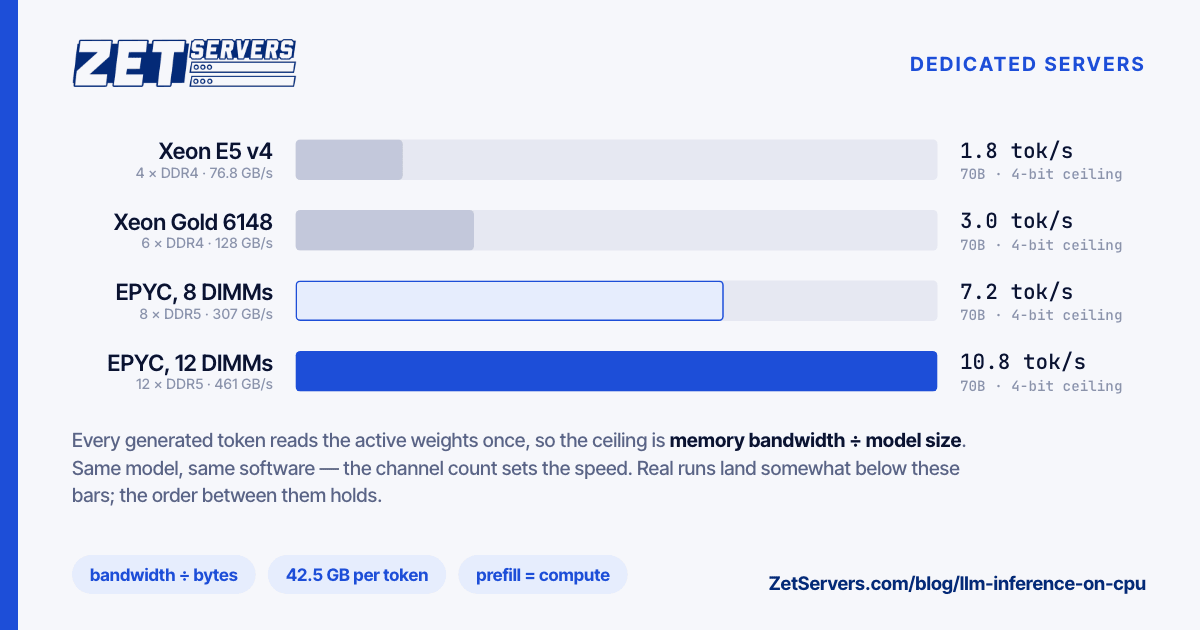
Peak memory bandwidth per socket is channels × transfer rate × 8 bytes. Here is the generation ceiling it sets for two model sizes, both at 4-bit:
| One socket |
Peak bandwidth |
70B ceiling |
8B ceiling |
| 4 × DDR4-2400 (Xeon E5 v4) |
76.8 GB/s |
~1.8 tok/s |
~16 tok/s |
| 6 × DDR4-2666 (Xeon Gold 6148) |
128 GB/s |
~3.0 tok/s |
~26 tok/s |
| 8 × DDR5-4800 (EPYC 9004, 8 DIMMs) |
307 GB/s |
~7.2 tok/s |
~63 tok/s |
| 12 × DDR5-4800 (EPYC 9004, full) |
461 GB/s |
~10.8 tok/s |
~94 tok/s |
These are ceilings. Real runs land below them — how far depends on the build, the thread count and where the weights sit in memory — so treat the table as an upper bound and measure. The ordering holds, though: the same model generates up to six times faster on a fully populated EPYC 9004 socket than on a Xeon E5 v4 one, and half as fast again on twelve channels as on eight. Channel population matters as much as the processor, so check it on delivery with dmidecode -t memory (the first-hour benchmark covers how) and ask for a twelve-DIMM build if this is the workload.
The catch: prompt processing
Generation is only half the work. Before the first output token, the model must process the whole prompt, and that phase — prefill — is limited by compute rather than bandwidth, because all the prompt's tokens go through large matrix multiplications together. GPUs are far faster at it. On a CPU, a short chat prompt is fine; a retrieval-augmented request that packs 8,000 tokens of context into every prompt can spend many seconds before the first word appears.
Cores and vector instructions help here. The EPYC 9004 range supports AVX-512, including the VNNI and BF16 extensions that inference libraries use; the Xeon E5 v3 and v4 generations stop at AVX2. Measure both phases on your own model with llama-bench, which reports prompt processing (pp) and generation (tg) separately:
llama-bench -m model.gguf -p 512 -n 128 -t 48
Two sockets are not twice as fast
A dual-socket server has two memory systems joined by an inter-socket link. When one model instance's weights sit in one socket's memory, the other socket's cores read them across that link at a fraction of local bandwidth. Two approaches work:
- Spread the weights across both sockets with llama.cpp's
--numa distribute, and measure whether it actually beats one socket.
- For serving several users, run one instance per socket, each pinned to its own cores and memory, and balance requests between them:
numactl --cpunodebind=0 --membind=0 llama-server -m model.gguf -t 64 --port 8080
numactl --cpunodebind=1 --membind=1 llama-server -m model.gguf -t 64 --port 8081
That doubles aggregate throughput for concurrent users, at the price of holding the model in memory twice.
Capacity is the real reason
What a CPU server has that a GPU does not is memory: hundreds of gigabytes of it, at a fraction of the price of the same capacity in VRAM. Weights are only part of the bill — each active conversation also holds a key-value cache that grows with its context length — so leave room on top of the model.
| Build |
RAM |
Fits comfortably |
| 1× EPYC 9254 |
128 GB |
Up to 32B dense at 8-bit; 70B at 4-bit |
| 2× EPYC 9554 |
512 GB |
70B at 16-bit; 4-bit mixture-of-experts models of several hundred billion parameters |
| 2× EPYC 9754 |
1 TB |
671B-class mixture-of-experts models at 8-bit |
Where CPU inference fits
It fits when the workload is:
- Low-concurrency — internal tools, a team assistant, agents that run a few requests at a time.
- Batch or offline — classifying, summarising or extracting across a document store overnight, where throughput per euro matters and latency does not.
- Private — data that must not leave your own machine or jurisdiction. EU data residency explains why where the bytes sit is only part of that question.
- Large but sparse — mixture-of-experts models that need more memory than an affordable GPU has.
It does not fit many concurrent chat users with low-latency expectations, long-context retrieval at interactive speed, or training of any kind. For those, GPUs are the tool, and we build GPU servers to order — send us the requirement.
Picking the box
Start from the model you intend to run and the concurrency you expect. Work out the bytes per token and the ceiling from the tables above; choose the smallest build whose memory holds the weights plus cache with room to spare; then prefer twelve populated channels over more cores. Serving tokens needs almost no bandwidth, so the 1 Gbps tier is plenty — though pulling down a 400 GB model takes about 53 minutes at that rate, which is worth knowing on day one. EPYC vs Xeon has the full platform comparison.
Frequently asked questions
Can you run an LLM without a GPU?
Yes. Generation speed on a CPU is set by memory bandwidth, and a modern server socket has enough to run small and mid-sized models at usable speed, and large mixture-of-experts models slowly but acceptably for low-concurrency work.
How many tokens per second can a CPU server generate?
At most its memory bandwidth divided by the weights read per token. A fully populated EPYC 9004 socket, at 460.8 GB/s, caps a 70B model at 4-bit near 11 tokens per second; real results land below that ceiling.
How much RAM does a 70B model need?
About 43 GB at 4-bit, 75 GB at 8-bit and 141 GB at 16-bit for the weights alone, plus the key-value cache for every active conversation.
Is a dual-socket server twice as fast?
Not for a single model instance. Memory is split between the sockets and cross-socket reads are slow, so run one instance per socket to use both.
Does quantisation reduce quality?
Somewhat, and less than the size saving suggests: 8-bit is close to the original for most models, and good 4-bit quantisations lose a little more. Test on your own prompts before committing to one.