EPYC vs Xeon is usually argued with benchmark charts of each vendor's newest chips. That is not the choice in front of you when you rent a dedicated server. What you can actually order is a spread of generations — Xeon E5 platforms from 2014 and 2016, a Xeon Gold from 2017, AMD EPYC 9004 parts from 2022 and 2023 — at prices seven times apart. The useful question is which of those differences your workload can feel, and for a surprising number of workloads the honest answer is: very few of them.
Here is the range as it stands, priced on the 1 Gbps tier unless noted:
| Build |
Launched |
Cores / threads |
Memory per socket |
PCIe per system |
From |
| 2× Xeon E5-2630 v3 |
2014 |
16 / 32 |
4 ch DDR4-1866 |
80 × Gen 3 |
€209 |
| 2× Xeon E5-2690 v4 |
2016 |
28 / 56 |
4 ch DDR4-2400 |
80 × Gen 3 |
€229 |
| 2× Xeon E5-2699 v4 |
2016 |
44 / 88 |
4 ch DDR4-2400 |
80 × Gen 3 |
€299 |
| 2× Xeon Gold 6148 |
2017 |
40 / 80 |
6 ch DDR4-2666 |
96 × Gen 3 |
25 Gbps tier up |
| 1× EPYC 9254 |
2022 |
24 / 48 |
12 ch DDR5-4800 |
128 × Gen 5 |
€449 |
| 2× EPYC 9254 |
2022 |
48 / 96 |
12 ch DDR5-4800 |
128–160 × Gen 5 |
€679 |
| 2× EPYC 9554 |
2022 |
128 / 256 |
12 ch DDR5-4800 |
128–160 × Gen 5 |
€959 |
| 2× EPYC 9754 |
2023 |
256 / 512 |
12 ch DDR5-4800 |
128–160 × Gen 5 |
€1,519 |
List prices, September 2026. Memory speeds are the platform maximum from Intel's and AMD's specifications.
Two things stand out before any benchmark. First, this is not this year's Xeon against this year's EPYC; it is an eight-year spread of hardware, and the older end is cheap because it is paid off, not because it is bad. Second, the core counts overlap: a €299 dual E5-2699 v4 has only four fewer cores than a €679 dual EPYC 9254. Cores are the headline. The differences that decide performance live in the other columns.
Per-core speed
Single-threaded work — a game tick, an interpreted request handler, one database query — runs on one core and cannot borrow the others. Two things set its speed: the clock, and how much the core gets done per clock.
The clock gap alone is wide. The E5-2630 v3 turbos to 3.2 GHz; the EPYC 9254 boosts to 4.15 GHz, about 30% higher, and that is before eight years of architecture: a larger L3 cache (128 MB against 20 MB), more work per clock, and AVX-512 support that the E5 generation lacks entirely. On a thread-bound workload the 9254 is in a different class, which makes it the part to look at for game servers and database primaries.
The high-core-count EPYCs trade some of that back. The 9754 packs 128 compact Zen 4c cores into each socket at 2.25 GHz base and 3.1 GHz boost — built for throughput across many threads, not for the fastest single one.
Memory bandwidth, the column spec sheets leave out
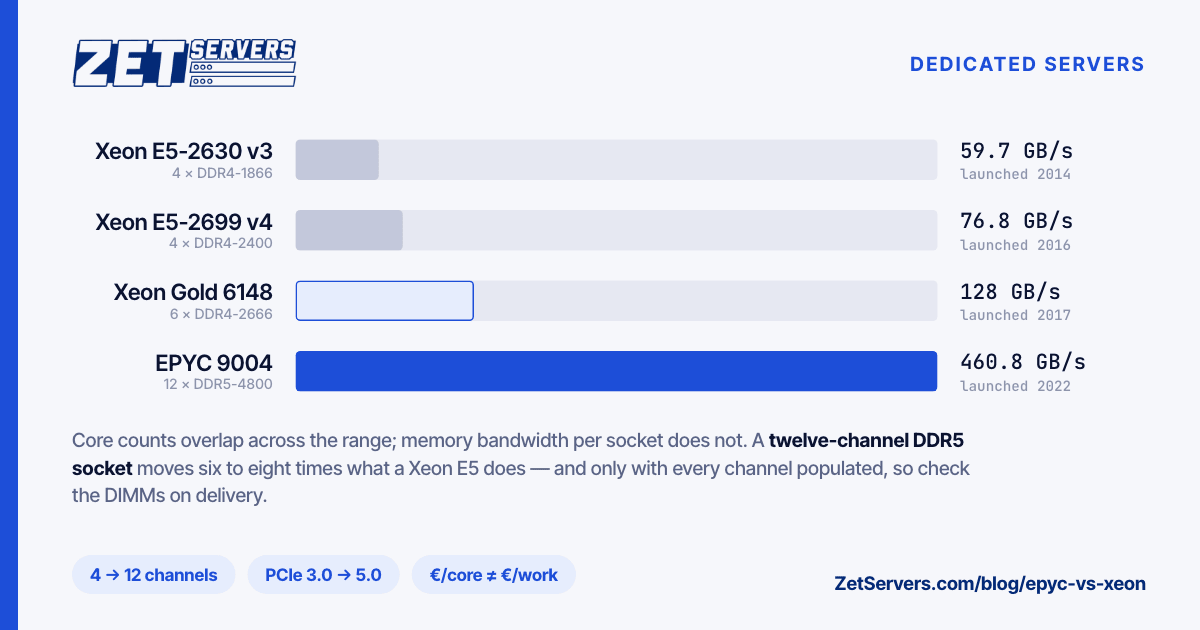
Every core waits on memory eventually, and here the generations are not close. Peak bandwidth is channels × transfer rate × 8 bytes:
| Processor |
Channels |
Peak per socket |
Per core |
| Xeon E5-2630 v3 |
4 × DDR4-1866 |
59.7 GB/s |
7.5 GB/s |
| Xeon E5-2699 v4 |
4 × DDR4-2400 |
76.8 GB/s |
3.5 GB/s |
| Xeon Gold 6148 |
6 × DDR4-2666 |
128.0 GB/s |
6.4 GB/s |
| EPYC 9254 |
12 × DDR5-4800 |
460.8 GB/s |
19.2 GB/s |
| EPYC 9554 |
12 × DDR5-4800 |
460.8 GB/s |
7.2 GB/s |
| EPYC 9754 |
12 × DDR5-4800 |
460.8 GB/s |
3.6 GB/s |
An EPYC 9004 socket moves six to eight times what a Xeon E5 socket does. Per core, the order is more interesting. The 9254 gives each of its 24 cores almost 20 GB/s, which is why it flies on databases, caches and analytics. The 9754 spreads the same pipe over 128 cores and lands, per core, about where the E5-2699 v4 does — so on bandwidth-bound code its extra cores add throughput only until the channels are full.
Peak figures also assume every channel holds a DIMM. The capacities these builds ship with — 128 GB, 256 GB, 512 GB and 1 TB — cannot be spread evenly over twelve channels with standard module sizes, so check the population on delivery with dmidecode -t memory; the benchmark checklist covers it. If memory bandwidth is your bottleneck, ask for a twelve-DIMM configuration when you order.
I/O: lanes, drives and the network card
PCIe decides how many fast devices a machine can feed at once. Each E5 socket brings 40 lanes of PCIe 3.0, about 39 GB/s in each direction. An EPYC 9004 system has 128 lanes of PCIe 5.0 — up to 160 on some dual-socket boards — at four times the speed per lane, roughly 500 GB/s. It shows in the chassis: the Xeon E5 builds carry 6 SSD slots, the EPYC builds 10 or 24 NVMe bays.
For a 1–10 Gbps port serving files, any of these platforms has headroom to spare. It starts to matter from 25 Gbps up, where the NIC, the NVMe array and the memory controller must all move data at the same time — saturating a 100 Gbps port does that arithmetic layer by layer. The 200 Gbps tier is offered on EPYC builds only.
Price per core, and what it hides
Divide the 1 Gbps price by the core count:
| Build |
Cores |
€ per core per month |
| 2× E5-2630 v3 |
16 |
13.06 |
| 2× E5-2690 v4 |
28 |
8.18 |
| 2× E5-2699 v4 |
44 |
6.80 |
| 1× EPYC 9254 |
24 |
18.71 |
| 2× EPYC 9254 |
48 |
14.15 |
| 2× EPYC 9554 |
128 |
7.49 |
| 2× EPYC 9754 |
256 |
5.93 |
The cheapest box is not the cheapest core, and the cheapest core is on the newest chip. The 9254 is the most expensive per core by a distance, because what you are buying there is speed and bandwidth per core, not count. And a price per core says nothing about what the core gets through in a second: a Zen 4 core does more work per clock than a Haswell or Broadwell core, so this table flatters the old Xeons against the EPYC 9554 and 9754.
Which one for which job
- Moving bytes, not computing them — download mirrors, seedboxes, restream relays, file origins. The port is the product; buy the cheapest box that keeps up with it. A dual E5-2630 v3 or E5-2690 v4 with 128 GB of RAM rarely limits a 1–5 Gbps delivery node.
- Many light threads — web and API fleets, CI runners, containers, lots of small virtual machines. Cheap threads and RAM win: the E5-2699 v4 (88 threads and 256 GB for €299) is the value pick, and at larger scale the EPYC 9554 and 9754 put 256 or 512 threads in one box.
- Thread-bound and latency-sensitive — game servers, database primaries, anything where one slow tick or query is the complaint. EPYC 9254, single or dual socket.
- Vectorised or memory-hungry — transcoding ladders, analytics, in-memory datasets. EPYC 9554 for cores; EPYC 9754 when the 1 TB of RAM is the point.
Deciding with your own workload
Spec sheets narrow the list; only your code picks the winner. Take your busiest hour, replay it on the candidate machine, and compare p99 latency and throughput per euro. Choose the CPU for where the workload is heading rather than where it is: the port on a machine can be upgraded later, but the processor is the one part you cannot change without moving. If no standard build fits — more RAM, specific drives, a particular CPU — ask for a custom configuration. A price match is usually on the table too.
Frequently asked questions
Is EPYC faster than Xeon?
Generation matters more than brand. Against the Xeon E5 and first-generation Xeon Scalable parts found in most rental catalogues, a current EPYC wins on per-core speed, memory bandwidth and I/O. Against Intel's current generation it is a closer, workload-by-workload contest.
Are older Xeon E5 servers still worth renting?
Yes, where the CPU is not the bottleneck. They carry ECC memory, plenty of threads and 128–256 GB of RAM at the lowest prices in the range. For moving bytes from disk to network, the port matters far more than the processor.
Does the CPU affect network throughput?
Not the rate you are guaranteed, but how much of it you can use. Serving files at 1–10 Gbps is easy for any of these machines. Heavy TLS, high packet rates and ports of 25 Gbps and up put real load on cores, memory and PCIe.
Why do the EPYC builds have more drive bays?
Because they have the lanes to feed them. Twenty-four NVMe drives at four lanes each need 96 lanes before the network card gets any — comfortably inside an EPYC system's 128, and beyond what a pair of E5 sockets can offer at a quarter of the speed per lane.
Can I get a CPU that is not listed?
Often, yes. Specific processors, more RAM, extra NVMe and GPUs are all available as custom builds. Send the requirement and we will quote it.