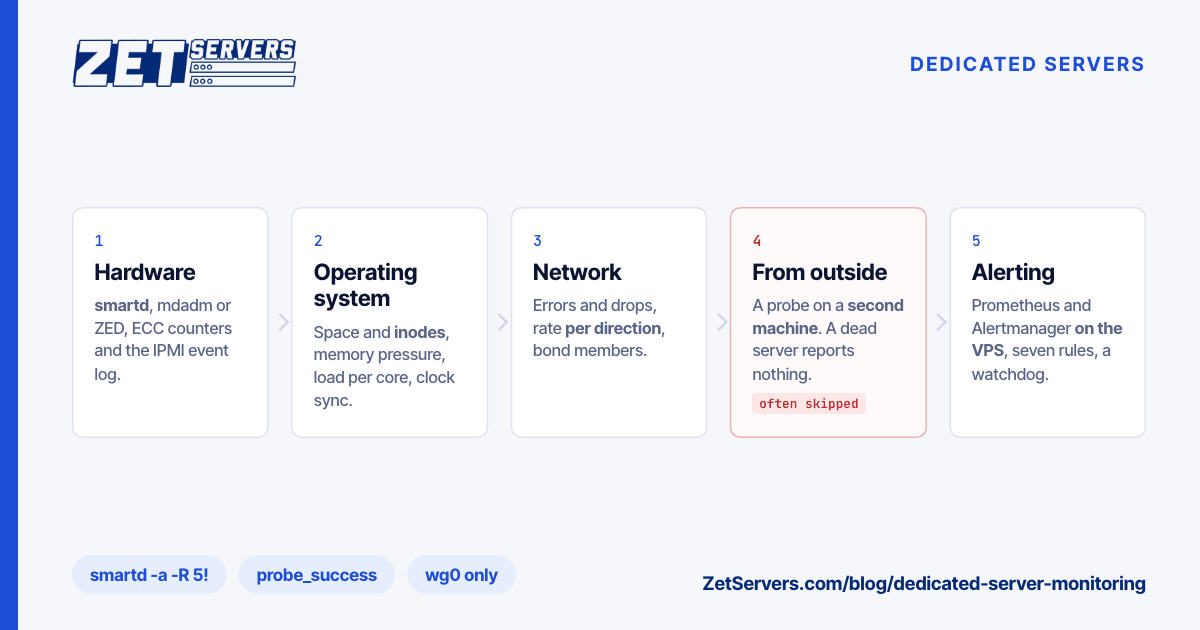
On a dedicated server, nobody watches the hardware for you. On a cloud instance a failing disk is the provider's problem; on your own machine the first sign is often a degraded array weeks after the first drive dropped out, or a customer saying the site is down. Dedicated server monitoring closes that gap in five layers: hardware, operating system, network, the service seen from outside, and alerting. Here is what to watch in each, and a minimal stack.
Layer 1: the hardware
Disks: smartd. smartmontools' smartd polls every drive and mails you when something changes. One line in /etc/smartd.conf covers a typical server:
DEVICESCAN -a -o on -S on -R 5! -W 2,40,45 -s (S/../.././02|L/../../6/03) -m [email protected]
If you add per-disk lines, put them above DEVICESCAN: smartd ignores everything after it. -a enables the standard checks: health, failing attributes, the error and self-test logs, pending and uncorrectable sectors. -R 5! makes any new reallocated sector critical. -W 2,40,45 uses the man page's example temperature limits; take yours from the drive's datasheet. -s runs a short self-test daily at 02:00 and a long one on Saturdays at 03:00. smartd checks every 1,800 seconds (30 minutes) by default. -m needs a working mail command: start once with -M test and confirm the message arrives.
Software RAID: mdadm. /proc/mdstat shows [UU] for a healthy mirror, [U_] for a degraded one. Set MAILADDR in /etc/mdadm/mdadm.conf so the mdadm --monitor service mails on failure, and test it:
mdadm --monitor --scan --oneshot --test
A degraded array still serves data, which is why it goes unnoticed; choosing a RAID level covers how long a rebuild leaves you exposed.
ZFS. zpool status -x prints all pools are healthy or names the pool that is not. ZED, the ZFS event daemon, mails on device faults once ZED_EMAIL_ADDR is set in zed.rc.
ECC memory. The kernel's EDAC driver counts corrected and uncorrected memory errors in /sys/devices/system/edac/mc/mc*/ce_count and ue_count; rasdaemon logs each one with its DIMM (ras-mc-ctl --errors). A lone corrected error is noise. A count rising on one DIMM is a part to replace on your schedule, not after a crash.
Sensors and the event log. The BMC behind your IPMI console reads every temperature, fan and power-supply sensor and keeps a System Event Log (SEL). With the ipmi_si and ipmi_devintf modules loaded:
ipmitool sdr type Temperature
ipmitool sdr type Fan
ipmitool sdr type "Power Supply"
ipmitool sel elist last 20
The SEL records failed fans, lost power-supply input and memory errors, often timestamped before the crash you are investigating.
Layer 2: the operating system
- Space and inodes.
df -h and df -i: small files can exhaust inodes with gigabytes free, and the error is the same "No space left on device".
- Memory pressure. Linux fills spare RAM with cache, so watch
MemAvailable, and on kernel 4.20 or later the stall times in /proc/pressure/memory.
- Load per core. A load of 16 is quiet on a 40-thread dual Xeon and overload on 4 cores: divide by
nproc. High load with idle CPUs means tasks waiting on disk.
- Clock.
timedatectl should report System clock synchronized: yes; certificates, logs and two-factor codes depend on it.
Layer 3: the network
ip -s link show eth0 prints errors and dropped beside the RX and TX counters. Rising errors point at a cable, optic or switch port; drops usually mean the host is not draining its receive queues. Both should stay flat.
Rate against the guarantee. Graph each direction separately, because a bandwidth guarantee applies per direction:
rate(node_network_transmit_bytes_total{device="eth0"}[5m]) * 8 / 1e9   # Gbps out
rate(node_network_receive_bytes_total{device="eth0"}[5m]) * 8 / 1e9    # Gbps in
A 1 Gbps port is 1,000,000,000 ÷ 8 = 125,000,000 bytes per second, so an 80% warning fires above 100,000,000. Sustained traffic near line rate is not a fault, but it is time to plan the next tier.
Bonds. A bond that loses a member keeps running at reduced capacity, silently; the BondMemberDown rule below compares node_exporter's configured and active member counts.
Layer 4: the service, from outside
A server cannot report its own outage: a kernel panic, a power failure or a dead uplink silences every check above along with your site. You need a second machine, in another location, asking what users ask: does it answer?
The Prometheus blackbox_exporter (port 9115) fetches URLs, TCP ports or ping targets and returns probe_success with per-phase timings; a small VPS runs it easily. A cron job running curl -fsS --max-time 10 against a health URL and mailing on failure also counts.
If the probe fails while the server looks healthy from its console, the fault is in the path; how to read an mtr report shows how to find it. One limit: a probe on the same provider's network shares part of that path, so for a fully independent view add one elsewhere.
Layer 5: alerting with Prometheus
The minimal stack is four programs: node_exporter (port 9100) on each server; Prometheus (9090), Alertmanager (9093) and blackbox_exporter on the monitoring VPS, so a dead server is noticed by a machine that is still alive. node_exporter's default collectors already include filesystem, mdadm, edac, hwmon, bonding, netdev, pressure and timex; the textfile collector adds anything a cron job writes, such as smartctl output. Prometheus scrapes the server over a WireGuard tunnel, set up below, and the site through the probe:
global:                                              # /etc/prometheus/prometheus.yml
  scrape_interval: 15s
rule_files: [/etc/prometheus/rules.yml]
alerting:
  alertmanagers:
  - static_configs: [{targets: ['127.0.0.1:9093']}]
scrape_configs:
- job_name: node
  static_configs: [{targets: ['10.8.0.2:9100']}]      # the server, over WireGuard
- job_name: blackbox
  metrics_path: /probe
  params: {module: [http_2xx]}
  static_configs: [{targets: ['https://example.com/']}]
  relabel_configs:
  - {source_labels: [__address__], target_label: __param_target}
  - {source_labels: [__param_target], target_label: instance}
  - {target_label: __address__, replacement: '127.0.0.1:9115'}
Then a handful of rules, each meaning "someone must act":
groups:
- name: servers
  rules:
  - alert: SiteDown            # from the blackbox probe
    expr: probe_success == 0
    for: 2m
  - alert: ServerUnreachable   # a dead server sends no metrics, so its other rules go quiet
    expr: up{job="node"} == 0
    for: 5m
  - alert: DiskFullIn24h       # 24 h x 3,600 s = 86,400 s
    expr: predict_linear(node_filesystem_avail_bytes{fstype!~"tmpfs|overlay"}[6h], 86400) < 0
    for: 30m
  - alert: InodesLow
    expr: node_filesystem_files_free{fstype!~"tmpfs|overlay"} / node_filesystem_files < 0.05
  - alert: RaidDegraded
    expr: node_md_disks_required - ignoring(state) node_md_disks{state="active"} > 0
  - alert: EccErrors           # the threshold of 10 is a starting point, not a standard
    expr: increase(node_edac_correctable_errors_total[24h]) > 10 or increase(node_edac_uncorrectable_errors_total[24h]) > 0
  - alert: BondMemberDown
    expr: node_bonding_active < node_bonding_slaves
Alertmanager groups them and delivers by email or chat:
route:
  receiver: ops
  group_by: [alertname, instance]
  repeat_interval: 4h
receivers:
- name: ops
  email_configs:
  - to: [email protected]
    from: [email protected]
    smarthost: smtp.example.com:587
    auth_username: [email protected]
    auth_password: change-me
  # webhook_configs posts Alertmanager's own JSON, which most chat tools
  # cannot display; use a native receiver such as slack_configs instead
  slack_configs:
  - api_url: https://hooks.slack.com/services/REPLACE/ME
    channel: '#ops'
Finally, watch the watcher: a rule with expr: vector(1) fires forever, and an external dead man's switch that pages when it stops arriving tells you the VPS itself has died.
Keep the exporters off the internet
node_exporter listens on every address by default and tells anyone your kernel version, disks, mounts and interfaces. Prometheus and Alertmanager have no login by default either.
| Component |
Default port |
Bind it to |
| node_exporter |
9100 |
the WireGuard address |
| Prometheus |
9090 |
localhost on the VPS |
| Alertmanager |
9093 (9094 cluster) |
localhost on the VPS |
| blackbox_exporter |
9115 |
localhost on the VPS |
Run a WireGuard tunnel from the VPS to each server, bind the exporter to the tunnel address and open 9100 only on wg0:
node_exporter --web.listen-address=10.8.0.2:9100        # on the server
ufw allow in on wg0 to any port 9100 proto tcp           # on the server
ssh -L 9090:127.0.0.1:9090 you@monitoring-vps            # from your laptop, for the Prometheus UI
Order node_exporter after [email protected], or it fails to bind at boot. The rest of securing a new server still applies.
The checklist
| Layer |
Tool |
Alert when |
| Disks |
smartd |
health fails, attribute 5 moves |
| Arrays |
mdadm, ZED |
a member missing |
| Memory |
EDAC, rasdaemon |
corrected errors rising |
| Board |
ipmitool |
sensor not ok, new SEL entry |
| OS |
node_exporter |
full in 24 h, inodes low |
| Network |
node_exporter |
errors climb, bond member down |
| Outside |
blackbox_exporter |
two minutes failing |
| Delivery |
watchdog |
test message missing |
Set it up on day one, right after the acceptance benchmark.
Our servers, for reference
Every dedicated server we sell has IPMI and DDR4 or DDR5 ECC memory, so the sensors, SEL and EDAC counters above are all there. For the monitoring box, our smallest unmetered VPS is €29 a month: one dedicated 3.2 GHz core, 4 GB of RAM and 50 GB of NVMe, in 8 European locations. Put it in a different city from your servers. Prices checked October 2026.
Frequently asked questions
What should I monitor on a dedicated server?
Five layers: disk health, RAID state, ECC errors and board sensors; filesystem space, inodes, memory pressure, load and clock sync; interface errors, throughput and bond members; the service seen from another location; and alert delivery. The outside check catches outages every inside check misses.
Why can't a server monitor itself?
Because the failures that matter most silence it. A kernel panic, a power loss or a dead uplink stops its own checks along with its service. A probe on a second machine, in another location, sees the outage as users do and can still alert.
Is it safe to expose node_exporter to the internet?
No. It has no authentication by default and publishes your kernel version, disks, mounts and interfaces to anyone who asks. Bind it to a private or WireGuard address, allow port 9100 only from the Prometheus host, and keep Prometheus and Alertmanager on localhost.
How do I get warned before a disk fails?
Run smartd with the -a directive, which watches SMART health, the error logs and pending sectors. Add -R 5! so any new reallocated sector is critical, and schedule self-tests with -s. Start it once with -M test to confirm the warning mail arrives.
Do I need Prometheus for a single server?
Not to start. smartd and mdadm mail, plus a curl check from another machine, cover the failures that cost the most. Prometheus earns its place once you want history, trends such as a disk filling over days, or several servers in one view.