A bare metal server is a physical machine rented to one customer, with no provider hypervisor between your operating system and the hardware. Every core, every DIMM, every drive and the network card belong to your workload and nobody else's. The term came back into fashion when cloud providers started selling it next to their virtual machines, and it now covers three products that behave quite differently. This guide separates them, lists what bare metal gives you that a cloud VM cannot, what it takes away, and the workloads where the numbers settle the choice.
The label is used for products with different billing, provisioning and lock-in:
|
Classic dedicated server |
Bare metal cloud |
Cloud .metal instance |
| What you get |
A whole server, monthly |
A whole server, hourly or monthly, through an API |
A whole host inside a public cloud |
| Provisioning |
Minutes to an hour if in stock, longer if built to order |
Minutes, from a pool of identical machines |
Minutes |
| Bandwidth |
Usually a port, often unmetered |
Varies; often metered |
The cloud's per-GB egress |
| Hardware choice |
Many builds, older and newer generations |
A few standard shapes |
The provider's instance families |
| Access |
Root, IPMI or similar out-of-band console |
Root, API, sometimes serial console |
Root, no firmware access |
All three are single-tenant, which is the property that matters most. They differ in how you pay for the network and in how quickly you can get another one. A cloud .metal instance gives you the whole host but leaves you on the cloud's egress tariff, so it solves the noisy-neighbour problem and keeps the bandwidth bill. A classic dedicated server is slower to scale out, but the port price is fixed.
What you gain without a hypervisor
Every cycle is yours. On a shared virtualisation host, other tenants compete for the same last-level cache, memory bandwidth and disk queues. Even with dedicated vCPUs, those shared resources leak performance from one guest to another. On a bare metal server there is no other guest. The run-to-run variance of a benchmark drops, and so does the p99 latency of anything that touches memory or storage hard: databases, search indexes, game servers, packet processing.
Full hardware access. You see the real CPU model and its flags, the real NVMe drives with their SMART data, the real NIC with its offloads, queues and firmware. That makes things possible that a VM blocks or emulates:
- running your own hypervisor, such as Proxmox or plain KVM, and carving the box into VMs on your own terms (see Proxmox on a dedicated server);
- tuning interrupt affinity, NIC ring sizes and RSS queues for multi-gigabit traffic;
- using ZFS or mdadm directly on whole disks instead of on virtual block devices;
- per-socket or per-core software licences, which are cheaper to count when the cores are physical and stable.
Out-of-band control. A dedicated server comes with an IPMI or BMC console: you can mount an ISO, watch the boot, change BIOS settings and power-cycle it while the operating system is down. In a cloud VM, the provider's console is the most you get.
Predictable cost. A monthly price for a whole machine and a fixed port does not move with traffic. That is the real reason most teams move workloads to bare metal, and it is mostly a bandwidth story.
What you give up
A bare metal server is a machine, and the cloud's abstractions that hide machines are gone.
Elasticity. A cloud autoscaler adds a VM in a minute and removes it an hour later. A dedicated server is ordered, delivered and billed by the month. In-stock builds are usually online within an hour of payment, but you cannot rent one for the afternoon. Bare metal fits the baseline load you carry every day; bursts that last hours belong somewhere else.
Live migration. When a cloud host needs maintenance, your VM is moved to another one without you noticing. When a drive or a power supply fails in a bare metal server, it is your server that is degraded. RAID and redundant power cover the common failures, but a motherboard fault means a hardware swap. Design for it: two servers in different cities, replication, and a load balancer or DNS failover in front.
Managed services. Object storage, managed databases, queues and load balancers are API calls in a cloud. On bare metal you run them yourself, which is cheap in money and expensive in attention: someone has to patch, back up and monitor each one.
Fine-grained sizing. A VM can have two cores and four gigabytes. The smallest dedicated server still has 20 cores and 128 GB. Below a certain size a VM is simply the cheaper machine, which is the line drawn in dedicated server vs VPS.
The cost comparison that decides most migrations
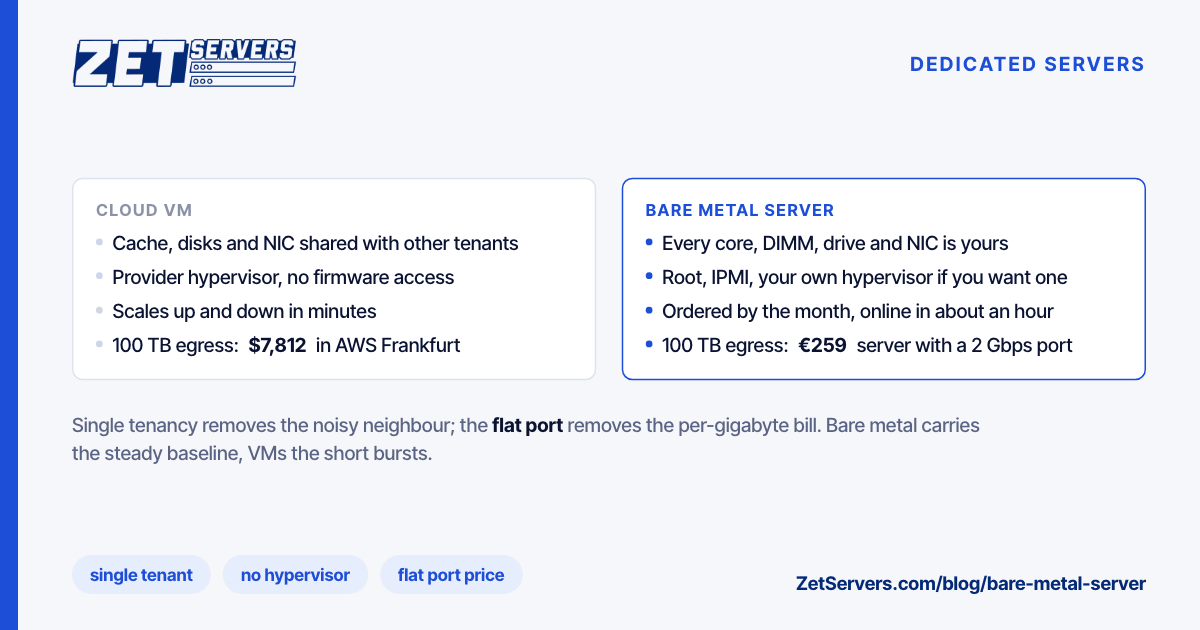
Compute prices between clouds and dedicated hosts differ, but the gap that forces the decision is usually egress. Cloud providers bill traffic leaving their network by the gigabyte; a dedicated server with an unmetered port bills the port. Using the list rates in our cloud egress fees comparison, checked on 19 October 2026:
| Monthly egress |
AWS Frankfurt egress alone |
Bare metal server that carries it |
| 10 TB |
$891 |
1 Gbps port, €209 including the server |
| 50 TB |
$4,293 |
1 Gbps port, €209 |
| 100 TB |
$7,812 |
2 Gbps port, €259 |
| 300 TB |
$18,886 |
5 Gbps port, €519 |
The right-hand column is our dual Xeon E5-2630 v4 build (20 cores, 128 GB) at each port speed, sized for a peak about three times the monthly average. It is the whole server, not just the traffic. The cloud column is the transfer line only, before any compute.
That comparison is not fair to every workload. A service that sends little data and scales up and down through the day can be cheaper in the cloud. A service that serves files, video, game traffic, VPN sessions or API responses at a steady rate almost never is.
- Anything that moves a lot of bytes. Video, downloads, backups, CDN origins and VPN exits pay for bandwidth first. A flat port turns the largest variable cost into a fixed one.
- Databases with a large working set. Memory bandwidth and NVMe latency without contention keep p99 queries flat. 256 GB to 1 TB of RAM in one box is ordinary on bare metal and expensive in a cloud.
- Game servers and real-time systems. A simulation tick with a fixed deadline suffers more from jitter than from a slower average.
- Your own virtualisation or container platform. One large server running Proxmox or Kubernetes packs dozens of workloads at a fraction of the per-VM price.
- Steady CPU-bound batch work. Transcoding, compilation, rendering and inference that run every day keep a machine busy enough to beat hourly pricing.
Where the cloud stays the better answer: spiky or unpredictable compute, short-lived environments, and small services that fit in a VM with room to spare.
A provider can call a large VM "bare metal". It takes a minute to check after handover:
systemd-detect-virt          # prints "none" on physical hardware
lscpu | grep -i hypervisor   # no output on physical hardware
dmidecode -s system-manufacturer   # the server vendor, not "QEMU" or "KVM"
lsblk -d -o NAME,MODEL,SIZE  # real drive models, not virtual disks
Then run the checks in how to benchmark a new dedicated server: CPU against published scores, memory against the channel count, disks against their datasheets and the port with iperf3. A real bare metal server passes all four on the first day or has a fault worth reporting.
Every ZetServers dedicated server is single-tenant bare metal with full root and IPMI, an unmetered guaranteed port, and the same price in each of our 13 cities. A few points on the range:
| Build |
Port |
Monthly |
| Dual Xeon E5-2630 v4, 20 cores, 128 GB |
1 Gbps unmetered |
€209 |
| Single AMD EPYC 9254, 24 cores, 128 GB DDR5, NVMe |
1 Gbps unmetered |
€449 |
| Dual Xeon E5-2630 v4, 20 cores, 128 GB |
10 Gbps unmetered |
€659 |
| Dual AMD EPYC 9554, 128 cores, 512 GB |
10 Gbps unmetered |
€1,679 |
Ports go up to 200 Gbps on the same platforms. 100 Gbps of L3/L4 DDoS filtering is included on every server.
Frequently asked questions
What is a bare metal server?
A bare metal server is a physical server dedicated to a single customer, with no virtualisation layer run by the provider. You install the operating system directly on the hardware and get all of its CPU, memory, storage and network capacity. It is the same thing hosting companies have long called a dedicated server.
Is a bare metal server faster than a cloud VM?
With the same hardware, the difference in average speed is small. The gain is consistency: no other tenant shares the cache, memory bandwidth, disks or network card, so tail latency and benchmark variance fall. Workloads sensitive to jitter, such as databases and game servers, notice it most.
Is bare metal cheaper than the cloud?
For steady workloads, and especially for anything that sends a lot of data, usually yes. Cloud egress is billed per gigabyte, while a dedicated server pays for a port. 100 TB a month costs about $7,800 in AWS Frankfurt egress alone and fits on a €259 server with a 2 Gbps unmetered port.
How long does it take to get a bare metal server?
At a cloud provider, minutes. At a dedicated host it depends on stock: our in-stock builds are usually online within an hour of payment, while a configuration that has to be built can take two to four weeks. Plan the baseline on bare metal and keep bursts on VMs.