A ZFS storage server makes its most expensive decisions at zpool create: a RAIDZ vdev's parity level and ashift are fixed once it exists, and recordsize applies only to files written after you set it. This guide works through those choices on our storage server, eight 12 TB hard drives with 128 GB of RAM and a separate 240 GB SSD for the operating system, using OpenZFS 2.4.4, the current release since 21 August 2026. Every capacity figure is arithmetic you can redo.
Before the pool: disks, not volumes
The OpenZFS tuning guide says whole disks should be given to ZFS, and that single-disk RAID 0 arrays from a controller are not equivalent. On our storage servers (96 TB raw, from €549 a month at 2 Gbps in Bucharest or Frankfurt), ZFS, mdadm or hardware RAID is your choice: ask for ZFS when you order, so the drives arrive as plain disks. Then check:
zfs version                          # userland and kernel module
lsblk -o NAME,SIZE,PHY-SEC,LOG-SEC   # physical vs logical sector size
ls -l /dev/disk/by-id/ | grep -v part
Distribution packages often trail upstream. Use /dev/disk/by-id/ names, which the OpenZFS FAQ recommends for pools under ten disks; sdX names are not persistent.
Usable capacity of a ZFS storage server with 8 × 12 TB
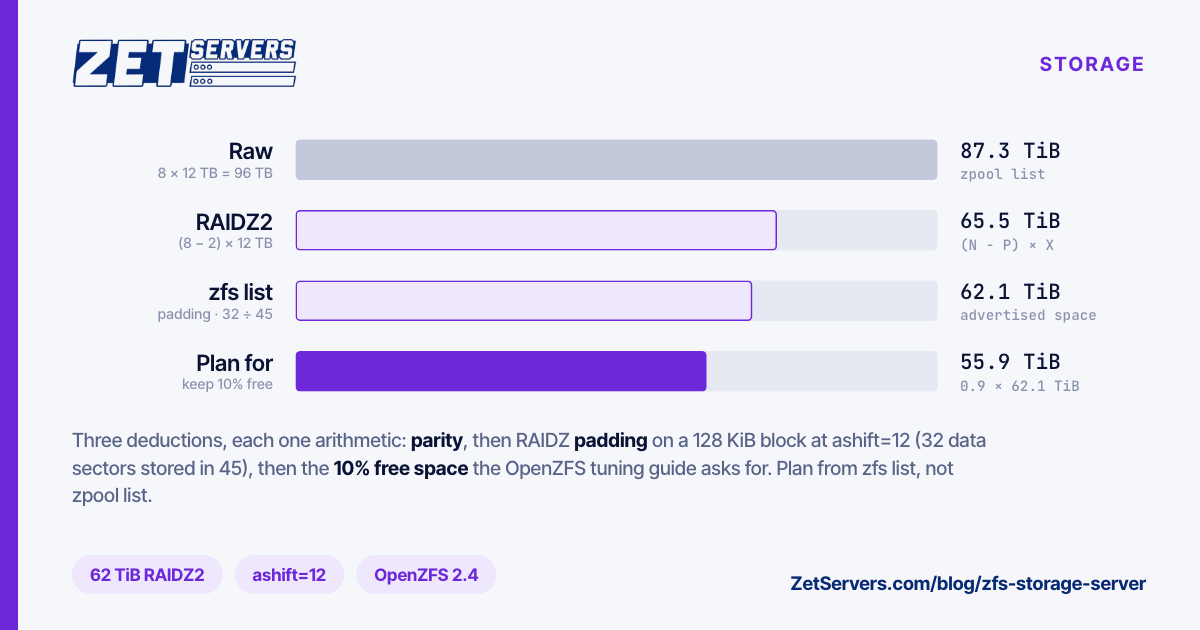
The OpenZFS rule of thumb: a RAIDZ group of N disks of size X with P parity disks holds approximately (N − P) × X. Mirrors hold half. In the binary units zfs list uses, one drive is 12 × 10¹² ÷ 2⁴⁰ = 10.91 TiB and all eight are 87.3 TiB.
| Layout |
Survives |
(N − P) × X |
In TiB |
zfs list shows, about |
| 4 × 2-way mirror |
1 per pair |
48 TB |
43.7 TiB |
43.7 TiB |
| RAIDZ1, 8 wide |
any 1 drive |
84 TB |
76.4 TiB |
73.5 TiB |
| RAIDZ2, 8 wide |
any 2 drives |
72 TB |
65.5 TiB |
62.1 TiB |
| RAIDZ3, 8 wide |
any 3 drives |
60 TB |
54.6 TiB |
49.9 TiB |
The last column is padding. OpenZFS allocates a RAIDZ block as data sectors plus parity per row, rounded up to a multiple of parity + 1. With ashift=12, a 128 KiB block is 32 sectors. On 8-wide RAIDZ2: 32 data + 2 × ⌈32 ÷ 6⌉ = 12 parity = 44, rounded up to 45, so 71.1% efficient rather than 6 ÷ 8 = 75%. ZFS hard-codes 128 KiB as the "typical" block when converting raw space to advertised space: 87.3 × 32 ÷ 45 ≈ 62.1 TiB. RAIDZ1 works out at 32 ÷ 38, RAIDZ3 at 32 ÷ 56.
Then two deductions. Slop space: ZFS refuses ordinary writes in the last 1/32 of the pool, capped at 128 GiB in the source; 62.1 ÷ 32 = 1.94 TiB, so the cap applies. Headroom: the tuning guide says to keep free space above 10%, because metaslabs below 4% free switch to a slower, CPU-heavy allocator. For RAIDZ2 that leaves 0.9 × 62.1 ≈ 55.9 TiB to plan around.
zpool list shows close to 87 TiB, physical space with parity included. Plan from zfs list.
Why RAIDZ2 is the usual pick at 12 TB
A failed drive leaves the vdev degraded until its replacement resilvers, which on full 12 TB drives can take a day or more. Choosing a RAID level does the rebuild arithmetic, and the ZFS conclusion is the same: RAIDZ1 resilvers with no redundancy left, RAIDZ2 keeps one parity drive throughout, and RAIDZ3 costs another 12.2 TiB (62.1 − 49.9), hard to justify when a second copy lives elsewhere.
Mirrors win on small random I/O: the tuning guide notes each RAIDZ vdev is limited to the IOPS of its slowest drive. But VM disks and databases belong on flash anyway; NVMe vs SATA vs HDD has the numbers.
RAIDZ expansion has shipped, in OpenZFS 2.3.0 on 14 January 2025: zpool attach adds a disk to an existing RAIDZ vdev, keeping redundancy throughout. Older blocks keep their old data-to-parity ratio. That helps when there are empty bays; here all eight drives form the pool from day one, so choose the width now.
Creating the pool
zpool create -o ashift=12 \
  -O compression=lz4 -O atime=off \
  tank raidz2 \
  /dev/disk/by-id/ata-DISK1 /dev/disk/by-id/ata-DISK2 \
  /dev/disk/by-id/ata-DISK3 /dev/disk/by-id/ata-DISK4 \
  /dev/disk/by-id/ata-DISK5 /dev/disk/by-id/ata-DISK6 \
  /dev/disk/by-id/ata-DISK7 /dev/disk/by-id/ata-DISK8
ashift=12 means 4 KiB sectors. The zpoolprops man page warns that some disks use 4 KiB sectors but report 512 bytes, and ashift can only be set when devices are first added, so state it.
compression=lz4 is what the default compression=on has selected since OpenZFS 2.2.0; per the tuning guide, incompressible data such as video is unlikely to see a penalty.
atime=off stops reads generating metadata writes.
One dataset per workload
recordsize is the largest block ZFS writes for a file, 128 KiB by default. Set it before the data arrives: a change affects only files created afterwards, and zfs rewrite does not apply it to existing ones.
| Dataset |
recordsize |
compression |
Why |
| Media library |
1M |
lz4 |
Large sequential files |
| Backups, archives |
1M |
zstd |
Written once, read rarely |
| MySQL or MariaDB (InnoDB) |
16K |
lz4 |
Matches the 16 KiB page |
| PostgreSQL |
32K |
lz4 |
64K and 128K also work well |
| VM disks |
zvol, 16K volblocksize |
lz4 |
Default since 2.2; better on NVMe |
zfs create -o recordsize=1M tank/media
zfs create -o recordsize=1M -o compression=zstd tank/backup
zfs create -o recordsize=16K tank/mysql
zfs get compressratio tank/backup     # measure, do not guess
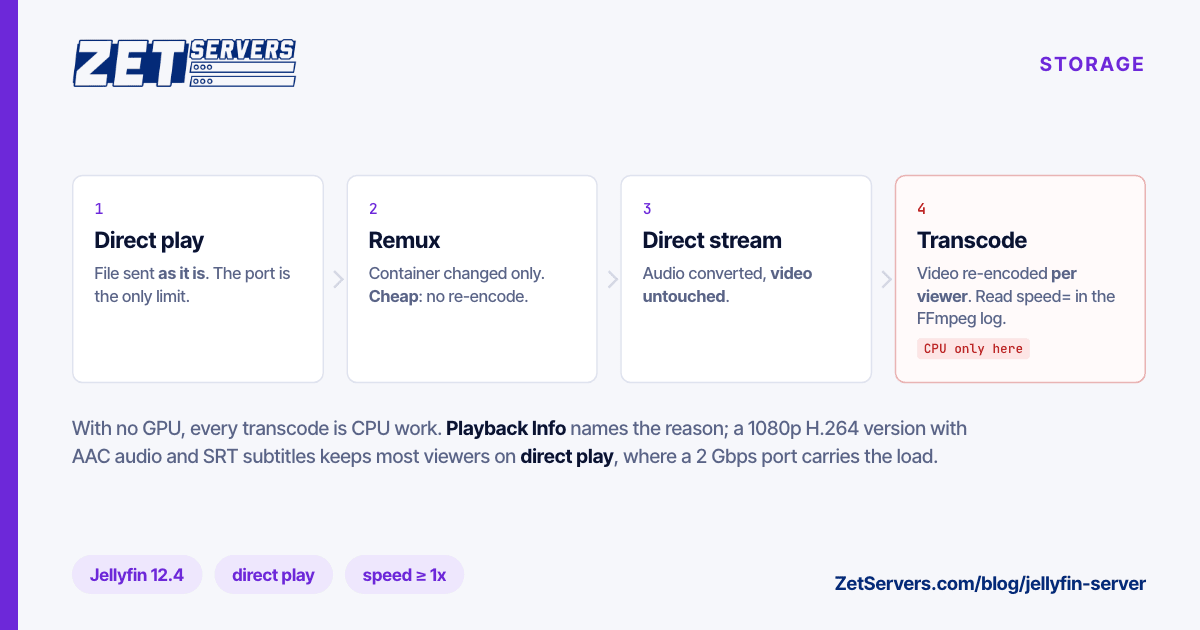
Each row follows the OpenZFS tuning guide; plain zstd means level 3. Large records also pad better: a 1 MiB block on 8-wide RAIDZ2 takes 256 data and 86 parity sectors, 342 in all, a multiple of three already, so 74.9% efficient against 71.1%, and a media dataset holds about 5% more than zfs list promises. A 16 KiB zvol block goes the other way: 4 data + 2 parity, 66.7%. A Jellyfin server library is the textbook tank/media.
ARC and the 128 GB of RAM
The ARC is ZFS's read cache in memory. With zfs_arc_max at its default of 0, OpenZFS 2.4 lets it grow to the larger of RAM minus 1 GiB and 5/8 of RAM: nearly all 128 GB here, which suits a ZFS storage server that only serves files. If the box also runs transcodes, containers or VMs, cap it, say at 64 GiB (64 × 2³⁰ = 68,719,476,736 bytes):
echo "options zfs zfs_arc_max=68719476736" > /etc/modprobe.d/zfs.conf   # at boot
echo 68719476736 > /sys/module/zfs/parameters/zfs_arc_max              # now
grep -E '^(size|c_max|hits|misses) ' /proc/spl/kstat/zfs/arcstats
Compare hits with misses over a busy week.
Why the 240 GB SSD stays the OS disk
A SLOG holds the ZFS intent log, which serves synchronous writes; the tuning guide recommends one where software calls fsync or uses O_SYNC on spinning disks. Media, backups and bulk copies are mostly asynchronous, and where sync writes matter, an unmirrored SSD shared with the root filesystem is the wrong home for them.
An L2ARC helps most with "random read-workloads of mostly static content" (zpoolconcepts) once the working set outgrows RAM. Its headers live in the ARC, up to 33% of it by default, so it spends memory to extend memory, and 240 GB would not double a cache that already uses most of 128 GB.
Keeping the OS apart also means a reinstall never touches the pool: zpool import tank brings it back.
Scrubs, snapshots and an offsite copy
A scrub verifies the checksum of all data and, on RAIDZ or mirrors, repairs what it finds. OpenZFS ships a systemd timer; check your distribution has not already scheduled one:
systemctl enable --now [email protected]
zpool status -v tank          # last scrub, bytes repaired, errors
Snapshots protect against deletion, not against losing the pool, so copy them elsewhere. Pull from the backup host, so production holds no credentials for it:
zfs snapshot -r tank/media@2026-11-25                        # on the storage server
ssh storage zfs send -L -c -i @2026-11-18 tank/media@2026-11-25 \
  | zfs receive -u vault/media                               # on the backup host
-i sends only changes since the previous snapshot. -L allows blocks over 128 KiB; the FAQ says incremental streams with large blocks must use it. -c keeps blocks compressed on the wire, -u leaves the copy unmounted, and for encrypted datasets -w sends raw data, so the receiver never holds the keys. Offsite backup server covers retention and restore time; self-hosted S3 storage compares S3 gateways to run on the pool.
Frequently asked questions
How much usable space does a ZFS storage server with eight 12 TB drives have?
With RAIDZ2, which survives any two drive failures, zfs list reports about 62 TiB: 72 TB of data drives, or 65.5 TiB, less RAIDZ padding for 128 KiB blocks. Keep 10% free, as the OpenZFS tuning guide advises, and plan on about 56 TiB.
Has RAIDZ expansion shipped in OpenZFS?
Yes. It arrived in OpenZFS 2.3.0 on 14 January 2025 and is in the current 2.4.4 release. zpool attach adds a disk to an existing RAIDZ vdev while redundancy is maintained. Blocks written earlier keep their old data-to-parity ratio; only new data gets the wider layout.
Can I change ashift or recordsize later?
Not ashift: it is set when a vdev is created and stays for its life. Recordsize can change at any time, but only files written afterwards use it, and zfs rewrite does not apply it to existing files. Set both before copying data in.
Should I put hardware RAID under ZFS?
No. The OpenZFS tuning guide says whole disks should be given to ZFS, and that single-disk RAID 0 arrays from a controller are not equivalent. ZFS repairs corruption from its own checksums and parity, which works only when it manages each drive. On our storage servers, ask for ZFS at order time.