A colocation checklist is worth writing down because the failures are so rarely technical. Hardware arrives without rails. A dual-PSU server is plugged into one feed. Nobody has the IPMI password and the only person who does is on a plane. Every item below has cost somebody a day of remote hands, and all of them are cheaper to settle before the box ships than after.
Space: measure the server, not the rack
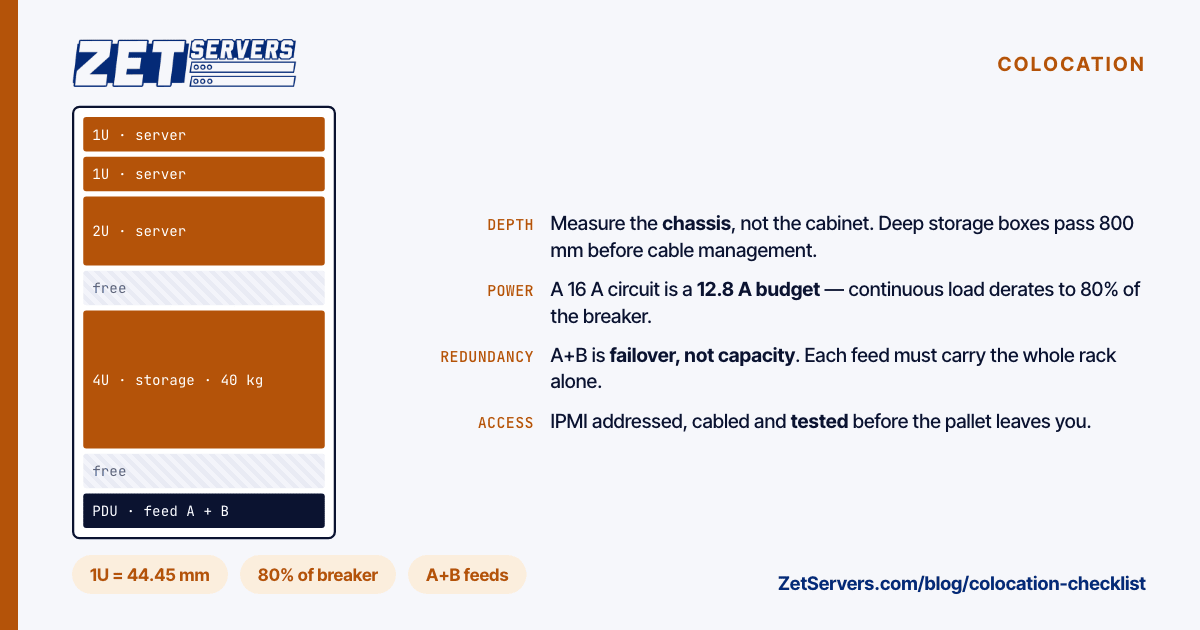
Rack units are standardised — 1U is 1.75 inches, 44.45 mm, under EIA-310 and IEC 60297 — so height is the one dimension that never surprises anyone. Depth and mounting do.
- Depth. Deep storage chassis and GPU boxes routinely exceed 800 mm with cable management behind them. Confirm the cabinet's usable depth, not its nominal size.
- Rail type. Square-hole, round-hole and threaded rails all exist, and a rail kit for one does not fit another. Ship the correct kit with the server, in the same box.
- Weight. A fully populated 4U storage chassis can exceed 40 kg. Facilities have per-rack weight limits and floor loading limits, and heavy equipment belongs at the bottom.
- Airflow. Hot aisle / cold aisle only works if every device pulls front to back. A switch with side-to-side airflow needs a duct kit or it will heat its neighbours.
Count the units you need including the ones you will not use for a year. Growing into an adjacent U is free; moving racks is not.
Power: the number everyone underestimates
Ask for the allowance in kilowatts per rack, not amps, and ask whether it is per feed or total across both.
Two facts change the arithmetic:
- Dual feeds are for redundancy, not capacity. Each feed must carry the full load alone, because that is the situation they exist for. A rack rated 5 kW on A+B gives you 5 kW of servers, not 10.
- Continuous loads derate the circuit. A server draws its load indefinitely, and standard practice sizes protection at 125% of a continuous load — equivalently, you may load a breaker to 80% of its rating. A 16 A circuit is a 12.8 A budget. Plan against that number and there are no surprise trips at 03:00.
Then work out what you actually draw, which is not what the PSU is labelled. A 750 W supply on an idle-to-moderate server may pull 150–250 W; the label is a ceiling, not a measurement. If you have the server in hand, meter it under load before you ship it. If you do not, use the vendor's power calculator and add margin.
Check the outlet types too. C13/C14 for most servers, C19/C20 for high-draw equipment, and the number of each on the PDU you are assigned. Bring the right cables — a facility will sell you one at a price that reflects the convenience.
Network: what is on both ends of the cable
Settle these in writing before delivery:
- Handoff. Copper or fibre, which optic, which speed, and how many ports. A 10G SFP+ port needs a module you are expected to supply more often than not.
- IP assignment. How many IPv4 addresses, what IPv6 prefix, and whether the gateway is on your subnet or link-local.
- Uplink commitment. Metered on 95th percentile, or unmetered at a guaranteed rate. These are different products with different failure modes on a busy month.
- Your own address space. If you hold a prefix and an ASN, a BGP session is normally arranged rather than assumed — and it needs an LOA, IRR objects and RPKI ROAs on your side before anything is announced.
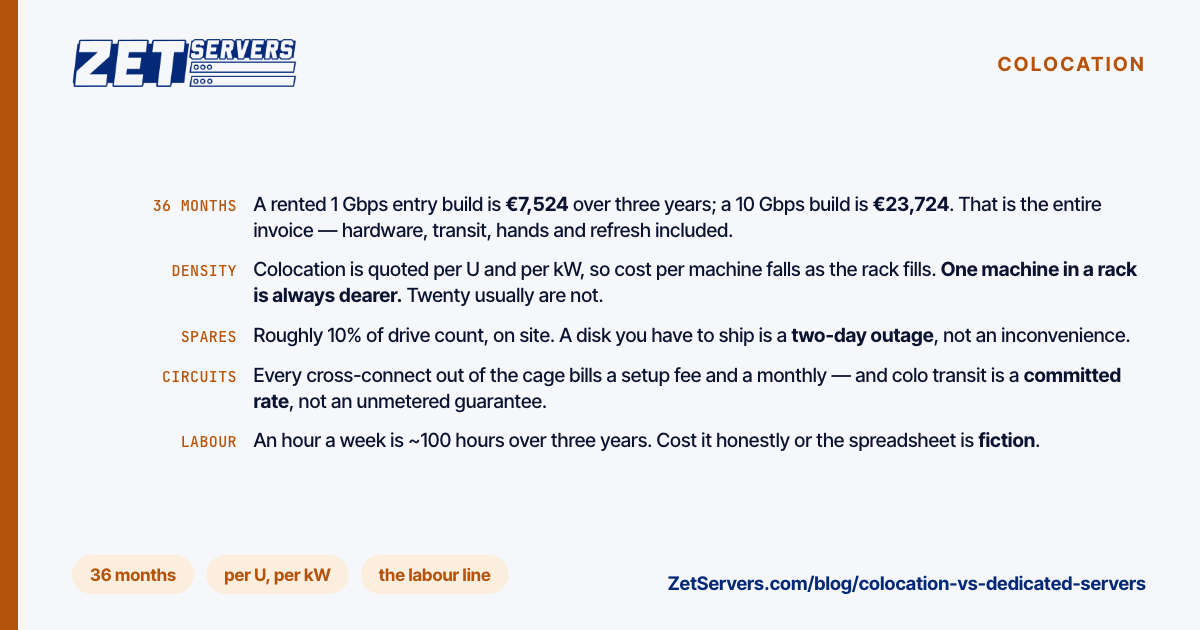
- Cross-connects. Circuits to other tenants or carriers in the same facility are usually billed per circuit, per month, and take days rather than minutes to provision.
The quality of the uplink is a separate question from its speed, and it is the one you cannot change later. What matters is whose network it is and how it reaches your users — the difference between direct peering and transit is covered in peering vs transit. We publish ours, including the exchanges we are present on, on the peering policy page.
Remote access: assume you will never touch the machine again
This is where colocation projects most often go wrong, because it costs nothing to get right and is nearly impossible to fix from another country.
- Out-of-band management configured before shipping. IPMI, iDRAC or iLO with a static address, a password nobody has to guess, and the dedicated management port cabled rather than shared with the data port.
- Serial console access, if the facility offers it. The one path that survives a network misconfiguration.
- Boot order and power policy. Set the machine to power on after AC loss. A server that stays off after a power event turns a two-minute blip into an outage that lasts until someone reads a ticket.
- A tested recovery path. Confirm you can reinstall from a virtual console before the server leaves your hands — the procedure is in how to reinstall your OS over IPMI.
- Documented credentials, held somewhere more than one person can reach.
Shipping and the paperwork
- Notify the facility before dispatch. Unannounced deliveries get refused, and a refused pallet is an expensive round trip.
- Label everything, including a label on the chassis itself with your company name and ticket reference. Cardboard is removed on arrival.
- Ship in the original packaging where you can. Rails, cables and accessories in the same consignment, listed on the manifest.
- Customs, for cross-border. Commercial invoice with realistic declared values, HS codes, and a decision on who pays duty. This is the single most common cause of a two-week delay.
- Keep spares on site. A spare drive and a spare PSU in the rack turn a hardware failure into a remote-hands ticket rather than a shipment.
Contract terms worth reading twice
- What remote hands includes, what it costs, and the response time. "Best effort" and "one hour" are very different products.
- Access policy. Who may enter, with how much notice, and what identification is required.
- Notice period and exit terms, including who de-racks and ships the equipment back.
- Whether the price is the price. Cross-connects, remote hands, additional IPv4 and out-of-hours access are frequently billed separately.
Frequently asked questions
How much power should I budget per server?
Meter it if you can. Failing that, budget 150–250 W for a typical single-socket 1U server under moderate load, 300–500 W for a dual-socket machine, and considerably more for storage chassis with many drives spinning or anything with a GPU. Size the rack allowance to the measured total, then leave headroom for the machine you have not bought yet.
Do I need my own IP addresses to colocate?
No. Most tenants use addresses assigned by the facility's network. Your own space becomes worthwhile when you need portability between providers or you already run an ASN — it requires an authorisation letter, registry objects and RPKI signing before announcement.
What is a cross-connect and when do I need one?
A physical cable between your rack and another tenant or carrier in the same building. You need one to reach a specific carrier, a peering fabric, or a partner already present in the facility. It is billed monthly and provisioned in days.
Is colocation cheaper than renting a dedicated server?
At scale, and only if you already own hardware and can amortise it. Below roughly a full rack, the hardware, spares, shipping and staff time usually exceed the cost of renting equivalent capacity — the crossover point is a spreadsheet exercise, not a rule.
Next steps
Work through space, power, network and remote access in that order, and settle each one in writing. Our own footprint, remote-hands terms and per-facility options are on the colocation page, and the backbone your rack would sit behind is described on the network page. If you have a hardware list and a target facility, send both and we will tell you what fits.