To build your own CDN you need three things: an origin that holds the content, a handful of caching edges near your users, and a way to send each user to the nearest edge. For an audience concentrated in one region — Europe, say — that comes down to a few small servers and an afternoon of nginx configuration, and it can deliver heavy traffic at a fraction of the per-terabyte price of a commercial CDN. It is not the right answer for everyone, and the end of this piece is candid about where it loses. First, the parts.
When it is worth doing
A do-it-yourself CDN pays off when most of these are true:
- Your bytes are cacheable — video segments, downloads, images, software packages, static builds.
- Your audience is regional. Eight edges spread across Europe can serve a European audience well; eight edges cannot cover the planet.
- Your volume is large and steady, so per-gigabyte pricing hurts and a flat monthly cost does not.
- Someone on the team runs nginx comfortably and does not mind being paged when an edge dies.
The shape
Every request lands on an edge. The edge answers from its cache — a hit — or fetches from upstream — a miss — then stores the response and answers. Upstream should be a shield: one cache in front of the origin that every edge misses into, so a new file is fetched from the origin once rather than once per edge. With eight edges and no shield, every new release is pulled from the origin eight times. The shield can simply be an nginx cache on the origin machine itself.
The edges
An edge is a bandwidth machine with a disk. It needs:
- A guaranteed rate, because delivery is its entire job. A port speed without a guarantee is a ceiling you discover at the busiest hour.
- Disk for the hot set — the files requested often enough to stay cached. NVMe, because a busy cache is random reads.
- RAM for the page cache, which is where the very hottest objects are actually served from.
- A location close to the users it serves.
Our unmetered VPS plans suit the role: each sits on a 25 Gbps port with 1 to 8 Gbps guaranteed and NVMe storage, in eight European regions — Frankfurt, Amsterdam, Paris, Madrid, Milan, Vienna, Dublin and Bucharest. How to choose a VPS covers what to check on any plan before trusting it with this job.
The nginx configuration that does most of the work
The cache itself is a few lines. This is a complete edge for one hostname:
proxy_cache_path /var/cache/nginx/edge levels=1:2 keys_zone=edge:64m
                 max_size=40g inactive=7d use_temp_path=off;

server {
    listen 443 ssl;
    http2 on;
    server_name cdn.example.com;
    ssl_certificate     /etc/ssl/cdn/fullchain.pem;
    ssl_certificate_key /etc/ssl/cdn/privkey.pem;

    location / {
        proxy_pass https://shield.example.com;
        proxy_ssl_server_name on;

        proxy_cache edge;
        proxy_cache_key $scheme$host$uri$is_args$args;
        proxy_cache_valid 200 206 7d;
        proxy_cache_valid 404 1m;
        proxy_cache_lock on;
        proxy_cache_use_stale error timeout updating http_500 http_502 http_503 http_504;
        proxy_cache_background_update on;

        add_header X-Cache-Status $upstream_cache_status always;
    }
}
Set max_size to about 80% of the disk you give the cache; each megabyte of keys_zone indexes roughly 8,000 objects, so 64 MB covers half a million. (http2 on needs nginx 1.25.1 or newer; older builds put http2 on the listen line instead.)
Four directives carry most of the value:
proxy_cache_lock on collapses simultaneous misses for the same object into a single upstream request. Without it, a popular new file triggers a stampede.proxy_cache_use_stale … updating keeps serving the previous copy while a fresh one is fetched, and keeps serving it when upstream errors — so the origin can fail without users noticing, for as long as the object is still in cache.proxy_cache_background_update on refreshes expired objects without making a user wait for the refresh.- The
X-Cache-Status header marks every response HIT, MISS or STALE. That header is how you will measure the hit ratio.
Large files need one more piece. A request for bytes three to four gigabytes into a five-gigabyte file should not make the edge fetch the whole file first. The slice module caches big objects in fixed-size pieces:
location /downloads/ {
    slice              1m;
    proxy_cache        edge;
    proxy_cache_key    $uri$is_args$args$slice_range;
    proxy_set_header   Range $slice_range;
    proxy_cache_valid  200 206 7d;
    proxy_pass         https://shield.example.com;
    proxy_ssl_server_name on;
}
Check that your build includes it with nginx -V 2>&1 | grep -o http_slice_module.
Sending users to the nearest edge
There are two ways, and most teams adopt them in this order.
GeoDNS. The authoritative DNS answers each lookup with the edge nearest the resolver that asked. Managed GeoDNS services do this out of the box; PowerDNS with its GeoIP backend does it self-hosted. Resolvers that send EDNS Client Subnet let the answer follow the user rather than the resolver. Pair it with health checks and a short TTL — 30 to 60 seconds — so a dead edge drops out of the answers within a minute.
Anycast. Every edge announces the same IP prefix over BGP, and internet routing carries each user to the topologically nearest one. It fails over faster than DNS and needs no GeoIP database, but it needs your own IP space and a BGP session at every edge; announcing your own IP space covers what that involves. Start with GeoDNS, and move to anycast when the fleet is large enough to justify it.
TLS on every edge
Every edge serves your certificate, and that hides one trap. With GeoDNS in place, Let's Encrypt's HTTP-01 challenge may be checked against a different edge from the one that requested the certificate, and fail. Use the DNS-01 challenge instead, or issue certificates centrally and push them to the edges along with the rest of your configuration.
The hit ratio decides the origin
The origin only ever sees misses:
origin egress = delivered traffic × (1 − hit ratio)
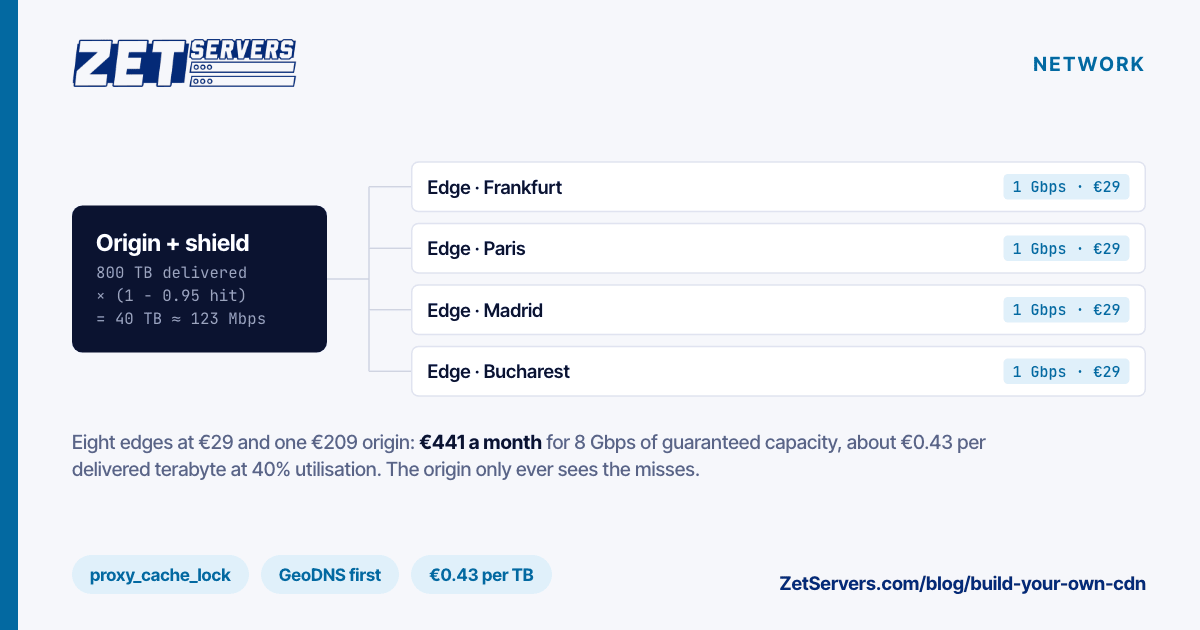
Deliver 800 TB a month at a 95% hit ratio and the origin sends 40 TB — about 123 Mbps averaged over the month. A modest origin server handles that easily. The origin's hard moments are fill bursts, not averages: after a purge or a big release, every edge misses at the same instant, and that is when proxy_cache_lock and the shield earn their keep.
What it costs
Eight edges on the entry plan, each with 1 Gbps guaranteed, cost €232 a month; a 1 Gbps dedicated server as origin and shield adds €209. That is €441 a month for 8 Gbps of guaranteed edge capacity. At 40% average utilisation:
8 edges × 324 TB × 0.40  ≈  1,037 TB delivered a month
€441 ÷ 1,037 TB          ≈  €0.43 per TB
Hold that figure against the per-terabyte price in any CDN quote; the cost per terabyte of bandwidth shows how to derive one from any flat rate. What the number leaves out is your time: monitoring, certificate renewals, the edge that dies on a Sunday. Price that honestly before deciding.
Where it loses
- Global reach. Users far from every edge wait for slow first bytes. A regional do-it-yourself CDN for the heavy traffic, plus a commercial CDN for the rest of the world, is a common split.
- Attack absorption. A large DDoS will flatten a handful of edges that a big CDN would soak up.
- Features. Image resizing, edge functions, a web application firewall — each is its own project on your own stack.
- On-call. The edges are servers, and servers need someone.
For live video, HLS and DASH segments cache like any other file, while playlists need a TTL of a second or two. Streaming servers are built around exactly that pattern.
Frequently asked questions
How many edge nodes does a CDN need?
Enough to put each large group of users within a short round trip. For Europe, four to eight well-placed edges cover most audiences. Add them where your analytics show users waiting, not where the map looks empty.
Can a VPS be a CDN edge?
Yes, if it has a guaranteed bandwidth rate and enough NVMe for the hot set. A cache is only as useful as the share of requests it answers, so size the disk from the popular part of your catalogue, not the whole of it.
Should I use GeoDNS or anycast?
GeoDNS first: it works with any server and any IP address. Anycast routes and fails over better, but needs your own prefix and a BGP session at every location.
What hit ratio should I expect?
It depends on the catalogue. A small set of popular files can stay above 95%; a long tail of rarely requested files may sit far lower. Measure it from the cache status header before sizing the origin.
Is building your own CDN cheaper than buying one?
On bandwidth, usually by a wide margin at high volume. On total cost, only if your operational time costs less than the difference — often true for teams already running servers, rarely for teams that are not.