Peering vs transit is the difference between paying a carrier to carry your packets and handing them straight to the network that owns the eyeballs. Both get a server to the internet. They do not get it there the same way, they do not cost the same, and on a bad day they do not fail the same way either. Here is what each one is, how to tell which one your traffic is using, and why it shows up in your latency graphs before it shows up anywhere else.
Two ways a network buys reach
Every autonomous system on the internet — yours, ours, your users' ISP — has exactly two ways to reach a network it is not directly attached to.
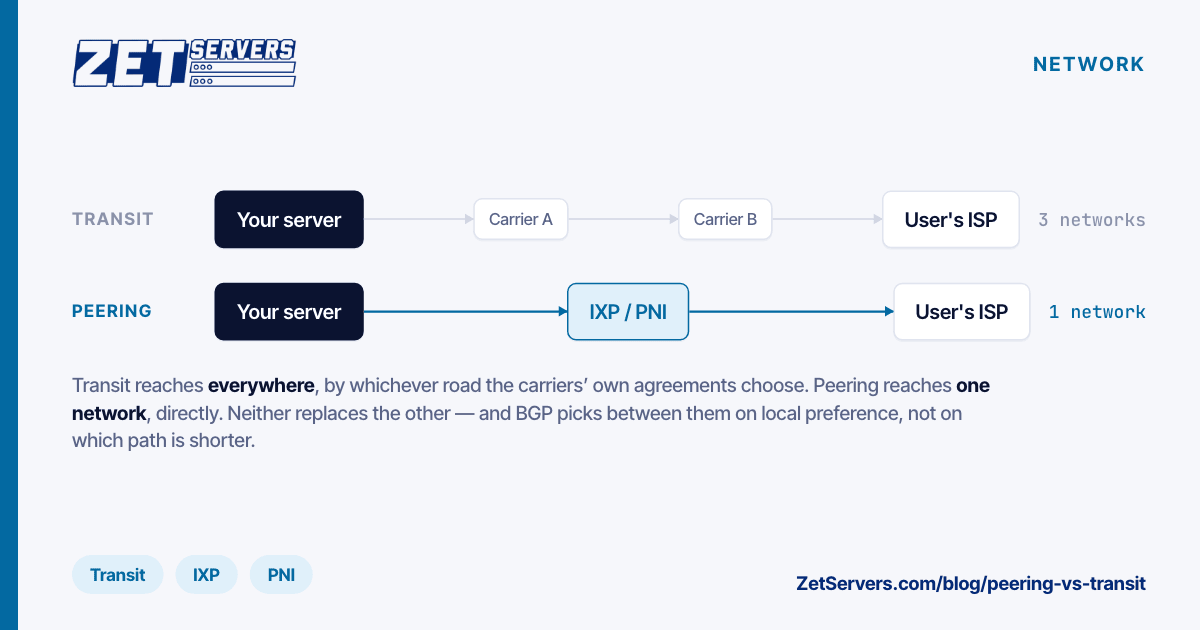
Transit is a commercial service. You pay a carrier and they announce your prefixes to the rest of the internet and carry your packets to any destination. It is reach-by-default: buy one full-table transit session and you can reach every prefix on the internet, whether or not you have ever heard of it. You pay for that, almost always on 95th-percentile committed bandwidth.
Peering is a bilateral arrangement. Two networks connect directly and exchange only their own traffic and their own customers' traffic — nothing else. There is normally no money involved (this is what "settlement-free" means), and there is no transitive reach: peering with network A does not let you reach network B through them.
The consequence people miss is that peering never replaces transit. It shortens the paths you use most, and transit catches everything else. A network with no transit can only reach the networks it peers with; a network with only transit reaches everything, by the longest available road.
What a transit session actually buys
A full-table transit session gives you the whole routing table — roughly a million IPv4 prefixes and over 150,000 IPv6 ones — and the carrier's promise to deliver to any of them. That is genuinely valuable and genuinely expensive.
What it does not buy is a short path. Your packet enters the carrier's network at your PoP, rides their backbone to wherever they hand off to the destination network, and that handoff point is chosen by their commercial arrangements, not by what is close to your user. Traffic from Frankfurt to a subscriber in Bucharest can legitimately transit through Vienna or Amsterdam if that is where the two carriers involved meet.
What a peering session actually buys
Peering removes the middle. Your packet leaves your router, crosses one exchange fabric or one cross-connect, and it is already inside the network your user is a customer of.
That is worth three things:
- Latency. One fewer network in the path is one fewer set of backbone hops, one fewer congested handoff, and typically single-digit milliseconds saved on a regional route.
- Predictability. A direct session is a link you can see. When it congests, you know; when a transit provider's peering with someone else congests, all you see is the symptom.
- Cost. Traffic that leaves over a settlement-free session is traffic you are not paying transit for. On an unmetered product this does not change the customer's bill — it changes whether the economics of an unmetered port work at all.
Peering is arranged in two shapes. Public peering happens over a shared exchange fabric — DE-CIX, AMS-IX, LINX and their peers — where one port reaches many networks, often via a route server. Private interconnect (PNI) is a dedicated cross-connect between two networks in the same facility, used when the traffic between them justifies its own 100G or 400G port.
The order a packet is actually chosen
BGP does not pick the shortest or the fastest path. It picks the most preferred one, by a fixed list of tie-breakers, and the first two on that list are set by the operator rather than by the internet:
- Highest local preference — a local policy knob. This is where "prefer peering over transit" is expressed.
- Shortest AS path.
- Lowest origin type, then lowest MED, then eBGP over iBGP, then lowest IGP cost to the next hop.
Local preference beating AS-path length is why a route can be preferred despite looking longer, and why AS-path length is a poor proxy for latency. A two-hop path through a congested transit handoff loses to a three-hop path over a clean peer every time, and no traceroute output tells you which one you got without measuring.
Reading it from your own server
You can see the difference from a shell. traceroute shows you hops; mtr shows you hops with loss and jitter over time, which is the part that matters:
mtr -rwzc 100 <destination-ip> # 100 packets, report mode, show ASNs
The -z flag prints the AS number for each hop. Read the AS sequence, not the hostnames — reverse DNS on carrier routers is frequently stale or misleading. If your traffic to a large ISP shows one AS between you and them, you are peering. If it shows two or three, you are on transit.
Two cautions on reading traceroutes:
- The path is asymmetric. What you see is the forward path. The return path can be completely different, and a problem on the return leg shows up as loss at every hop after the break — which looks like the wrong router is at fault.
- ICMP is deprioritised. Routers rate-limit their own control-plane responses. A middle hop showing 20% loss while the final hop shows 0% is a router protecting itself, not a broken link.
For the view from the other side, most large networks publish a looking glass. Running a trace back toward your own prefix from a looking glass in your user's region is the only cheap way to see your return path.
What to ask a host about their network
Marketing pages count peers. That number alone tells you very little — a session at an exchange you never send traffic to is a row in a database. The questions that separate a real network from a rented one:
- Do you run your own AS and announce your own space? If the answer is no, the "network" is someone else's, and every routing decision belongs to a company you have no relationship with.
- What is the transit mix? Multiple full-table providers means a single carrier's bad day is a reconvergence, not an outage.
- Is the peering policy published? An open policy that lists requirements is a network that expects to be asked. We publish ours, including the exchanges and the session profile, on the AS25198 peering policy page.
- Is there capacity headroom, or is the peering port full? A saturated peering link is worse than transit, because it fails during exactly the hours you care about.
- Do they validate RPKI? Dropping RPKI-invalid routes is now table stakes for not being a party to somebody else's hijack.
Our own answers are on the network page: AS25198, our own 100/400G backbone, full tables from twelve Tier 1 carriers underneath a large direct-peering layer, and an open policy at every exchange we are present on.
Frequently asked questions
Is peering always faster than transit?
No. Peering removes an intermediary, which usually shortens the path, but a congested peering port or a peer with a poor internal backbone can be slower than a well-provisioned transit route. What peering reliably gives you is a shorter path you can see and control; speed follows from that most of the time, not all of it.
Does more peers mean better performance for my server?
Only for the peers your traffic actually uses. Fifty sessions with networks your users are not on change nothing. What matters is whether the specific ISPs your audience buys internet from are reachable directly, which is a question about your audience, not about a headline number.
Can I peer with my host?
Not usually, and you would not want to — peering is between networks that each carry their own traffic. If you run your own AS and your own address space, you can announce it from a server or a rack and take transit from the host instead. That is a normal arrangement in colocation.
Why does my traceroute look worse than my actual performance?
Because traceroute measures the router's willingness to answer ICMP, not the forwarding path's health. Judge a path by end-to-end throughput and loss on real traffic, and use mtr to localise a problem only after the end-to-end measurement says there is one.
Next steps
If you are comparing hosts, the network is the part you cannot change after you order — hardware can be swapped, a routing table cannot. Read the peering policy and the network page of anyone you are considering, then measure the path from their test IP to your actual users before you commit. If you want us to trace a specific route for your audience before you order, ask us and we will run it.