Migrating to a dedicated server is one of the few infrastructure jobs where the technical work is easy and the sequencing is what fails. Copying data is solved. Cutting traffic over without losing a write, without a stale DNS cache sending customers to a machine you already turned off, and with a way back if the new box misbehaves — that is the part worth planning. What follows is the order that works, and the two rehearsals that make it boring.
Before you copy anything
Inventory what the old machine actually does. Not what the documentation says. Run ss -tlnp for every listening service, crontab -l for every user plus /etc/cron.d, and check for systemd timers. The forgotten cron job that emails an invoice on the 1st is the classic post-migration incident.
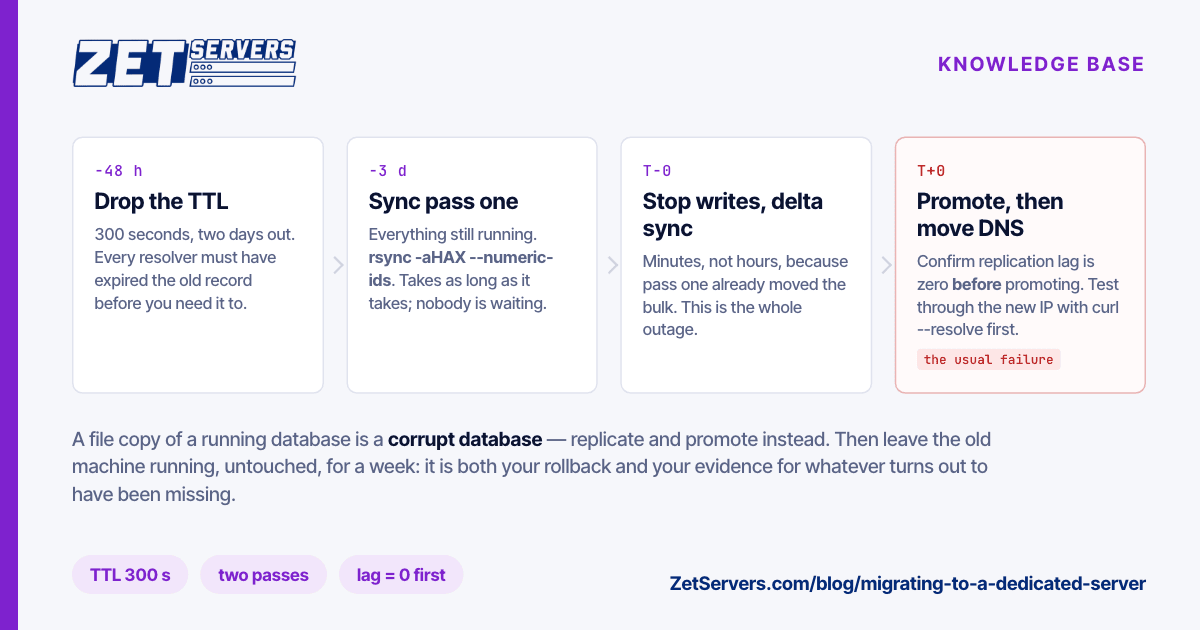
Drop your DNS TTL first. Set it to 300 seconds at least 48 hours before the cutover, so every resolver has expired the old value by the time you need to move. Doing this on the day is the single most common cause of a migration that drags for two days — some resolver somewhere is still holding a 24-hour record.
Prepare the destination properly. Same OS major version unless you are deliberately upgrading; changing distribution and machine at once means you cannot tell which one broke it. Harden before it carries traffic, not after — securing a new dedicated server is a 20-minute job on an empty box and a nervous one on a live one.
Verify the hardware before you trust it. Check the disks report the size and model you ordered, that the array is in the layout you asked for, and that the uplink delivers its guaranteed rate — verifying port speed takes five minutes and is much better done now than during the cutover window.
The copy, in two passes
Never a single copy. Two, and the second one is short.
Pass one, days before, with everything running:
rsync -aHAX --numeric-ids --delete \
  --exclude=/proc --exclude=/sys --exclude=/dev \
  /srv/ root@new-server:/srv/
This moves the bulk while nobody is waiting. It will take as long as it takes.
Pass two, during the window, with services stopped:
rsync -aHAX --numeric-ids --delete /srv/ root@new-server:/srv/
Because pass one did the work, pass two moves only the delta and finishes in minutes. That difference is what turns a four-hour outage into a fifteen-minute one.
Databases do not migrate this way. A file copy of a running database is a corrupt database. Use replication: set the new server up as a replica, let it catch up, verify replication lag is zero, then promote it during the window. For MySQL that is binary log replication; for PostgreSQL, streaming replication. Both reduce the cutover to a promotion and a connection-string change.
The cutover
The order matters and each step has a verification:
- Announce the window. Even a 15-minute one.
- Stop writes on the old machine. Stop the application, leave the database readable.
- Run the delta sync, then promote the database replica. Confirm lag is zero before promoting, not after.
- Start services on the new machine with traffic still pointed at the old one. Test through the new server's IP directly —
curl --resolve yourdomain.com:443:NEW_IP https://yourdomain.com/health exercises the real vhost and TLS path without touching DNS.
- Move DNS. With a 300-second TTL, most traffic follows within five minutes.
- Watch both machines. The old one should go quiet over the next hour; anything still arriving there is a hardcoded IP somewhere, and now you know where.
- Keep the old machine running, untouched, for a week. It is your rollback and your evidence when something turns out to have been missing.
What breaks, and it is always one of these
- TLS certificates. Copy the private keys and the full chain, or reissue before the cutover. An HTTP-01 challenge will not validate against a host DNS has not moved to yet, so reissue after DNS or use DNS-01 beforehand.
- File ownership.
--numeric-ids exists because UIDs differ between installs. Without it, a fresh distribution's different user numbering silently reassigns every file.
- Hardcoded IPs. In application configs, firewall rules, third-party allowlists, monitoring, webhook endpoints. Grep the old server's configuration for its own address before you migrate; you will find some.
- Outbound reputation. A new IP sending mail starts with no reputation. Warm it, and set SPF, DKIM and reverse DNS before the first message leaves.
- Cron overlap. Both machines running the same scheduled job during a dual-run period means double invoices or double emails. Disable cron on the new server until the cutover, then disable it on the old one immediately after.
- Kernel and firewall defaults. A new box's
nf_conntrack_max, file descriptor limits and TCP buffers are defaults, not your tuned values — and if you tuned them for a reason, the reason still applies. Linux 10 Gbps tuning covers the ones that matter at high rates.
The rehearsal that pays for itself
Do the whole cutover once, a week early, against the new machine, with DNS untouched. Sync, promote a replica, start services, run your health checks through --resolve, then throw the state away and re-sync.
It costs an evening and it converts every unknown into a known: how long the delta sync takes, whether the certificates work, whether the application starts cleanly against a database it has never seen, which config file still points at the old address. Migrations that go badly are almost always migrations nobody rehearsed.
If the new machine is also a change in scale — more disks, a faster uplink, a different CPU class — verify the new capability under load before you need it. A 1 Gbps guaranteed box behaves differently from the VPS it replaced, and the time to discover a misconfigured NIC is not during the window.
Frequently asked questions
How long does migrating to a dedicated server take?
The preparation is days; the actual downtime window is 15 to 30 minutes if you did two-pass syncing and lowered your TTL beforehand. A single-pass migration on a large dataset can run for hours.
Can I migrate with zero downtime?
For read traffic, effectively yes. For writes, you need either a brief pause or an application that tolerates dual-writing. Most teams find a 15-minute window far cheaper than the engineering required to avoid it.
Should I upgrade the OS at the same time?
No. Migrate first, upgrade later. Two changes at once means you cannot bisect a failure.
What if something breaks after the cutover?
Point DNS back. That is why the old machine stays running untouched for a week and why the TTL stays low until you are confident.
Do I need to reinstall the OS on the new machine first?
Only if the delivered image is not what you want. If it is not, reinstalling over IPMI is quicker than adapting to someone else's defaults. If you would rather not run the cutover alone, ask us to schedule it — we have done a few.