Null routing is the bluntest tool a hosting network has against a DDoS attack: its routers throw away every packet addressed to one IP. The flood stops crossing the network, and so does every legitimate connection to that address. For the host it is cheap and runs at line rate. For the customer who owns the IP it is an outage, delivered by their own provider. Below: how it works, why hosts do it, how to spot one, and what to ask.
A route to nowhere
A null route is an ordinary route whose next hop is a discard interface: Null0 in the Cisco sample of RFC 5635, discard in the Juniper one. The RFC's case for it is scale: routers forward faster than they filter and hold far more routes than filter entries, so a discard route keeps up where an access list would not.
The remotely triggered part solves distribution, since an attack arrives across every edge router at once. Destination-based RTBH, as RFC 5635 describes it, has four pieces:
| Piece |
What it does |
| Discard address |
Often from 192.0.2.0/24 or private space, routed to the null interface on the edge routers |
| Trigger community |
Matched by the edge routers' BGP policy, which rewrites the next hop to the discard address |
| Trigger router |
Announces the victim's address over iBGP with that community and NO_EXPORT |
| Safety filters |
Egress filters denying prefixes longer than you announce, and anything carrying the trigger communities |
One announcement, and every participating edge router drops the traffic before it crosses the backbone. Illustrative, with documentation addresses:
prefix       203.0.113.50/32       # one host, not its /24
next-hop     192.0.2.1             # the discard address, routed to Null0
communities  64500:666 no-export   # internal trigger, kept inside the AS
65535:666: asking the next network to drop it
A drop at your own edge comes after the traffic has crossed the links into your network. If the flood is bigger than those links, the host has to ask its upstreams to drop it on their side.
In place of each upstream's own trigger, RFC 7999 defined one well-known value, BLACKHOLE, which IANA registered as 0xFFFF029A. 0xFFFF is 65535 and 0x029A is 2 × 256 + 154 = 666, so it is written 65535:666. Its rules:
- Advisory. Honouring it is each operator's choice; on a bilateral session both sides must agree first.
- As specific as possible. Networks usually refuse prefixes longer than /24 (IPv4) or /48 (IPv6), but a blackhole should be one address, /32 or /128, so nothing next to the victim is dropped.
- Kept local. The receiver should add NO_EXPORT or NO_ADVERTISE so it goes no further.
- Only for your own space. A neighbour should honour it only for prefixes you are authorised to announce. An unauthorised BLACKHOLE can itself be a denial-of-service attack.
If you run your own prefix, announcing your own IP space covers the BGP session this rides on.
Why a host does it
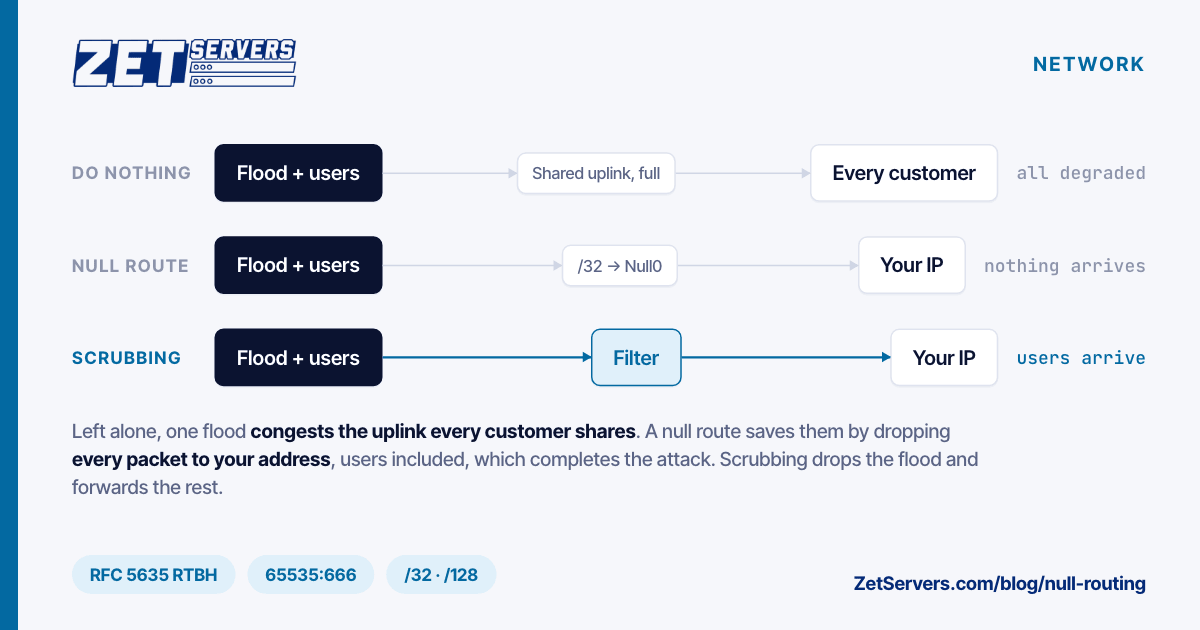
A host's links to its transit providers and peers are shared. A flood aimed at one customer arrives on the same links as everyone else's traffic, and RFC 5635 describes what happens when it exceeds them: legitimate traffic starved out, collateral damage to other customers and the network.
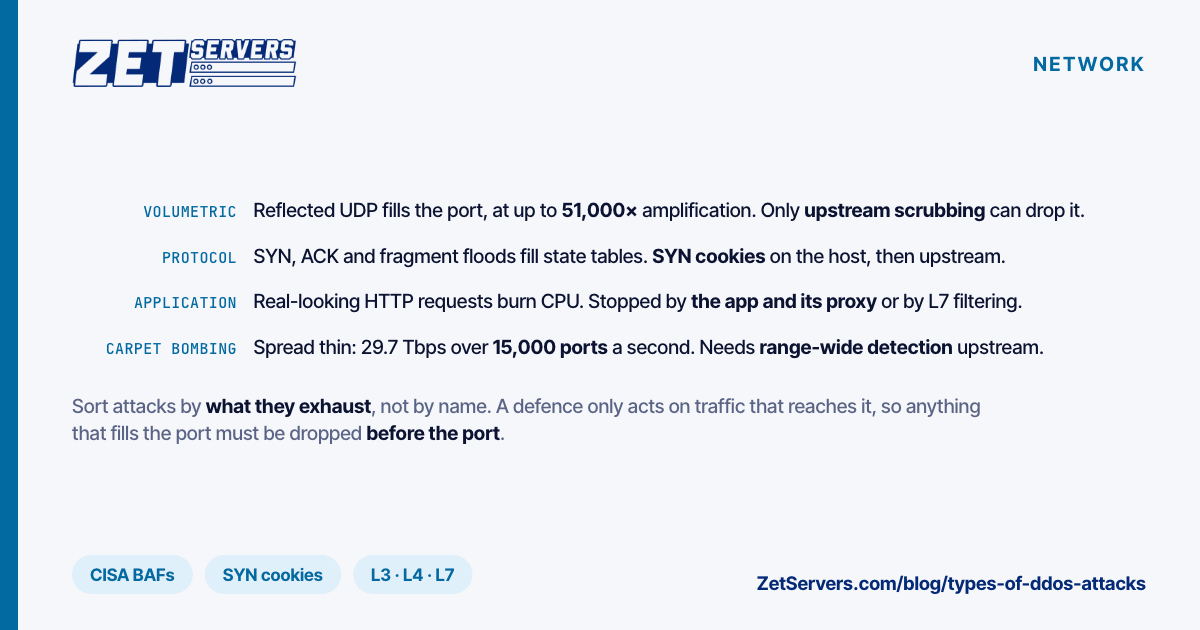
Null routing one address trades one customer's reachability for everybody else's. A /32 inside a /24 is 1 of 256 addresses, about 0.4% of the block; blackholing the /24 would cut off all 256, which is why both RFCs want a single host. A /32 only helps against an attack on one address; floods spread across a range are in types of DDoS attacks.
Why it finishes the attacker's job
The attacker wanted your address unreachable. A null route makes it unreachable to everyone, users included, until someone removes it. The RFC is plain about destination-based RTBH: "the impact of the attack on the target is complete."
- Your server is fine, and useless. It keeps running and can send, but replies to it are dropped, so no connection completes either way. Out-of-band management such as IPMI normally answers on a separate address, which a /32 null route on the main IP does not touch.
- Duration is policy, not protocol. Neither RFC sets one, and we have no survey of hosts' timers to quote: ask. Attacks are short. Cloudflare's 2025 Q3 report found 89% of network-layer attacks over in under 10 minutes, and its Q4 record, 31.4 Tbps, lasted 35 seconds. A null route that outlives the attack is downtime the host added.
- Renumbering may not help. RFC 5635 suggests moving the service to a new address and updating DNS, but notes botnets are told to re-resolve the name, so the attack follows.
How to recognise a null route from outside
The signature: a trace that dies at the provider's edge while the rest of the subnet answers. Run an mtr report to the address, then to a neighbour in the same /24. Illustrative, documentation addresses:
$ mtr -rwzn -c 100 203.0.113.50                     # the null-routed address
HOST: probe-1                   Loss%   Snt   Last   Avg  Best  Wrst StDev
  1. AS64496  192.0.2.1          0.0%   100    0.5   0.6   0.4   2.0   0.2
  2. AS64497  198.51.100.9       0.0%   100    6.9   7.1   6.6   9.4   0.4
  3. AS64500  198.51.100.130     0.0%   100    7.8   8.0   7.5  10.2   0.4
  4. ???                        100.0   100    0.0   0.0   0.0   0.0   0.0

$ mtr -rwzn -c 100 203.0.113.51                     # its neighbour, hops 1-3 as above
  4. AS64500  198.51.100.161     0.0%   100    8.1   8.3   7.9  10.0   0.3
  5. AS64500  203.0.113.51       0.0%   100    8.2   8.3   8.0   9.7   0.3
- Silence starts at the edge. The target's trace reaches the host's border router, hop 3, then nothing; the neighbour's runs on to the server. The exact last hop varies by router. A server that is merely down looks different: the trace reaches its gateway, and only the server is silent.
- Repeat over TCP with
mtr -T -P 443, since some networks filter ICMP. A null route drops every protocol alike.
- Try another vantage point. Where an upstream honoured 65535:666, the trace dies before the host's AS, so traces from different places can die in different networks.
- Check from inside. Inbound traffic on the server falls to almost nothing, flood included. A flood that reaches you looks the opposite: the port pinned at line rate.
The alternative: filter instead of drop
Upstream scrubbing draws traffic for the address through filtering capacity that discards the attack and forwards the rest, so the IP stays reachable during the flood. Our guide to the DDoS protected dedicated server covers how it works and what a capacity figure promises.
Filtering capacity is a ceiling, so the null route does not disappear. It moves up, to attacks bigger than the ceiling.
Questions to ask a host about null routing
- What triggers it? A threshold, link load or an engineer's call? Is filtering tried first?
- What gets blackholed? Your /32 or /128, or a wider prefix that takes neighbours with it?
- Where? At the host's edge, or upstream via 65535:666 or a provider community?
- For how long? A timer, the attack's end, or your request? Can you ask for early removal?
- Will you be told, with the attack size and start time?
- Can you trigger it yourself for your own prefix, as RFC 5635's customer-triggered RTBH allows?
- What about repeats? Is a second attack treated the same?
What the included 100 Gbps tier changes
DDoS protection is an option on the order form of every ZetServers KVM VPS plan and dedicated server. The 100 Gbps tier is included at €0. It and the paid tiers up to 5 Tbps are network-layer (L3/L4) protection: €149 a month for 500 Gbps, €499 for 1 Tbps, €999 for 2 Tbps, €2,499 for 5 Tbps. The 10 Tbps tier, €4,499, adds Layer 7 filtering. Order form prices, 26 October 2026, excluding VAT.
Without protection, the attack size that gets your address sacrificed is set by the host's shared links, and you rarely know it. A tier names the figure: the size meant to be filtered rather than blackholed. 100 Gbps is 100 times a 1 Gbps port and 10 times a 10 Gbps one; 1 Gbps dedicated servers start at €209 with it included.
It is still a ceiling: the 31.4 Tbps record is 3.14 times our top tier. Ask support what happens above the tier you chose.
Frequently asked questions
What is null routing?
Null routing sends all traffic for an IP address to a discard interface, so routers drop it instead of forwarding it. Hosts use it during DDoS attacks, normally on one /32 or /128, so a flood aimed at one customer does not congest links everyone shares. The address stays unreachable until the route is removed.
Does a null route stop a DDoS attack?
It stops the attack hurting the rest of the network, not you. Every packet to the null-routed address is dropped, legitimate users' included, so the target goes offline as the attacker intended; RFC 5635 calls the impact on the target complete. Filtering, which drops only attack traffic, keeps the address reachable.
How long does a null route last?
As long as the host's policy says. Neither RFC 5635 nor RFC 7999 sets a duration: it might be a timer, the end of the attack, or your request, so ask in advance. Cloudflare found 89% of network-layer attacks in 2025 Q3 ended within 10 minutes, so a long null route can outlast the attack.
How can I tell if my IP has been null-routed?
Run mtr or traceroute to the address and to a neighbour in the same subnet. A null-routed address stops answering at the provider's edge or inside its upstream, while the neighbour answers all the way. A server that is simply down looks different: the trace reaches its gateway, and only the server is silent.