Linux 10 Gbps tuning is mostly a matter of undoing defaults that were chosen for a slower internet. A stock kernel on a modern server will move a few gigabits without complaint and then flatten, and the flattening is rarely the network's fault — it is a receive window sized in 2005, one CPU core taking every interrupt, and a web server calling read() and write() when it could be calling sendfile().
This is the layer below measurement. If you have not yet established what the link itself delivers, start with how to verify your port speed and come back with a number to improve.
Why a single stream stalls first
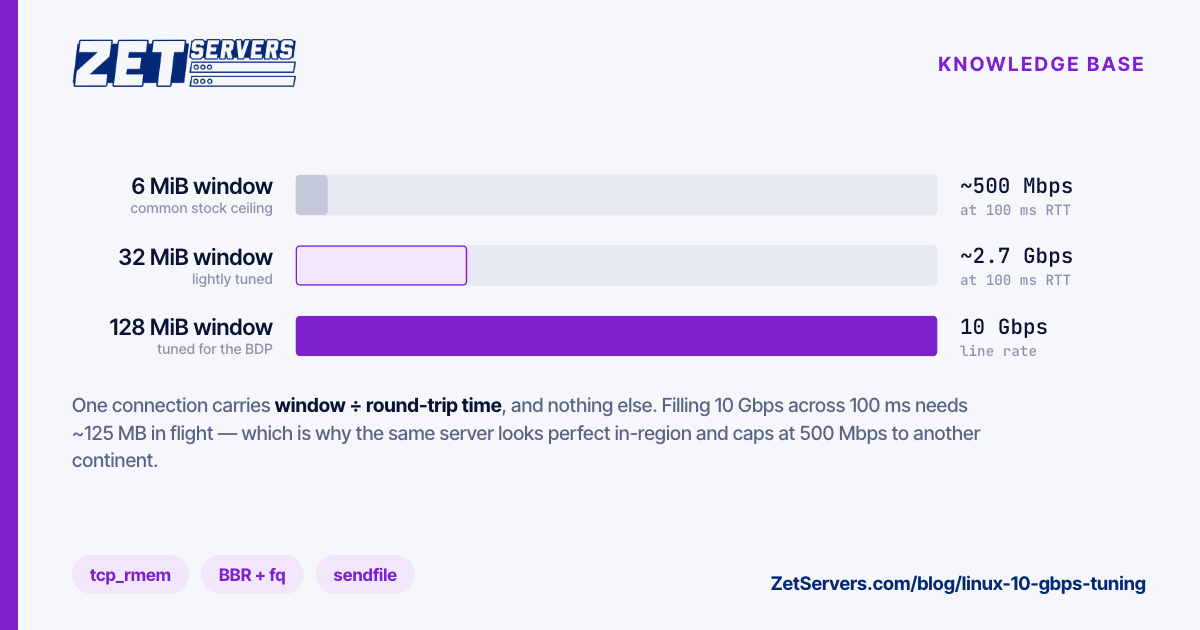
The ceiling on one TCP connection is the bandwidth-delay product: how many bytes must be in flight to keep the pipe full.
throughput = window size / round-trip time
At 100 ms RTT, filling 10 Gbps requires roughly 125 MB in flight. Your ceiling is the third value of net.ipv4.tcp_rmem — read it rather than assume it, because distributions ship different numbers. A 6 MiB ceiling, which is a common stock value, works out at:
6 MiB / 0.1 s ≈ 63 MB/s ≈ 500 Mbps
That is the entire explanation for "my 10 Gbps server only does 500 Mbps to Australia". The link is fine; the window ran out. Locally, at 1 ms, the same 6 MiB would sustain far more than the port — which is why the problem is invisible in a datacentre-local test and obvious to a real user.
Check what you have before changing anything:
sysctl net.core.rmem_max net.core.wmem_max
sysctl net.ipv4.tcp_rmem net.ipv4.tcp_wmem
sysctl net.ipv4.tcp_congestion_control net.core.default_qdisc
Raise the ceilings, leave the autotuning to do the rest — the middle and maximum values of tcp_rmem are what the kernel scales between, so raising the maximum permits a large window without forcing one:
cat >/etc/sysctl.d/99-10g.conf <<'EOF'
net.core.rmem_max = 134217728
net.core.wmem_max = 134217728
net.ipv4.tcp_rmem = 4096 262144 134217728
net.ipv4.tcp_wmem = 4096 262144 134217728
net.core.default_qdisc = fq
net.ipv4.tcp_congestion_control = bbr
EOF
sysctl --system
fq is not optional alongside BBR: BBR paces its sends, and it needs a queueing discipline that can pace. Setting the congestion control without the qdisc gets you a fraction of the benefit.
Give the NIC more than one core
A single 10 Gbps flow can generate more interrupts than one core can service. Multi-queue NICs spread that across cores by hashing flows, but only if the queues exist and the interrupts are distributed.
ethtool -l eth0          # how many combined queues are configured vs available
ethtool -L eth0 combined 16
ethtool -g eth0          # ring buffer sizes, current vs maximum
ethtool -G eth0 rx 4096 tx 4096
Ring buffers absorb bursts while the CPU is busy elsewhere. Raising them trades a little latency for a lot of drop resistance, which is the right trade on a delivery server. Confirm you are actually dropping before you raise them — ethtool -S eth0 | grep -Ei 'drop|miss|error' names the counter that matters, and if it is zero the ring is not your problem.
For interrupt distribution, irqbalance handles the common case adequately. Pin manually only when you have measured one core saturated in mpstat -P ALL 1 while the others idle, and pin to cores on the NUMA node the NIC's PCIe lanes belong to (cat /sys/class/net/eth0/device/numa_node). Cross-node memory access on a two-socket box costs real throughput on this workload.
Leave the offloads on
Generic receive offload, TCP segmentation offload and their relatives let the NIC and kernel batch work that would otherwise cost a per-packet trip through the stack. At 10 Gbps a 1500-byte MTU means over 800,000 packets per second in each direction; batching is what makes that affordable.
ethtool -k eth0 | grep -E 'segmentation|receive-offload|checksum'
They are on by default and should stay on. The advice to disable them comes from packet-capture and firewall debugging, where they distort what tcpdump sees, and it gets copied into performance guides where it does the opposite of what is intended.
Jumbo frames (MTU 9000) genuinely reduce per-packet overhead, but only when every device along the path agrees. That makes them a fit for a storage back-end on a private VLAN and a reliable source of black-holed traffic anywhere on the public internet. Leave the public interface at 1500.
Make the application stop copying
Above the kernel, the largest single win for file delivery is not copying bytes through userspace at all.
For nginx serving static files or media segments:
sendfile on;
tcp_nopush on;
tcp_nodelay on;
aio threads;
output_buffers 4 512k;
sendfile moves data from page cache to socket without a userspace round trip. tcp_nopush fills full frames before sending. aio threads keeps a slow disk read from blocking the worker that issued it, which matters as soon as the working set exceeds RAM.
If you terminate TLS — and you do — kernel TLS moves the encryption alongside sendfile so the data path stays in the kernel. Nginx 1.21.4 and later support it, provided OpenSSL 3.0 was built with enable-ktls and the kernel has kTLS available (4.17 at minimum, 5.2 or later in practice):
ssl_conf_command Options KTLS;
The benefit scales with how much of your traffic is large static objects. For a video or download workload it is substantial; for an API returning small JSON responses it is noise.
Verify, then re-verify from outside
Every change above should be justified by a measurement before and confirmed by one after. Two rules that save time:
- Test to a far-end host you control, with several parallel streams. A single stream measures the window, not the port; public speed-test endpoints mostly cap below 1 Gbps and will under-report a fast link by an order of magnitude.
- Test at realistic RTT. A local iperf3 run will look perfect with the stock window and tells you nothing about the users you are tuning for. Run one test in-region and one across an ocean.
Where the far end is genuinely far, no local setting fixes physics — the fix is to be closer to the user, which is a network and PoP question rather than a kernel one. Sizing the port itself, rather than making it perform, is covered in how much bandwidth do you actually need.
Frequently asked questions
Should I use BBR or cubic?
BBR generally wins on long, lossy paths — transcontinental transfers, mobile networks — because it does not treat a lost packet as automatic evidence of congestion. Cubic remains a reasonable default for short, clean paths. Test both against your actual users; the answer depends on the paths your traffic takes, not on which is newer.
Why is one CPU core at 100% while the rest are idle?
All receive interrupts are landing on one queue, or on one core. Check ethtool -l for the configured queue count and mpstat -P ALL 1 for the distribution. A single-queue configuration on a multi-gigabit NIC caps you at whatever one core can process.
Do these settings help a 1 Gbps server?
The window settings help on any high-latency path, including 1 Gbps. The NIC queue and offload work only starts to matter above roughly 2–5 Gbps, where per-packet cost becomes the binding constraint.
Will tuning fix packet loss?
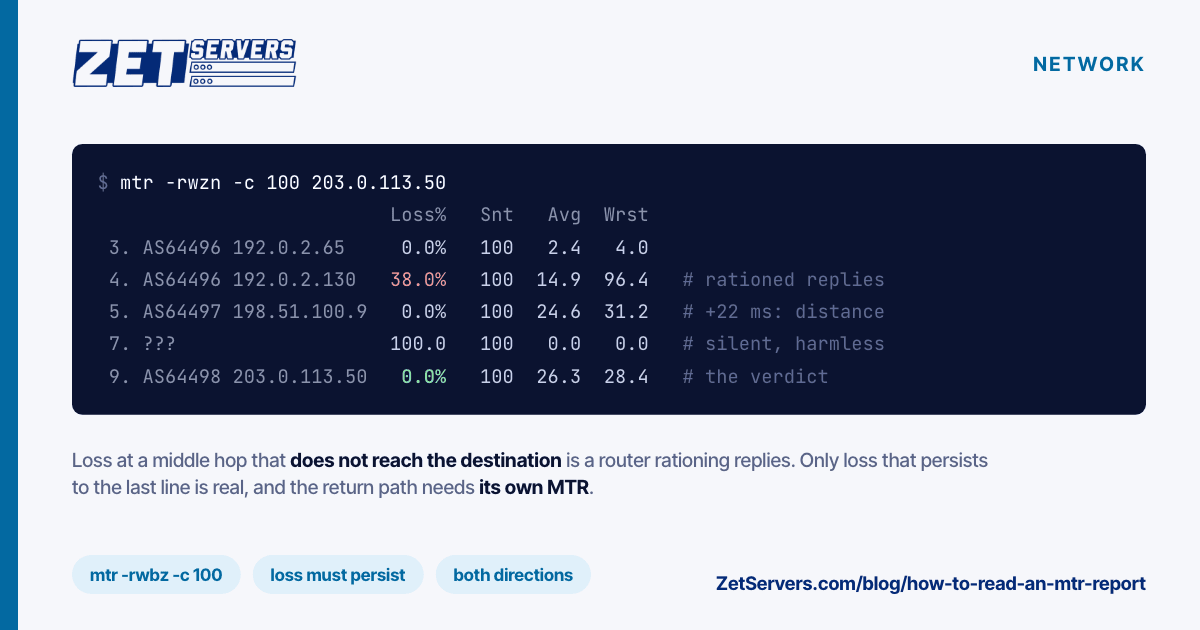
No. Loss is a path problem — congestion or a fault somewhere between you and the user — and tuning changes only how gracefully your stack copes with it. Larger buffers and BBR reduce the damage; they do not remove the cause. Localise it with mtr before you spend time on the kernel.
Next steps
Apply the window ceilings first, measure, then move to queues and offloads only if the measurement says the CPU is the constraint. Configurations at 10 Gbps and 25 Gbps ship with hardware that can reach line rate, so if yours does not after this, the remaining variable is the path rather than the box.