A VPS plan lists vCPUs the way a dedicated server lists cores, but a vCPU is a scheduling promise, not a piece of silicon. A dedicated vCPU means hardware time nobody else is scheduled onto; a shared vCPU means a place in a queue with other customers' virtual machines. The two look identical in lscpu, cost very different amounts, and behave the same right up until the host gets busy. This is how to tell them apart before that happens — and how to check which one you have.
What a vCPU is, physically
Under KVM, each virtual CPU is an ordinary thread on the host. The host kernel's scheduler decides when that thread runs and on which hardware thread, exactly as it would for any other process. Everything a provider promises about vCPUs is a promise about that scheduling.
Two details decide what you are buying:
- A hardware thread is not always a core. On hosts with simultaneous multithreading — Intel's Hyper-Threading, AMD's SMT — every physical core presents two hardware threads that share its execution units and caches. Many providers map one vCPU to one hardware thread, so two vCPUs can be two halves of one core. AWS, for one, documents that each vCPU on its x86 instances is a thread of a physical core.
- The ratio is rarely published. A shared plan sells more vCPUs than the host has hardware threads, on the bet that most guests idle most of the time. That overcommit ratio is the most important number on the plan, and it is almost never on the page.
Shared and dedicated, side by side
|
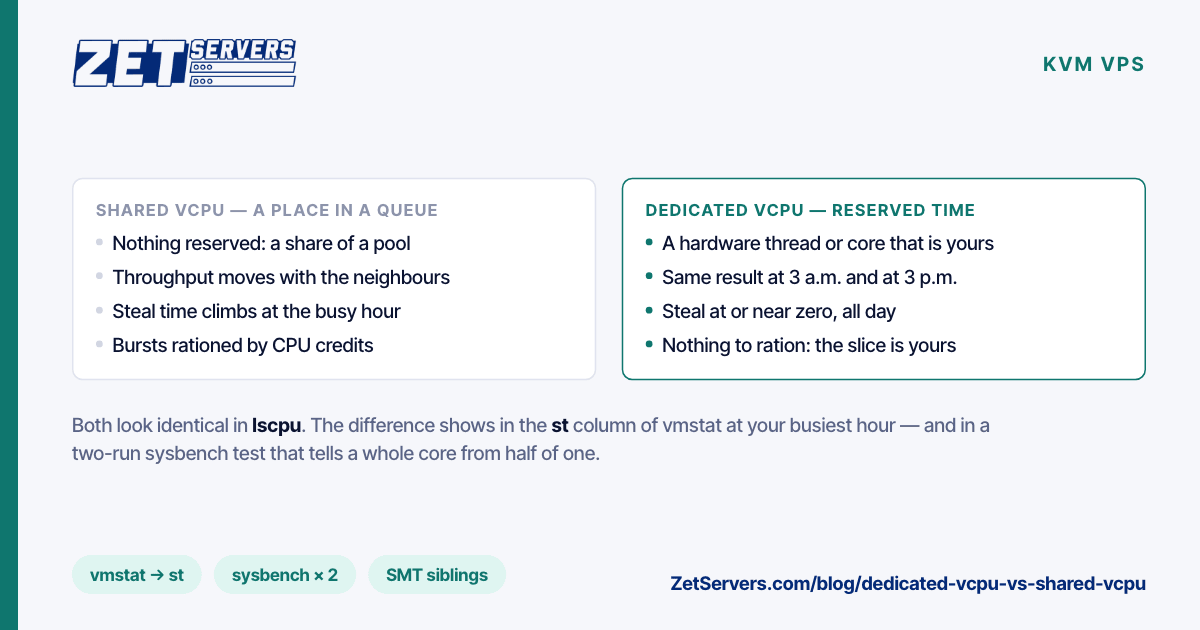
Shared vCPU |
Dedicated vCPU |
| What is reserved |
Nothing — a share of a pool |
A hardware thread or a core |
| Throughput |
Varies with the neighbours |
Stable, hour to hour |
| Steal time |
Rises when the host is busy |
At or near zero |
| Bursting |
Often rationed by CPU credits |
You already have the whole slice |
| Price per vCPU |
Low |
Higher |
| Good for |
Idle-heavy, bursty work |
Anything with a deadline |
Burstable plans are the extreme case of sharing: a baseline of a fraction of a core, with credits that let you run faster for a while and a throttle when they run out. They are excellent for a small website and miserable for a build server that happens to run all afternoon.
Steal time: the number that tells you
Linux reports how long a vCPU was ready to run while the hypervisor was busy running something else. That is steal time, and three standard tools show it:
vmstat 5            # the last column, st
mpstat -P ALL 5     # %steal for each vCPU (sysstat package)
top                 # %st in the CPU summary line
On a dedicated vCPU, steal should sit at or very near zero, including at the busiest hour of the day. On a shared plan, a few percent at peak is normal; double digits that persist mean you are paying for CPU time you are not receiving. Watch it across a whole day rather than once — contention follows your neighbours' schedules, not yours.
Two limits are worth knowing. Steal only appears when the hypervisor reports it, which KVM does and some platforms do not. And it measures time, not quality: a neighbour thrashing the shared L3 cache or the memory bus slows you down without adding a single point of steal. That second effect is one of the costs of sharing a host that dedicated server vs VPS walks through, and a large part of why the heaviest workloads eventually leave virtual machines altogether.
A ten-minute test for any VPS
lscpu shows whatever topology the hypervisor chose to declare, which proves nothing. Measure instead:
sysbench cpu --threads=1 --time=60 run | grep 'events per second'
sysbench cpu --threads=$(nproc) --time=60 run | grep 'events per second'
Divide the second result by the number of vCPUs and compare it with the first:
- Close to the single-thread figure, allowing for some drop as clocks settle under all-core load: each vCPU is doing a full core's worth of work.
- Roughly half to two-thirds of it: your vCPUs are probably pairs of hyperthreads sharing physical cores, and you have about half as many cores as the plan suggests.
- Low, and different on every run: contention. Check steal while the test runs.
Run it at a quiet hour and again at your busiest. A dedicated vCPU gives the same answer both times. The rest of a day-one check — memory, disks, network — is in the first-hour benchmark checklist; on a VPS the disk tests tell you less, but the network test tells you just as much.
When the difference matters
Choose dedicated vCPUs when any of these is true:
- The work has a deadline. Game ticks, voice mixing, request handlers with a latency target, CI jobs somebody is waiting on.
- The CPU is busy most of the day. Sustained load is exactly what an oversold host cannot give every guest at once.
- You are moving packets at gigabit rates. Encryption and packet processing are CPU work per packet, so a VPN or proxy node on a multi-gigabit guarantee needs cores that are there when the traffic is. Servers for a VPN provider shows how that load scales.
- You benchmark or capacity-plan. Numbers from a shared vCPU describe your neighbours as much as your code.
A shared plan is fine — and cheaper — for low-average, bursty work: a small website, a chat bot, a monitoring agent, a development box that idles eighteen hours a day.
What our plans use
Our unmetered VPS range runs on KVM with dedicated vCPU cores at 3.2 GHz — not shared, not oversold — and full hardware virtualisation, so you can load your own kernel:
| vCPU |
RAM |
NVMe |
Guaranteed bandwidth |
Price |
| 1 |
4 GB |
50 GB |
1 Gbps |
€29/mo |
| 2 |
8 GB |
100 GB |
2 Gbps |
€59/mo |
| 4 |
16 GB |
200 GB |
4 Gbps |
€119/mo |
| 8 |
32 GB |
400 GB |
6 Gbps |
€239/mo |
| 16 |
64 GB |
800 GB |
8 Gbps |
€459/mo |
Every plan sits on a 25 Gbps unmetered port, and cores, RAM and disk can be resized later without a rebuild. Run the test above on day one; if steal is not near zero, tell us. When a workload needs more than 16 cores or the full memory bandwidth of a socket, a physical machine wins — EPYC vs Xeon walks through the dedicated range from the CPU up.
Frequently asked questions
Is a dedicated vCPU the same as a physical core?
Not necessarily. It guarantees the vCPU is not shared with other customers, but depending on the provider it may be a full core or one hardware thread of a core. Ask the question directly, then confirm the answer with the two-run sysbench test.
What is CPU steal time?
The share of time a virtual CPU was ready to run while the hypervisor was running another guest. It shows as st or %steal, should be near zero on dedicated vCPUs, and is the clearest single sign of an oversold host.
Does a dedicated vCPU mean the rest of the VPS is dedicated too?
No. RAM, storage and network each come with their own terms. On our plans the network guarantee is its own number — 1 to 8 Gbps depending on the plan — and the disks are a shared NVMe array in RAID 10.
How many vCPUs do I need?
Measure rather than guess: run the workload on a small plan, watch CPU use and steal at peak, and step up when the busiest hour sits above roughly 70% utilisation. Because resizing needs no rebuild, starting small costs nothing.
Can I move from a VPS to a dedicated server later?
Yes. The dedicated range runs on the same network, so the move is a data migration, not a change of provider.