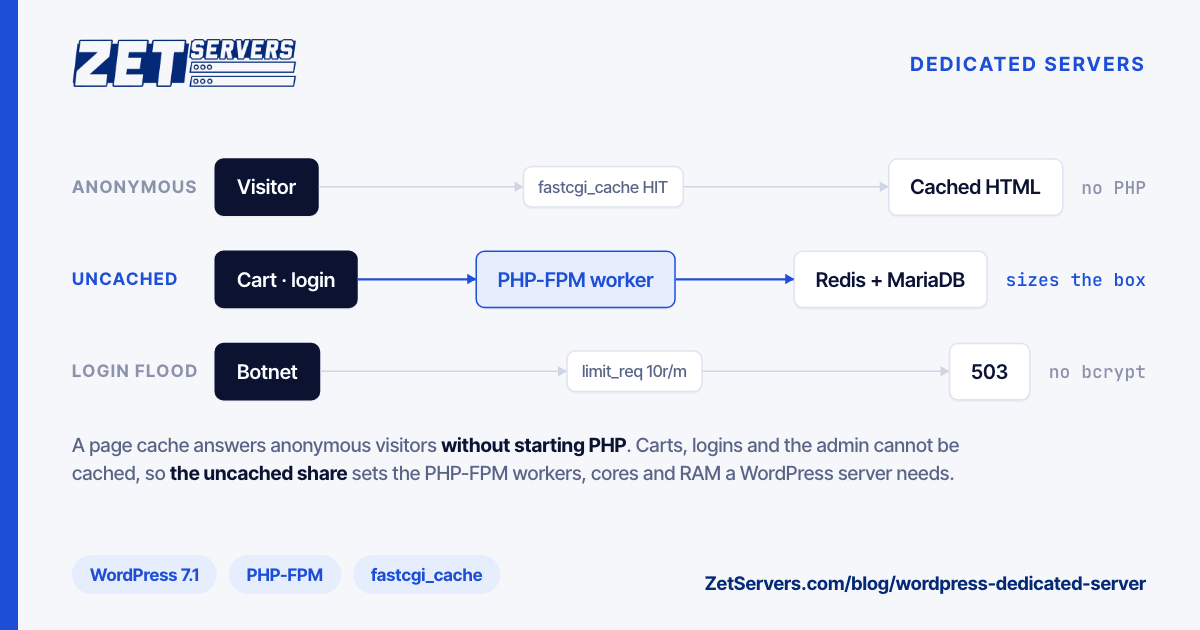
A WordPress dedicated server earns its price when the requests you cannot cache outgrow a VPS. Anonymous page views served from a page cache never start PHP; logged-in editors, WooCommerce carts and checkouts, search and the admin always do. That uncached share decides how many PHP-FPM workers you need, how many cores run them, and how much memory is left for the database. This guide sizes each against the current release, WordPress 7.1.5, out since 18 November 2026, with 7.2 due on 8 December.
What WordPress 7.1 and WooCommerce ask for
|
WordPress 7.1 |
WooCommerce (11.3.1 current) |
| PHP |
8.3+ recommended; compatible with 7.4 to 8.5 |
8.3+, tested up to 8.4 |
| Database |
MySQL 8.4+ or MariaDB 10.11+ |
MySQL 8.0+ or MariaDB 10.6+ |
| PHP memory |
asks for 40 MB (64 MB multisite) |
256 MB or more |
PHP 8.6 shipped on 19 November 2026, but WordPress's compatibility table stops at 8.5 and WooCommerce tests against 8.4. For a store, run 8.4, which gets security fixes until the end of 2028.
Sizing a WordPress dedicated server: workers, RAM and cores
PHP-FPM serves each request in one worker process, and pm.max_children caps how many exist; the PHP manual says it "sets the limit on the number of simultaneous requests that will be served". Two ceilings bound it.
RAM. Workers × memory per worker, plus the database, Redis and the operating system, must fit. Measure workers as PSS, not RSS: OPcache keeps compiled scripts in one shared segment, 128 MB by default, and RSS counts those pages again in every worker. PSS divides each shared page among the processes sharing it. As root, at your busiest hour:
for p in $(pgrep -f 'php-fpm: pool'); do awk '/^Pss:/ {print $2}' /proc/$p/smaps_rollup; done \
  | awk '{s+=$1; n++} END {printf "%d workers, %.0f MB average PSS\n", n, s/n/1024}'
Cores. A PHP request runs on one thread. Busy workers equal request rate × time per request, so cores set throughput; workers beyond the core count help only while requests wait on the database or a remote API such as a payment gateway. Set pm.status_path = /fpm-status, allow it from localhost only, and read /fpm-status?full: each worker reports its last request duration, an upper bound on its CPU time.
At an assumed 250 ms of CPU per uncached request, the ceiling is cores ÷ 0.25 s:
| Plan |
Cores |
RAM |
Uncached requests/s |
| €59 VPS |
2 vCPU |
8 GB |
8 |
| €119 VPS |
4 vCPU |
16 GB |
16 |
| €209, 2× Xeon E5-2630 v4 |
20 cores, 40 threads |
128 GB |
80 on physical cores |
| €449, 1× EPYC 9254 |
24 cores, 48 threads |
128 GB DDR5 |
96, at a faster clock |
The EPYC boosts a core to 4.15 GHz against the Xeon's 3.1 GHz, so the same page finishes sooner. Memory runs out later: at an assumed 80 MB a worker, 10 GB of the 16 GB VPS holds 128 workers, far more than four cores keep busy. A starting pool for the €209 server:
; /etc/php/8.4/fpm/pool.d/www.conf: 20 cores, 128 GB
pm = static
pm.max_children = 80          ; 80 × 80 MB = 6.4 GB
pm.max_requests = 1000        ; recycle workers, in case a plugin leaks
pm.status_path = /fpm-status
Then watch max children reached and listen queue. Requests waiting with the CPU at 100% need cores; waiting with the CPU idle, more workers.
Page cache and object cache do different jobs
A page cache stores the finished HTML of a URL, and nginx serves a hit without starting PHP. WordPress's nginx documentation gives a fastcgi_cache example, with the Nginx Helper plugin purging changed pages.
An object cache stores what WordPress computes inside a request: query results, options, transients. By default it lasts one request. Redis, through the Redis Object Cache plugin (3.0.1, tested up to 7.1.5), keeps it between requests, so the pages the page cache cannot serve run fewer queries. Site Health suggests one on every multisite, and on sites with 1,000 or more posts, comments, terms, users or options.
The page cache removes PHP from anonymous traffic; the object cache makes the remaining PHP cheaper. Here is a fastcgi_cache setup built on WordPress's example, with WooCommerce's pages and cookies added:
http {
    fastcgi_cache_path /var/cache/nginx/wp levels=1:2 keys_zone=WP:100m inactive=60m max_size=5g;
    fastcgi_cache_key "$scheme$request_method$host$request_uri";

    server {
        set $skip 0;
        if ($request_method = POST) { set $skip 1; }
        if ($query_string != "")    { set $skip 1; }
        if ($request_uri ~* "/wp-admin/|/wp-json/|/xmlrpc.php|wp-.*\.php|/cart/|/checkout/|/my-account/") { set $skip 1; }
        if ($http_cookie ~* "comment_author|wordpress_[a-f0-9]+|wp-postpass|wordpress_logged_in|woocommerce_items_in_cart|woocommerce_cart_hash|wp_woocommerce_session_") { set $skip 1; }

        location ~ \.php$ {
            include fastcgi_params;
            fastcgi_param SCRIPT_FILENAME $document_root$fastcgi_script_name;
            fastcgi_pass unix:/run/php/php8.4-fpm.sock;
            fastcgi_cache WP;
            fastcgi_cache_valid 200 60m;
            fastcgi_cache_bypass $skip;
            fastcgi_no_cache $skip;
            fastcgi_cache_lock on;
            fastcgi_cache_use_stale updating error timeout http_500;
            fastcgi_cache_background_update on;
            add_header X-Cache $upstream_cache_status;
        }
    }
}
At nginx's 8,000 keys per megabyte, the 100 MB zone indexes about 800,000 pages. The cache lock sends one request per missing page to PHP while the rest wait. Rename /cart/, /checkout/ and /my-account/ if your store uses other slugs.
Why WooCommerce carts and logged-in users skip the cache
A page cache keeps one copy per URL. A cart or an admin bar differs for every visitor, and serving one customer's cached page to the next would show them someone else's basket. So WooCommerce asks caches to exclude the cart, checkout and account pages, sends no-cache headers and sets DONOTCACHEPAGE on them, and marks shoppers with cookies such as wp_woocommerce_session_, which points to their cart in the database. nginx, by default, does not store any response that sets a cookie.
Every page a visitor opens after adding to the cart therefore reaches PHP. Your buyers are your PHP load. Measure the share:
log_format cache '$remote_addr [$time_local] "$request" $status $upstream_cache_status $request_time';
access_log /var/log/nginx/access.log cache;
awk '{print $(NF-1)}' /var/log/nginx/access.log | sort | uniq -c | sort -rn
HIT is free. MISS, BYPASS and EXPIRED reached PHP; their rate at the busiest hour is what the table above has to carry.
The database: same box or its own
On one server, run MariaDB or MySQL beside PHP: it removes a network hop from every query, and 128 GB leaves room for a large buffer pool. Check your database's size:
SELECT table_schema, ROUND(SUM(data_length + index_length) / 1048576) AS mb
FROM information_schema.tables GROUP BY table_schema;
Because carts live in the database, a store's writes grow with its shoppers, not its readers. Move the database to its own machine when its cache competes with PHP for memory, or when you want a replica elsewhere. A dedicated database server covers the working set and buffer pool.
Bandwidth: page weight × page views
The 2025 Web Almanac puts the median WordPress page on mobile at 2,894 KB. Call it 3 MB:
1M views/month:   1,000,000 × 3 MB = 3 TB   → 3e12 × 8 ÷ 2,592,000 s ≈ 9.3 Mbps average
10M views/month:  30 TB → 93 Mbps average, ≈ 278 Mbps at a peak 3× the average
A 1 Gbps port carries about 324 TB a month at line rate, so bandwidth rarely forces the move: the €119 VPS guarantees 4 Gbps, more than the €209 server's 1 Gbps. Video and downloads are the exceptions. A CDN in front shrinks the origin's share to HTML and misses; building a CDN origin server covers the cache headers. Weigh your own pages in the browser's developer tools.
Login and XML-RPC floods
Every wp-login.php attempt is an uncached PHP request. Since WordPress 6.8, passwords are checked with bcrypt at PHP's default cost, which PHP 8.4 raised from 10 to 12. Bcrypt is slow on purpose, and each attempt against a real username runs one check. Time it:
php -r '$t = microtime(true); password_hash("x", PASSWORD_BCRYPT); printf("%.0f ms\n", (microtime(true) - $t) * 1000);'
If it prints 100 ms, 100 attempts a second keep 10 cores busy. WordPress's brute-force guidance names xmlrpc.php, especially system.multicall, as a frequent target, says to disable XML-RPC if unused, and rate-limits logins per address:
limit_req_zone $binary_remote_addr zone=logins:10m rate=10r/m;   # in http {}

location = /xmlrpc.php { deny all; }   # only if nothing you run uses XML-RPC
location = /wp-login.php {
    limit_req zone=logins burst=20 nodelay;
    include fastcgi_params;
    fastcgi_param SCRIPT_FILENAME $document_root$fastcgi_script_name;
    fastcgi_pass unix:/run/php/php8.4-fpm.sock;
}
Per-address limits stop one client, not a botnet. The 100 Gbps of L3/L4 filtering included with our servers keeps packet floods off the port, but an HTTP flood arrives as complete requests; Layer 7 DDoS protection covers the defences.
From a VPS to a WordPress dedicated server
Move when max children reached climbs with the CPU saturated at peak, when the database no longer fits beside PHP, or when the media library outgrows the VPS disk.
- €59 unmetered VPS: 2 dedicated 3.2 GHz vCPUs, 8 GB, 100 GB NVMe, 2 Gbps. A cached blog.
- €119 VPS: 4 vCPUs, 16 GB, 200 GB NVMe, 4 Gbps. A small store.
- €209 1 Gbps dedicated server: 2× Xeon E5-2630 v4, 128 GB, six SSD slots. A store that outgrew four cores; €259 with 2 Gbps.
- €449 EPYC 9254: 128 GB DDR5, ten NVMe slots. When checkout speed matters most.
Listings show drive slots, not drives: specify a mirrored pair in the order. Most configurations are activated within an hour of payment. Moving a live site is a sequencing job, and migrating to a dedicated server has the order that works.
Frequently asked questions
When does a WordPress site need a dedicated server?
When its uncached requests, from logged-in users, carts, checkouts, search and the admin, saturate a VPS's cores at peak. The PHP-FPM status page shows it: max children reached climbing while the CPU sits at 100%. Anonymous traffic behind a page cache rarely forces the move.
How much RAM does a WordPress dedicated server need?
Enough for PHP-FPM workers × their measured memory, plus the database buffer pool, Redis and the operating system. Measure workers as PSS, since RSS counts OPcache's shared memory in every worker. On 128 GB, 80 workers at 80 MB take 6.4 GB, leaving the rest for MariaDB.
Is Redis a replacement for a page cache?
No. A page cache stores whole HTML pages and serves anonymous visitors without running PHP. Redis, as WordPress's persistent object cache, keeps query results and options between requests, so carts, logged-in views and the admin make fewer database queries. A busy store needs both.
Can WooCommerce pages be cached?
Product and category pages can, for visitors without a cart. Cart, checkout and My Account cannot, and WooCommerce sends no-cache headers on them. Once a shopper adds an item, cookies such as woocommerce_items_in_cart should bypass the cache on every page, so size PHP for shoppers, not page views.