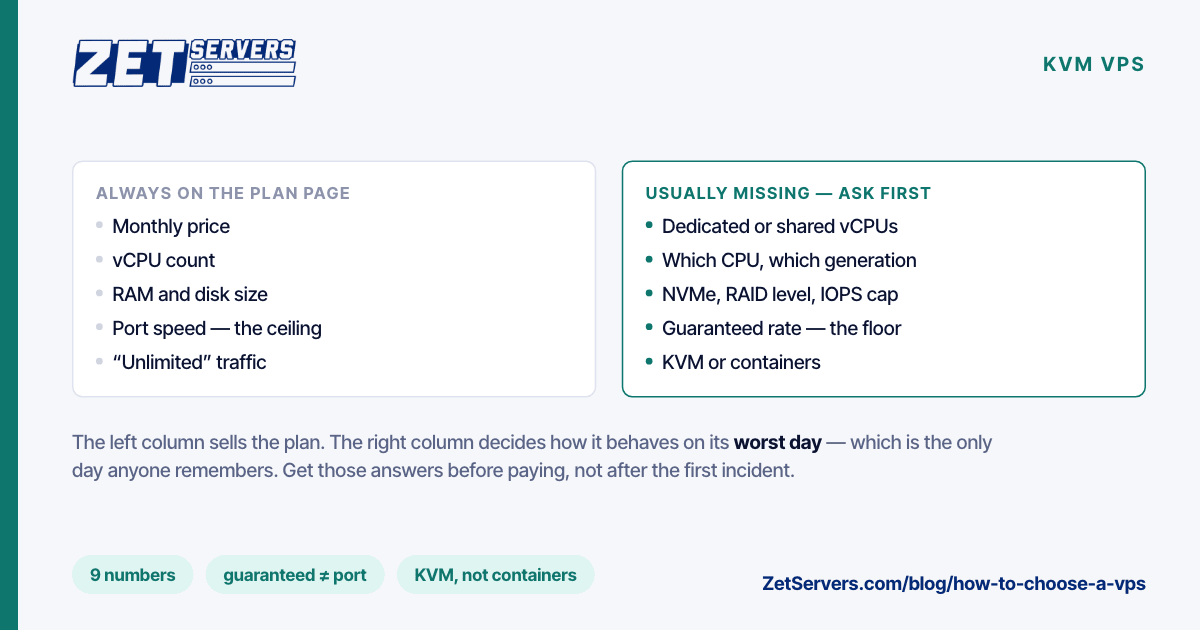
Knowing how to choose a VPS is mostly knowing which numbers are missing from the plan page. Price and vCPU count are always there. Whether those vCPUs are shared, whether the bandwidth figure is a guarantee or just a port speed, whether the disk is NVMe in a redundant array — those usually are not, and they are the numbers that decide how the machine behaves on its worst day, which is the only day anyone remembers. Here are the nine to find before paying, what a good answer sounds like, and the red flags.
1. Are the vCPUs dedicated or shared?
The single biggest variable. A dedicated vCPU is reserved hardware time; a shared one is a place in a queue with other customers. The difference is invisible while the host is quiet and decisive when it is not. Dedicated vCPU vs shared vCPU explains the mechanics, and a ten-minute test that settles the question on any plan.
Red flag: "vCPU" with no qualifier at all, or a mention of "fair share" CPU.
2. Which CPU, at what clock?
A vCPU on a 2014 host and one on a 2023 host are not the same unit of work. Ask for the processor family, or at least the clock. For single-threaded work — game servers, most web request handlers, a small database — clock and generation matter more than core count.
3. How much RAM, and is it guaranteed?
Some platforms advertise "burst" memory that a guest can use only while the host has spare. Plan on the guaranteed figure alone. RAM is also what you will run out of first: size it for the application at peak, plus the hot part of any database, plus the page cache your web server leans on — not for the idle footprint you see on day one.
4. What kind of disk, and how protected?
NVMe, SATA SSD or spinning disk; one drive or a redundant array; and whether there is a per-VM IOPS cap. NVMe in RAID 10 is the answer you want for anything with a database. A fast drive behind a low IOPS cap is a slow drive, so ask about the cap as well as the hardware.
Red flag: "SSD storage" with no mention of the interface or of redundancy.
5. Port speed, guaranteed rate or traffic cap?
These are three different numbers, and plan pages love to blur them. The port speed is a ceiling. A guaranteed rate is a floor you can use all day, every day. A monthly traffic allowance is a cap on volume, and "unlimited" usually means a fair-use clause that caps you anyway. What unmetered bandwidth actually means separates the claims; the short version is that a guaranteed rate with no traffic counter is the only one you can plan capacity on.
Red flag: a large port speed ("10 Gbps!") with no guaranteed rate beside it.
6. Where is it, and how far from your users?
Location sets the latency floor, and no amount of CPU buys it back. Choose the region nearest the bulk of your users and test from where they actually are. Choosing a server location has the arithmetic, including why a cold HTTPS request spends three round trips before the first byte of your response.
7. Full virtualisation or containers?
Full virtualisation (KVM) gives you your own kernel: kernel modules, in-kernel WireGuard, Docker without workarounds, your own sysctl settings. Container-based VPS platforms share the host's kernel and quietly rule out some of that. If the page does not say which it is, assume containers and ask; on a server you already have, KVM VPS vs container VPS gives the one command that settles it.
8. What access do you get?
Full root; a web console (VNC or similar) that works when SSH does not; the OS templates you need; a custom ISO upload for anything else; and both IPv4 and IPv6. The console is the feature you need at two in the morning after a firewall rule locks you out, so confirm it exists before that night comes.
9. How fast to provision, and how do you grow?
Minutes, not hours, for a VPS. More important is the growth path: can cores, RAM and disk be resized without a rebuild, and is there a larger step — a dedicated server on the same network — for when the VPS range runs out? A migration between providers is the expensive kind of upgrade.
The nine numbers, and our answers
| Question |
A good answer |
Our unmetered VPS |
| vCPU type |
Dedicated, stated |
Dedicated KVM cores, not oversold |
| CPU clock |
Stated |
3.2 GHz |
| RAM |
Stated per plan |
4 to 64 GB DDR4 |
| Disk |
NVMe, redundant |
NVMe in RAID 10 |
| Bandwidth |
Guaranteed rate, no cap |
1–8 Gbps guaranteed on a 25 Gbps port, unmetered |
| Location |
Near your users |
8 European regions |
| Virtualisation |
KVM |
KVM, custom kernels allowed |
| Access |
Root, console, ISO, IPv6 |
Root, VNC console, custom ISO, IPv4 and IPv6 |
| Provisioning and growth |
Minutes; resize in place |
About a minute; resize without rebuild |
Two things no table captures. Support: ask how fast tickets are answered and by whom — ours come from a NOC staffed around the clock, with a 15-minute average response. And DDoS protection: ask exactly what is included, up to what attack size, and whether it is on by default.
A worked example
Say you are hosting an API with a 30 GB PostgreSQL database, for customers mostly in Spain and Portugal, peaking at 400 Mbps.
- Location first. Madrid is the nearest region to both markets.
- RAM next. The database is 30 GB, but the hot part — the tables and indexes an ordinary hour touches — is closer to 10 GB. The 16 GB plan lets PostgreSQL keep that in memory with room for the application.
- CPU. Four dedicated cores come with that plan, which is plenty for a moderate request rate. Check steal on day one anyway.
- Bandwidth. 400 Mbps at peak fits well inside the 4 Gbps guarantee, with room for a launch week.
- Growth. When the hot set outgrows 16 GB, resize to 8 vCPU and 32 GB in place.
That is the €119 plan, chosen by working through RAM and location first, not by picking the cheapest price and hoping. When the answer to any of these starts being "more than 16 cores" or "more than 64 GB", the VPS range has run out, and dedicated server vs VPS is the next thing to read.
Frequently asked questions
What matters most when choosing a VPS?
Whether the vCPUs are dedicated, and whether the bandwidth figure is a guaranteed rate or only a port speed. Those two numbers decide how the machine behaves under load; the rest is sizing.
How much RAM does a VPS need?
Enough for the application at peak, plus the hot part of any database, plus a margin. If the server swaps during its busiest hour, it needs more RAM, not more cores.
Is NVMe worth it on a VPS?
For anything with a database or lots of small files, yes: latency under concurrent load is where NVMe pulls away from SATA. For a relay or proxy that barely touches the disk, it matters much less.
How do I test a VPS after buying it?
Watch steal time over a day, run a CPU test with one thread and then with all of them, and measure the network with iperf3 and parallel streams — never a browser speed test. How to verify your port speed has the method.
When is a VPS no longer enough?
When you are renting more than half a host's worth of resources, or you need hardware-level control: raw disks, the full memory bandwidth of a socket, an out-of-band console. Past that point, a dedicated machine is cheaper and faster.