A DDoS protected dedicated server is one whose provider filters attack traffic inside its own network, before it reaches your server's port, and forwards the clean remainder. The protection comes down to two things: a capacity, quoted in gigabits or terabits per second, and a policy for what happens when an attack is bigger than that. This guide covers how the filtering works, what the capacity figure does and does not promise, how to size it from public attack data, and the questions that separate a real offer from a checkbox.
Why the server cannot protect itself
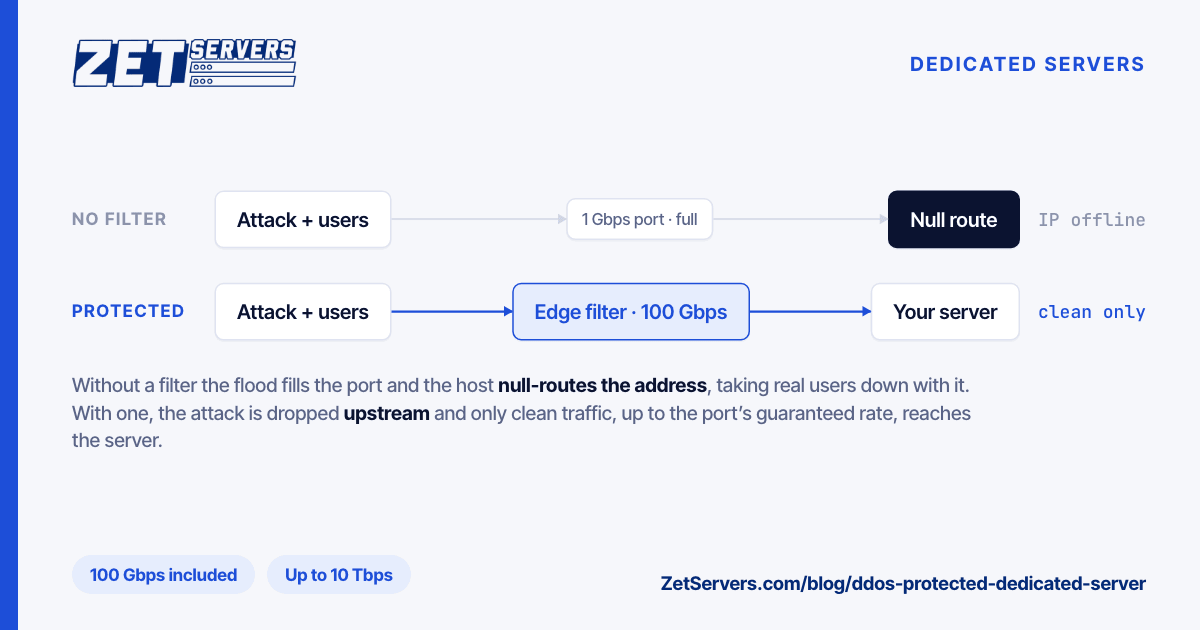
Every filter you run on the box, from nftables rules to the application's own rate limits, sees a packet only after it has crossed your uplink. When the flood is bigger than the port, the port is the bottleneck: legitimate packets are dropped in the queue on the switch next to you along with the attack, before any rule of yours runs.
The sizes make the point. Cloudflare's 2025 Q4 DDoS threat report describes a 31.4 Tbps attack that lasted 35 seconds. Against a 1 Gbps port that is 31,400 times the pipe; against 10 Gbps, 3,140 times. An attack does not need to be a record to take a server down, either. It only has to exceed your guaranteed rate at the one point it is aimed at.
So filtering has to happen where there is more capacity than the attack: upstream, in the provider's network.
What an unprotected host does instead: the null route
When an unprotected customer is attacked, the provider has two options: let the flood congest an uplink shared with every other customer, or drop all traffic to the target address. Most choose the second. The tool is a null route, also called a remotely triggered black hole. The host announces your address to its upstream networks with a tag asking them to discard traffic for it. RFC 7999 standardises that tag as the BLACKHOLE community, 65535:666, and notes the announced prefix is typically as specific as possible: a single /32 for IPv4 or /128 for IPv6.
That protects the network and finishes the attacker's job. Your address is unreachable for everyone, real users included, until the null route is lifted, and when that happens is the host's policy, not yours. To your customers, a flooded server and a null-routed one look the same: offline.
How upstream filtering works
Protection replaces the null route with a filter. The details differ between providers, but the shape is the same:
- Detect. Traffic towards each protected address is measured against its normal pattern. A sudden jump in packets, bits or one particular protocol marks an attack.
- Filter. Traffic for that address passes through filtering capacity that drops what matches the attack: reflected UDP from well-known amplifier services, malformed or fragmented floods, SYN floods that never complete a handshake, sources sending far above any normal rate.
- Forward. What remains is delivered to your server as usual, up to your port speed.
On our network the filtering runs at the network edge, before traffic reaches your server's port, and the first tier is included with every server. Two properties matter more than any vendor name: whether the filter is always in the path, and how much it can absorb.
Always-on or on-demand
Always-on filtering inspects traffic all the time, so nothing has to switch over when an attack starts. On-demand filtering diverts your traffic to a scrubbing centre only after an attack is detected, usually by changing routing, so the first part of every attack reaches you unfiltered.
That gap matters because attacks are short. Cloudflare's 2025 Q3 report found that 89% of network-layer attacks and 71% of HTTP attacks end in under 10 minutes. A diversion that takes a few minutes to engage can miss most of an attack while your server is already down. Ask which kind you are buying and how long the switch takes. "Within minutes" is a long time for a game lobby or a checkout page.
What "100 Gbps of protection" means
The capacity is the largest attack the provider commits to filtering for you. It covers three things and leaves out a fourth:
- It sets the threshold where filtering stops and the provider's fallback, usually a null route, begins. Ask what happens above it and for how long.
- It is quoted in bits per second, but floods of small packets exhaust routers by packet rate first. The same Q3 report records an attack of 14.1 billion packets per second. Ask for a packet-rate figure as well.
- It covers the network layer, L3 and L4. An HTTP flood made of valid, encrypted requests looks like customers to a network filter. Filtering that needs Layer 7 is a separate capability; ours is part of the 10 Tbps tier.
- It does not raise your port. A 1 Gbps server behind 100 Gbps of protection still receives at most 1 Gbps of clean traffic. If legitimate demand is the problem, the answer is a faster unmetered port, not a bigger filter.
How much protection do you need
Public data gives a rough shape. Cloudflare mitigated 47.1 million attacks in 2025, and network-layer attacks were 78% of what it saw in the fourth quarter. Its Q3 report says most attacks are relatively small, while attacks above 1 Tbps grew 227% in a single quarter. The distribution has a long tail: most targets see attacks that a 100 Gbps filter absorbs, and a few draw botnets measured in terabits.
Size by who might attack you, not by the record:
| Profile |
Starting tier |
| Websites, APIs, mail, VPN exits, small communities |
100 Gbps (included) |
| Busy game servers, gambling, crypto, anyone with a public rival or a ransom note |
500 Gbps to 1 Tbps |
| Hosting resellers, large game networks, services already hit by terabit floods |
2 to 5 Tbps |
| Public sites hit by HTTP floods that need Layer 7 filtering too |
10 Tbps + Layer 7 |
Above the included tier, the price per gigabit of capacity is close to flat:
| Tier |
Monthly |
Per Gbps of capacity |
| 100 Gbps |
included |
€0 |
| 500 Gbps |
€149 |
€0.30 |
| 1 Tbps |
€499 |
€0.50 |
| 2 Tbps |
€999 |
€0.50 |
| 5 Tbps |
€2,499 |
€0.50 |
| 10 Tbps + Layer 7 |
€4,499 |
€0.45 |
Prices are from our order form on 26 October 2026, in euros per month excluding VAT; the tier is a choice you make when you configure the server. The per-gigabit column is the monthly price divided by the capacity, for example €149 ÷ 500 = €0.30.
What a protected server costs
Add the tier to the server price:
| Server |
Port |
Server only |
With 500 Gbps |
With 1 Tbps |
| Dual Xeon E5-2630v4, 20 cores, 128 GB |
1 Gbps |
€209 |
€358 |
€708 |
| Single AMD EPYC 9254, 24 cores, 128 GB DDR5 |
1 Gbps |
€449 |
€598 |
€948 |
| Dual Xeon E5-2630v4, 20 cores, 128 GB |
10 Gbps |
€659 |
€808 |
€1,158 |
With the included 100 Gbps tier, each costs the server price alone. 1 Gbps dedicated servers start at €209 and 10 Gbps dedicated servers at €659, and the same protection tiers appear on every KVM VPS from €29.
Seven questions to ask any host
- What is the capacity, in Gbps and in packets per second?
- Always-on or on-demand? If on-demand, how long until filtering starts?
- What happens above the capacity? A null route, for how long, and who lifts it?
- Is Layer 7 included? Ours is part of the 10 Tbps tier; the lower tiers are network-layer.
- Which addresses are covered? Every IP routed to the server, or only the main one?
- Can the filter be tuned to your protocol? Game and voice traffic is mostly UDP, and a generic UDP limit drops real players. Our game server hosting tunes the policy to the titles you run, on request.
- How is it billed? A monthly tier, a fee per attack, or a charge for the attack traffic itself.
What protection does not do
A filter decides what reaches your port. It does not make an application survive real load it was never sized for, and it cannot hide an address you have already published in DNS, a game server list or an email header. It is also no substitute for the basics: closed ports, key-only SSH, current packages. Start with securing a new dedicated server, then choose the tier.
Frequently asked questions
What is a DDoS protected dedicated server?
A DDoS protected dedicated server is a physical server whose provider filters attack traffic in its own network before it reaches the server's port, forwarding only clean traffic. Without that filter, a flood larger than the port takes the server offline, and many hosts respond by null-routing its IP address until the attack ends.
Is DDoS protection included with ZetServers dedicated servers?
Yes. Every dedicated server and KVM VPS includes a 100 Gbps network-layer protection tier at no extra charge. Larger tiers of 500 Gbps, 1 Tbps, 2 Tbps and 5 Tbps cost €149 to €2,499 a month, and the 10 Tbps tier, which adds Layer 7 filtering, costs €4,499 a month.
What happens if an attack is bigger than my protection?
That depends on the provider's policy, so ask before you buy. The usual fallback is a null route: traffic to the attacked address is dropped upstream, which protects the network but makes the address unreachable until the route is lifted. Choosing a tier above the attacks you are likely to draw keeps you below that point.
Does DDoS protection add bandwidth to my server?
No. Protection decides what reaches your port; it does not change the port itself. A server with a 1 Gbps guarantee still receives at most 1 Gbps of clean traffic during an attack. If legitimate traffic is outgrowing the port, move to a higher unmetered tier rather than a larger protection tier.