Nobody can tell you how many players per game server your build will hold without knowing the title, and anyone who quotes a number without asking is guessing. What is knowable is the shape of the limit: which resource runs out first, at roughly what point, and what you can do about it. Three ceilings decide it — the tick deadline, memory per instance, and bandwidth per player — and they bind in that order for almost every multiplayer title.
The tick deadline is the real limit
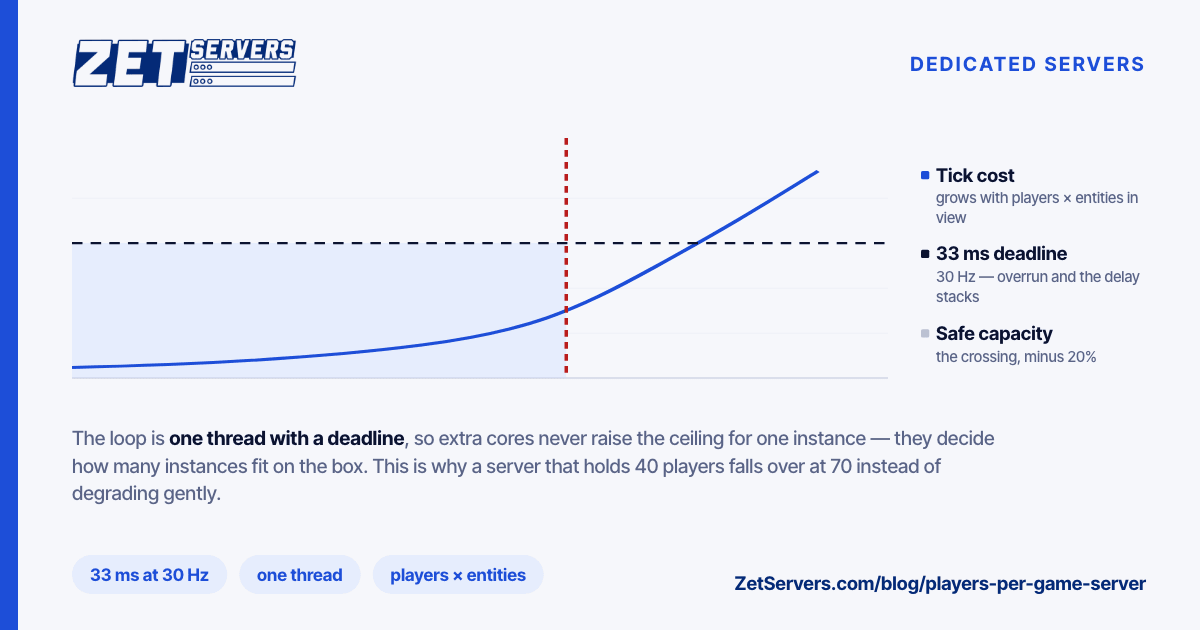
A game server runs a loop. Each iteration reads input, advances the simulation, and sends every player a snapshot of what they can see. The tick rate sets the deadline: at 30 Hz the loop has 33 ms, at 64 Hz it has 15.6 ms, at 128 Hz it has 7.8 ms. Overrun and the next tick starts late, the delay compounds, and players report stutter that no graph shows.
The cost of a tick does not scale linearly with player count. Building each player's view means checking what is near them, so the work grows with players × relevant entities — quadratic in the worst case, and closer to linear only when the map is large enough that interest sets stay small. This is why a server that runs 40 players comfortably falls over at 70 rather than degrading gently: you crossed the deadline, and past it every tick is late.
That loop is one thread. Extra cores do not raise the ceiling for one instance; they decide how many instances fit on the box. Clock speed and IPC raise it. Game server hardware works through the tick budget in detail, and the conclusion is unchanged by any amount of money: buy fewer, faster cores for the instance, more cores for the fleet.
Bandwidth per player, computed
This one is genuinely arithmetic:
per-player downstream = snapshot size × tick rate × 8
A 1,500-byte snapshot at 30 Hz is 1500 × 30 × 8 = 360 kbps per player. Upstream from each client is far smaller — inputs, a few dozen bytes per tick.
Scale it:
| Players |
Tick rate |
Snapshot |
Per instance |
| 20 |
30 Hz |
1.5 KB |
7.2 Mbps |
| 64 |
64 Hz |
2.0 KB |
65.5 Mbps |
| 100 |
20 Hz |
4.0 KB |
64 Mbps |
Two things follow. First, bandwidth is rarely the binding constraint for a single instance — 65 Mbps is nothing on a 1 Gbps guaranteed uplink. Second, it becomes the constraint for a fleet: forty instances of the middle row is 2.6 Gbps, sustained, and that is a real port.
Substitute your own snapshot size — capture traffic on a full server for a minute and divide. Titles vary by an order of magnitude, and published figures are usually measured on empty servers.
Memory, and how many instances fit
Memory per instance is close to constant with player count and dominated by the map and asset set: often 1–4 GB for a modern title, sometimes more for large open maps. Instances per box is then a straightforward division, minus what the OS and monitoring want.
A 44-core box with 256 GB of RAM might hold 30 instances by memory and 40 by core count — so memory binds, and the honest capacity is 30. Work both divisions and take the smaller. Then subtract 20%, because a box running at its computed limit has no room for the evening when every instance is full at once.
Latency is a separate purchase
Players do not experience your tick rate. They experience tick rate plus round-trip time plus jitter, and the last of those is the one that ruins matches.
Two facts worth internalising. A 128 Hz server 90 ms away feels worse than a 30 Hz server 20 ms away for most competitive titles — distance beats tick rate. And jitter matters more than absolute latency: a stable 60 ms is playable, a 30 ms path that spikes to 120 is not, because client-side prediction cannot correct what it cannot predict.
That makes region placement a capacity decision, not a marketing one. Splitting one large box in Frankfurt into two smaller ones in Frankfurt and Bucharest usually improves more players' experience than doubling the tick rate would. Our game server builds exist in multiple European and US sites for exactly that reason.
Work from concurrent players at peak, not registered users:
- Peak concurrent players, from your own logs. For a new community, assume 5–15% of registered users at peak.
- Divide by players per instance — the title's server slot count, not the theoretical maximum.
- Add 30% for uneven fill: instances do not pack neatly, and half-full servers still consume a slot's worth of tick budget.
- Divide by instances per box from the memory and core arithmetic above.
- Sum the bandwidth across all instances and check it against the guaranteed rate.
A community with 600 peak concurrent players at 40 per instance needs 15 instances, 20 with headroom — comfortably one 44-core box, at maybe 1.3 Gbps of aggregate egress. A community ten times that size needs a fleet, a matchmaker, and a conversation about regions.
Frequently asked questions
How many players per game server can one CPU core handle?
There is no portable number — it depends entirely on the title's simulation cost per entity. What is portable is the method: measure tick time at several player counts, plot it, and find where the curve crosses your deadline. That crossing point is your answer, and it is the only one that is true for your build.
Does a higher tick rate reduce how many players fit?
Yes, directly. Doubling the tick rate halves the time budget per tick and doubles bandwidth per player. Most communities are better served by a stable 30–64 Hz than an unstable 128.
Should I run many instances on one big box or several small ones?
One big box is cheaper per instance; several smaller ones fail independently and can sit in different regions. Past a couple of hundred concurrent players, the regional argument usually wins.
How much bandwidth does a full server actually use?
Snapshot size × tick rate × 8 × players. Measure the snapshot on a full server rather than trusting documentation — the difference between an empty and a full server is large.
What hardware should a new community start on?
One high-clock bare-metal box with room for double the instances you need today. Growth in this space is uneven, and the cost of being slightly oversized is far lower than the cost of a laggy launch weekend — tell us the title and player count and we will size it.