Turning on IPv6 on a dedicated server takes about ten minutes. Turning it on correctly takes a little longer, and getting it wrong is worse than leaving it off — a published AAAA record that does not work makes your site slower for the users who have IPv6, which is most of them. Here is the configuration, the three things that break it, and how to prove it works before you publish the record.
What you are actually assigned
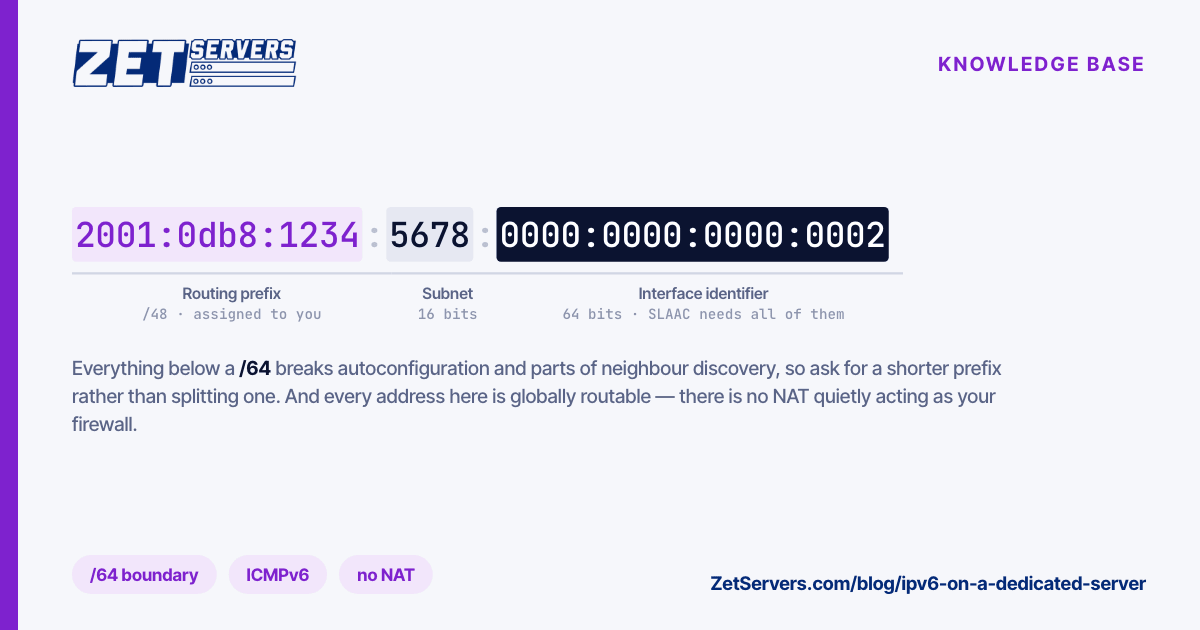
Providers hand out IPv6 in prefixes, not addresses. A server typically gets a /64, which is 18 quintillion addresses, and that is the smallest sensible unit rather than a generous one.
The /64 boundary is structural. Stateless address autoconfiguration derives the host part of an address from a 64-bit interface identifier, so subnets smaller than /64 break autoconfiguration and a good deal of neighbour discovery with it. Split a /64 and you have made work for yourself; ask for a /56 or /48 instead if you need multiple subnets for containers or VMs.
Three addresses in your prefix are not yours to use freely: the all-zeros subnet-router anycast address, and the reserved anycast range at the top of the subnet. In practice, take an address well inside the range and move on.
Configuring it
Most servers get their prefix by router advertisement, which the kernel accepts by default. That is fine for a single-homed box and wrong for one that forwards traffic — the moment you enable forwarding, the kernel stops accepting RAs unless you say otherwise:
sysctl net.ipv6.conf.all.forwarding      # 1 on a router/host running containers
sysctl net.ipv6.conf.eth0.accept_ra      # must be 2 if forwarding is 1
For a server, static configuration is usually better than autoconfiguration: the address is then predictable, which matters when it appears in DNS, in firewall rules and in other people's allowlists. With systemd-networkd:
[Match]
Name=eth0

[Network]
Address=2001:db8:1234:5678::2/64
Gateway=fe80::1
IPv6AcceptRA=no
The gateway is frequently a link-local address (fe80::/10), which looks wrong to anyone used to IPv4 and is entirely normal — routers advertise themselves by link-local address, and your provider will tell you which one.
Turn off privacy extensions on a server. They exist to rotate a client's source address for privacy and will silently change the address your outbound connections come from, which breaks reverse DNS, allowlists and mail delivery:
sysctl -w net.ipv6.conf.all.use_tempaddr=0
The three things that break it
Blocking ICMPv6
IPv4 tolerates a firewall that drops all ICMP. IPv6 does not. Neighbour discovery — the equivalent of ARP — is ICMPv6, and so is path MTU discovery, because routers no longer fragment packets in transit.
Drop ICMPv6 wholesale and you get the worst class of bug: small requests succeed, large responses vanish. TLS handshakes complete, then the page never loads. The rule to keep is simple — permit neighbour solicitation and advertisement, echo, and above all packet-too-big:
ip6tables -A INPUT -p icmpv6 --icmpv6-type packet-too-big -j ACCEPT
ip6tables -A INPUT -p icmpv6 --icmpv6-type neighbour-solicitation -j ACCEPT
ip6tables -A INPUT -p icmpv6 --icmpv6-type neighbour-advertisement -j ACCEPT
ip6tables -A INPUT -p icmpv6 --icmpv6-type echo-request -j ACCEPT
Forgetting there is no NAT
Every address in your /64 is globally routable. There is no accidental firewall provided by address translation, so a service bound to :: is reachable from the internet the instant IPv6 comes up — including services you had assumed were protected because they were only listening on a private IPv4 address.
Audit what is listening on both families before you bring the interface up, and mirror every IPv4 rule in your IPv6 rule set. A hardening pass that covers both is in how to secure a new dedicated server.
Publishing AAAA before testing
Modern clients use Happy Eyeballs: they try both families and prefer whichever answers first, falling back after a short delay. That delay is real and it applies to every request until the client gives up on the broken family. A misconfigured AAAA record does not take your site down, it makes it perceptibly slower and does so only for the subset of users with working IPv6 — which is why it survives so long undetected.
Test before you publish, not after.
Firewall rules are not the IPv4 ones with a 6 in the name
Mirroring your rule set across both families is necessary but not sufficient, because a few things differ in ways that matter.
Link-local traffic is load-bearing. Neighbour discovery, router advertisements and duplicate address detection all run over fe80::/10, so a default-deny INPUT policy that does not permit link-local ICMPv6 will detach the server from its own network segment — usually a few minutes after you congratulate yourself on the rule set.
Extension headers are the other difference. IPv6 moves options that IPv4 kept in a fixed header into a chain of extension headers, and a fragment or routing header can push the transport header far enough into the packet that naive filters stop matching on port. Modern nftables and ip6tables handle this correctly; hand-written rules that assume a fixed offset do not.
Finally, rate-limit rather than drop. A blanket ICMPv6 drop breaks path MTU discovery; a rate limit gives you the protection without the outage:
ip6tables -A INPUT -p icmpv6 -m limit --limit 100/sec -j ACCEPT
Proving it works
From the server:
ping6 -c3 2606:4700:4700::1111        # reachability
curl -6 -sS https://ifconfig.co       # what the internet sees as your source
ip -6 route show                      # is there a default route at all
From outside, using a host on a different network:
curl -6 -sS -o /dev/null -w '%{http_code} %{time_total}\n' https://yourdomain.example/
Check three things beyond reachability:
- Reverse DNS. Set a PTR for the address you actually send from. Mail servers check it, and on IPv6 several large providers are stricter about it than on IPv4.
- Source address selection. If the server has several IPv6 addresses, confirm which one it uses outbound. It is not always the one in DNS.
- MTU behaviour. Fetch something large, not just a health-check endpoint. A path MTU problem is invisible on small responses.
Our own network runs dual-stack across AS25198, and IPv6 is available on dedicated servers and VPS alike. If the server you have does not carry a prefix yet, ask for one — it costs nothing and takes a ticket.
Frequently asked questions
Do I need IPv6 if everything already works over IPv4?
You need it for the users who reach you better over IPv6, and for the ones behind carrier-grade NAT whose IPv4 experience is degraded by address sharing. It is also the difference between being reachable and being reachable directly from mobile networks that are IPv6-only internally.
Why does my server have an address starting fe80?
That is a link-local address. Every IPv6 interface has one automatically, it is used for neighbour discovery and router advertisements, and it is not routable off the local link. Its presence does not mean IPv6 connectivity works.
Should I use SLAAC or static addressing on a server?
Static, in nearly all cases. A server's address appears in DNS records, firewall rules and third-party allowlists, and an address the kernel derives for itself can change when hardware or configuration does.
Can I split my /64 into smaller subnets?
Technically yes, practically no. Autoconfiguration and parts of neighbour discovery assume a 64-bit host portion, so a /80 or /112 subnet will misbehave in ways that are hard to trace. Request a shorter prefix — a /56 or /48 — if you need several subnets.
Next steps
Configure statically, keep ICMPv6, mirror your firewall rules across both families, and only then publish the AAAA record. If you want a shorter prefix than the default assignment for containers or VM subnets, tell us what you need it for and we will route it.