Choosing an uplink speed is usually done backwards: someone picks a number that sounds right, buys it, and finds out a quarter later whether it was. The number is derivable. You need three inputs — peak concurrent demand, the per-unit bitrate of whatever you serve, and how much headroom you want above the peak — and one honest look at what each step up the ladder costs per gigabit, because that curve is not smooth and the cheapest gigabit is not on the tier most people buy.
Start from peak, never from total
Monthly transfer is the wrong starting point. A port is a rate, and rates are set by the busiest five minutes of the month, not by the sum of all of them.
Work it in this order:
- Peak concurrent units. Simultaneous viewers, active downloads, subscribers online, CDN edges filling at once. Take the real peak from your logs, not the average.
- Bitrate per unit. 6 Mbps for a 1080p stream, 8–12 for 4K, whatever your average object size divided by the time you want it delivered in works out to for downloads.
- Multiply, then add overhead. TCP, TLS and IP headers cost roughly 3–5% over payload. Retransmits on a bad path cost more.
- Add headroom. 30% is a working default. It absorbs the day your peak is not the peak you measured.
A worked example: 3,000 concurrent 1080p viewers at 6 Mbps is 18 Gbps of payload, about 18.9 Gbps with overhead, and 24.6 Gbps with 30% headroom. That is a 25 Gbps build, and no amount of arguing moves it to 10.
The reverse conversion is the one to keep in your head. A saturated 1 Gbps link moves 125 MB/s, which over a 30-day month is 324 TB. So a workload delivering 300 TB a month is a 1 Gbps workload only if it delivers evenly around the clock — and nothing does. Divide by your peak-to-average ratio to get back to the rate you actually need: at a ratio of 3, that 300 TB needs closer to 3 Gbps.
What each step actually costs
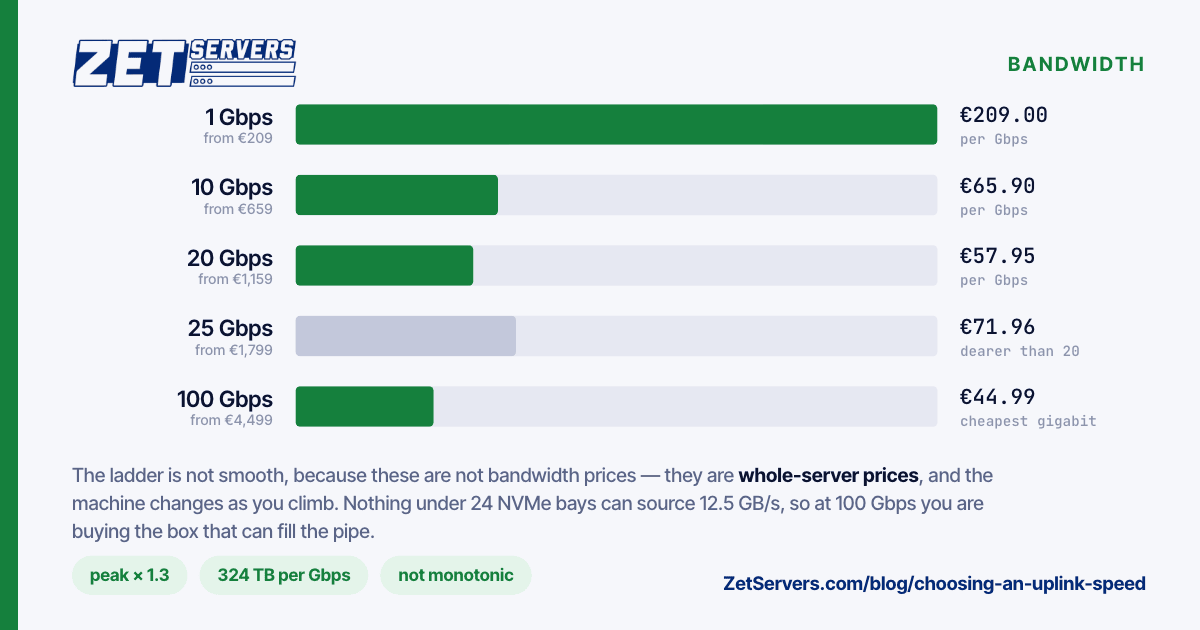
Entry price per tier across our bare-metal range, and the same price divided by the guaranteed rate:
| Tier |
From |
€ per Gbps |
| 1 Gbps |
€209 |
209.00 |
| 2 Gbps |
€259 |
129.50 |
| 5 Gbps |
€519 |
103.80 |
| 10 Gbps |
€659 |
65.90 |
| 20 Gbps |
€1,159 |
57.95 |
| 25 Gbps |
€1,799 |
71.96 |
| 50 Gbps |
€2,799 |
55.98 |
| 100 Gbps |
€4,499 |
44.99 |
| 200 Gbps |
€12,879 |
64.40 |
Read the third column carefully, because it is not monotonic. The 20 Gbps entry is cheaper per gigabit than the 25. The 100 Gbps entry is the cheapest gigabit on the entire ladder. The 200 Gbps tier is more expensive per gigabit than the 50.
The reason is that these are not bandwidth prices — they are whole-server prices, and the entry configuration changes as you climb. The 1 Gbps entry is a dual Xeon E5; the 100 Gbps entry is a dual EPYC 9554 with 512 GB of RAM and 24 NVMe bays, because nothing smaller can source 12.5 GB/s. You are buying the machine that can fill the pipe, not the pipe.
Two things follow. First, if you sit between two tiers, price both — the larger one is sometimes cheaper per delivered terabyte and always cheaper per gigabit. Second, if you are buying a high tier for the bandwidth alone and the included hardware is far beyond what you need, that is the moment to ask for a build instead of a listing.
The mistakes that cost the most
Confusing port speed with guaranteed rate. A 25 Gbps port with 1 Gbps guaranteed is a 1 Gbps service with a generous burst. Both numbers are honest; only one of them is a promise. Every tier above is quoted as a guarantee. If you cannot tell which you are being sold, verify the port speed on a trial box before committing.
Sizing to average. The single most common error, and the one that produces "the server is fine but the site is slow at 9pm".
Ignoring the other direction. Ingest, replication, and backup targets fill inbound. Most ports are symmetric, but your capacity planning frequently is not.
Forgetting the disks. A 10 Gbps port asks the storage layer for 1.25 GB/s sustained. A 100 Gbps port asks for 12.5 GB/s, which is an NVMe array and nothing else. Buying the uplink without buying the disks that feed it produces a very expensive idle NIC — NVMe vs SATA vs HDD has the per-device numbers.
Buying one large box where two smaller ones fit better. Two 10 Gbps servers cost €1,318 and give you 20 Gbps plus a second failure domain. One 20 Gbps server costs €1,159. Cheaper is not automatically right when the cheaper option has a single power supply between you and an outage.
A rule of thumb worth keeping
Size the port to peak × 1.3, buy the tier at or just above that number, and check the tier above it as well — on this ladder it is occasionally cheaper. Then verify the disks and the CPU can actually source the rate before you celebrate. If your peak calculation lands between two tiers and you cannot break the tie, ask us to price both against your traffic shape.
Frequently asked questions
Is choosing an uplink speed different for burst traffic?
Yes. If your peak is genuinely brief — minutes a month, not hours — a lower guaranteed rate on a much larger port is the efficient buy. Our unmetered VPS range does exactly that: a 25 Gbps port with 1 to 8 Gbps guaranteed.
How much headroom is enough?
30% above measured peak for stable traffic; 100% if your traffic is event-driven and a bad estimate means a failed launch. Below 15% you are running at the edge, where retransmits and queue delay start showing up as latency long before the graph reads 100%.
Does a bigger port make individual connections faster?
Only until a single connection's own limits bind — window size, round-trip time and loss. One TCP flow across a long path may never exceed a few hundred megabits regardless of the port. Aggregate throughput scales; a single transfer often does not.
What if my traffic doubles mid-contract?
Upgrading the rate is a switch-port change, not a migration, provided the server's NIC and disks can source it. That is the argument for buying a machine with headroom even when you buy a modest rate.