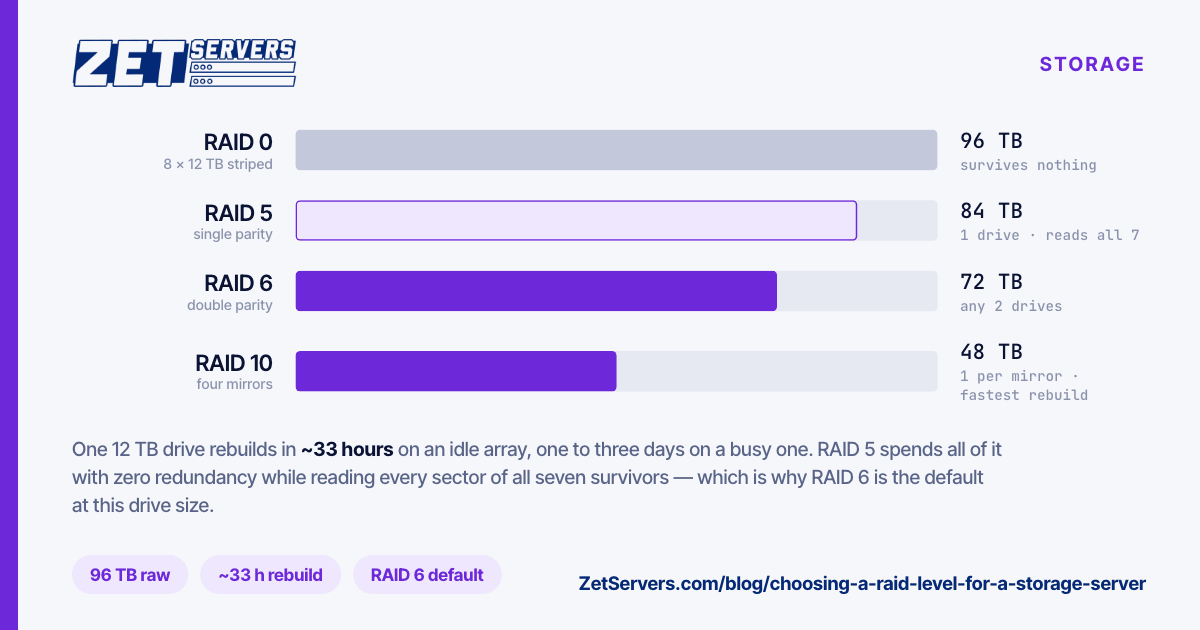
A storage node here is eight bays of 12 TB — 96 TB raw — with the operating system on its own 240 GB SSD, so the array holds nothing but your data. RAID 0, 5, 6 and 10 are supported, and the array is configured before handover: you tell us the level at order time.
This is how to pick a RAID level for a storage server.
The four options, side by side
| Level |
Usable |
Survives |
Rebuild reads |
Best for |
| RAID 0 |
96 TB |
nothing |
— |
Scratch, cache, anything reproducible |
| RAID 5 |
84 TB |
1 drive |
all 7 survivors |
Archives you also back up elsewhere |
| RAID 6 |
72 TB |
any 2 drives |
all 6 survivors |
The default for 12 TB drives |
| RAID 10 |
48 TB |
1 per mirror |
one 12 TB mirror |
Random I/O, databases, busy seedboxes |
Those numbers in TiB
Drive capacity is sold in decimal terabytes; your filesystem reports binary tebibytes. Nothing is missing — the units differ:
- 12 TB = 10.9 TiB per drive
- 96 TB raw = 87.3 TiB
- 84 TB (RAID 5) = 76.4 TiB
- 72 TB (RAID 6) = 65.5 TiB
- 48 TB (RAID 10) = 43.7 TiB
Subtract filesystem overhead on top of that, and reserve space if you run ZFS — a pool kept above roughly 80% full slows down noticeably.
The number that decides it: rebuild time
A rebuild is not instant, and the array is degraded until it finishes. One 12 TB drive at a sustained 100 MB/s of rebuild throughput takes:
12,000,000 MB ÷ 100 MB/s = 120,000 s ≈ 33 hours
That is the optimistic case, on an idle array. Serving traffic while rebuilding halves it easily, which puts a real rebuild somewhere between one and three days.
Why that matters per level:
- RAID 5 spends those days with zero redundancy, while reading every sector of all seven surviving drives — the heaviest load those drives have seen since the last rebuild, applied to drives of the same age and batch.
- RAID 6 spends them with one drive of redundancy left. Same read load, but a second failure is survivable rather than fatal.
- RAID 10 only reads the 12 TB partner of the failed drive, so the rebuild is both shorter and far gentler.
Drive datasheets quote an unrecoverable read error rate — commonly 1 in 10^14 bits for consumer drives, 1 in 10^15 for enterprise ones. A RAID 5 rebuild here reads about 84 TB, which is 6.7 × 10^14 bits. At the consumer figure that is a coin-flip-scale risk of hitting a URE mid-rebuild; at the enterprise figure it is much lower. Real drives usually do better than their spec, and a URE does not always kill the rebuild — modern controllers can drop the sector and continue. Treat it as the reason RAID 6 is the sensible default at this drive size, not as a prophecy.
Pick by workload
Archive, backup target, cold catalogue → RAID 6. Capacity per euro matters, the data is written once and read rarely, and you want the array to survive a second failure during a three-day rebuild.
VOD origin or media library → RAID 6, plus an NVMe tier in front for the titles people actually watch. Sequential reads are what HDD arrays are good at; the hot 5% belongs on flash.
Seedbox, or anything with many small random reads and writes → RAID 10. You give up half the raw capacity and get roughly double the random write performance of a parity array, plus the fastest rebuild of the four.
Scratch space, transcode workspace, a cache you can refill → RAID 0, and only then. One drive failure loses the array. Eight drives fail eight times as often as one.
RAID is not a backup
Every level here survives hardware failure. None of them survives rm -rf, a bad deploy, ransomware or a mistyped dd — all of which replicate to the parity in real time. If the data matters, it needs a copy on another machine, ideally in another location. Two nodes in two PoPs is a common layout; ask us for matched builds if you want them identical.
Frequently asked questions
Can I change the RAID level later?
Not without destroying the array. Converting between levels in place is either unsupported or a multi-day operation with the data at risk throughout — plan to back up, rebuild and restore instead. This is why the level is chosen at order time.
Hardware RAID or ZFS?
Both work. Hardware RAID hides the array behind one block device and needs no tuning; ZFS gives you checksums, snapshots and send/receive at the cost of RAM and a controller in passthrough mode. If you want ZFS, say so at order time so the drives are not locked behind a RAID volume.
Does the OS drive need redundancy too?
The OS lives on a separate 240 GB SSD, so an array failure never takes the system down with it — and reinstalling the OS never touches the array. If you want the boot device mirrored as well, ask for it in the quote.
How full can I let it get?
On ext4 or XFS, plan to stay under about 90%. On ZFS, under about 80% — a pool past that point fragments and slows measurably. Size the array for the capacity you will have in a year, not the one you need this week.
Next steps
Storage server specifications list the current builds. If you are pairing deep storage with a separate egress node, or replicating across PoPs, send a quote request with the layout you have in mind — and see how much bandwidth you actually need before you pick the port tier.