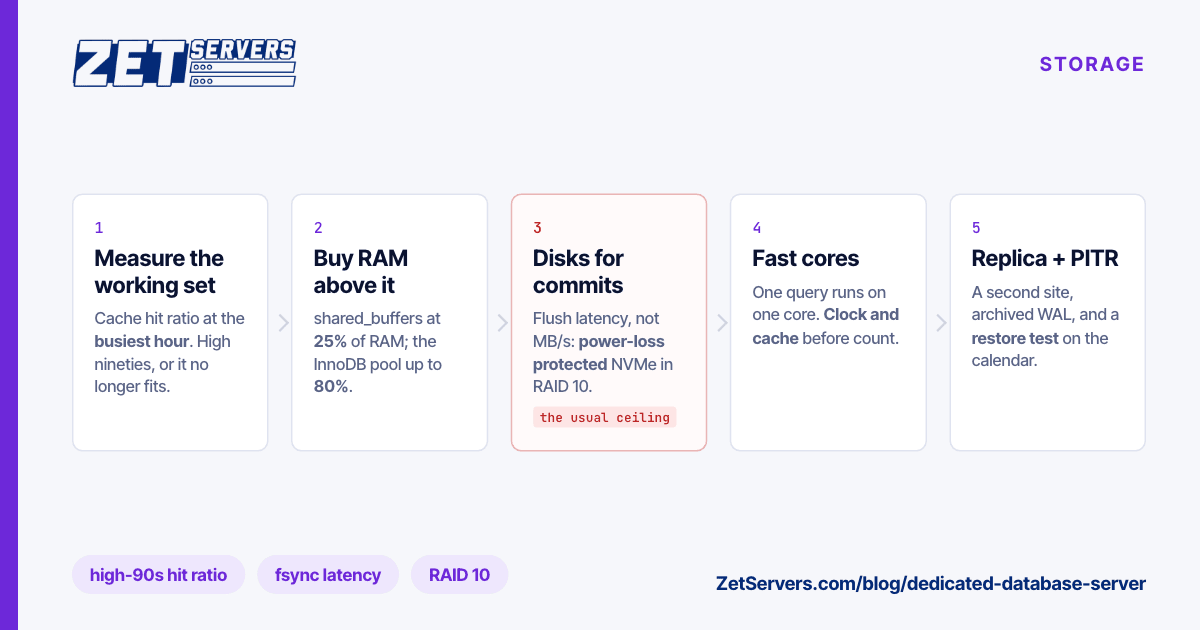
A dedicated database server is sized from one number most people never measure: the working set — the data and indexes that an ordinary hour of traffic actually touches. Fit it in memory and the disks mostly absorb writes; miss by a little and every query turns into a disk read. The total size of the database matters much less than you would expect. So the order is: measure the working set, buy memory for it, choose disks for the writes, and only then think about cores.
Measure the working set
Both major open-source databases will tell you how often they found what they needed in memory.
PostgreSQL, across the whole cluster:
SELECT round(100.0 * sum(blks_hit) / nullif(sum(blks_hit) + sum(blks_read), 0), 2)
       AS cache_hit_pct
FROM pg_stat_database;
MySQL or MariaDB with InnoDB:
SHOW GLOBAL STATUS LIKE 'Innodb_buffer_pool_read%';
-- Innodb_buffer_pool_reads          = requests that had to go to disk
-- Innodb_buffer_pool_read_requests  = all logical reads
For a transactional workload you want the hit ratio in the high nineties at your busiest hour. When it is lower, find which tables and indexes are being read from disk; that is the part of the working set that no longer fits. One caveat on the PostgreSQL figure: blks_read counts reads that missed PostgreSQL's own buffers, some of which the operating system's page cache still served from memory. A high ratio is conclusive; a lower one needs iostat -x to tell real disk reads apart.
RAM: the upgrade that removes I/O
Once you know the working set, buy memory above it, with room to grow. Configuration then follows each project's own guidance:
- PostgreSQL: the documentation suggests starting
shared_buffers at 25% of RAM on a dedicated server, and leaving the rest to the operating system's page cache, which PostgreSQL relies on. Set effective_cache_size to what the two can hold together — commonly 50–75% of RAM.
- MySQL (InnoDB): the manual suggests the buffer pool can take up to 80% of physical memory on a dedicated database server, because InnoDB does its own caching.
On our dedicated range, memory comes in four steps:
| RAM |
Builds |
From |
| 128 GB |
2× Xeon E5-2630 v3 · 2× Xeon E5-2690 v4 · 1× EPYC 9254 |
€209 · €229 · €449 |
| 256 GB |
2× Xeon E5-2699 v4 · 2× EPYC 9254 |
€299 · €679 |
| 512 GB |
2× EPYC 9554 |
€959 |
| 1 TB |
2× EPYC 9754 |
€1,519 |
Prices are for the 1 Gbps tier; larger or differently balanced memory is available as a custom build.
Disks: commit latency, not throughput
Once the working set fits, reads come from memory. Writes do not: every commit waits for the write-ahead log — PostgreSQL's WAL, InnoDB's redo log — to be flushed to stable storage. What limits a busy transactional database is the latency of that flush, repeated thousands of times a second, not the drive's headline megabytes per second.
Two consequences follow:
- Enterprise SSDs with power-loss protection. A drive with capacitors to finish in-flight writes can acknowledge a flush from its cache; a drive without them has to wait for the flash. The difference in flush latency is large, and it lands directly on every commit.
- RAID 10, not RAID 5 or 6. Parity RAID turns each small write into several reads and writes; mirrors do not. Choosing a RAID level has the arithmetic.
Measure the flush rate before trusting a server with a database:
pg_test_fsync -f /var/lib/postgresql/fsync.test     # ships in PostgreSQL's bin directory
fio --name=wal --rw=write --bs=8k --size=512m --fsync=1 \
    --ioengine=sync --filename=/var/lib/mysql/fio.test
The EPYC builds carry 10 or 24 NVMe bays, room for a mirrored pair for the operating system and a separate RAID 10 array for data. The Xeon builds have six SSD slots, which is fine for a database whose write rate is moderate.
CPU: fast cores before many
Most transactional queries run on one core from start to finish. PostgreSQL can parallelise large scans and aggregates, but a typical OLTP query — an index lookup, a join across a handful of rows — uses a single core, and its latency is set by that core's speed and by how much of the data sits in cache. That favours high clocks and big caches over core count. The EPYC 9254, with a 4.15 GHz boost and 128 MB of L3 across 24 cores, is the database part in our range; EPYC vs Xeon explains why its memory bandwidth per core matters as much as its clock.
Thousands of connections are a pooling problem, not a core problem. Put PgBouncer or ProxySQL in front before buying cores to hold idle sessions. On dual-socket machines memory belongs to one socket or the other; leave vm.zone_reclaim_mode at 0, the default on current kernels, so the kernel uses remote memory rather than throwing away cache.
Replicas and backups, sized by recovery
A single database server is a single point of failure, and RAID protects against a dead drive, not against a dropped table.
- A replica in a second location. Asynchronous replication costs nothing on the commit path. Synchronous replication makes every commit wait for the replica — a full network round trip per transaction, about 5–7 ms between Frankfurt and Amsterdam and much more across a continent. Choosing a server location has the latency floor for common routes.
- Point-in-time recovery. A base backup plus archived WAL (pgBackRest or WAL-G) or binary logs for MySQL restores to the second before the mistake.
- Off the machine, off the site. An offsite backup server sized by restore time, and a restore test that is on the calendar.
Moving an existing database onto new hardware is a replication job too: build the new server as a replica, let it catch up, then promote it. Migrating to a dedicated server walks through that cutover.
When a VPS is enough
If the working set fits comfortably in 16–64 GB and the write rate is modest, a database runs well on a VPS with dedicated cores and NVMe, and resizes in place as it grows. A dedicated server earns its price when the working set outgrows 64 GB, when commit latency needs drives you control, or when a neighbour's backup window starts showing up in your p99.
A starting configuration
For a 256 GB server running only PostgreSQL, on NVMe:
shared_buffers = 64GB
effective_cache_size = 192GB
maintenance_work_mem = 2GB
max_wal_size = 16GB
wal_compression = on
random_page_cost = 1.1
These are starting points, not answers. Keep work_mem modest: it is allocated per sort and per hash operation, so a generous value multiplied by a few hundred connections is how databases run out of memory.
Frequently asked questions
How much RAM does a database server need?
Enough to hold the working set with room to grow, measured rather than guessed. A cache hit ratio in the high nineties at the busiest hour means you have enough; a falling one means the working set is outgrowing memory.
Is NVMe worth it for a database?
Yes, for anything write-heavy or with a working set larger than RAM. Choose enterprise drives with power-loss protection — for commits, flush latency matters far more than the sequential speed printed on the box.
Should I use RAID 10 or RAID 5 for a database?
RAID 10. Parity RAID multiplies the cost of small random writes, which is exactly what a database does all day, and it rebuilds slowly under load.
Should the database share a server with the application?
For small systems that is fine, and it removes a network hop. Separate them when the application's memory use starts competing with the database's cache, or when the two need to scale independently.
How do I move a production database with minimal downtime?
Replicate to the new server, let it catch up, stop writes briefly, confirm the replica has zero lag and promote it. The outage is only that final step, typically a few minutes.